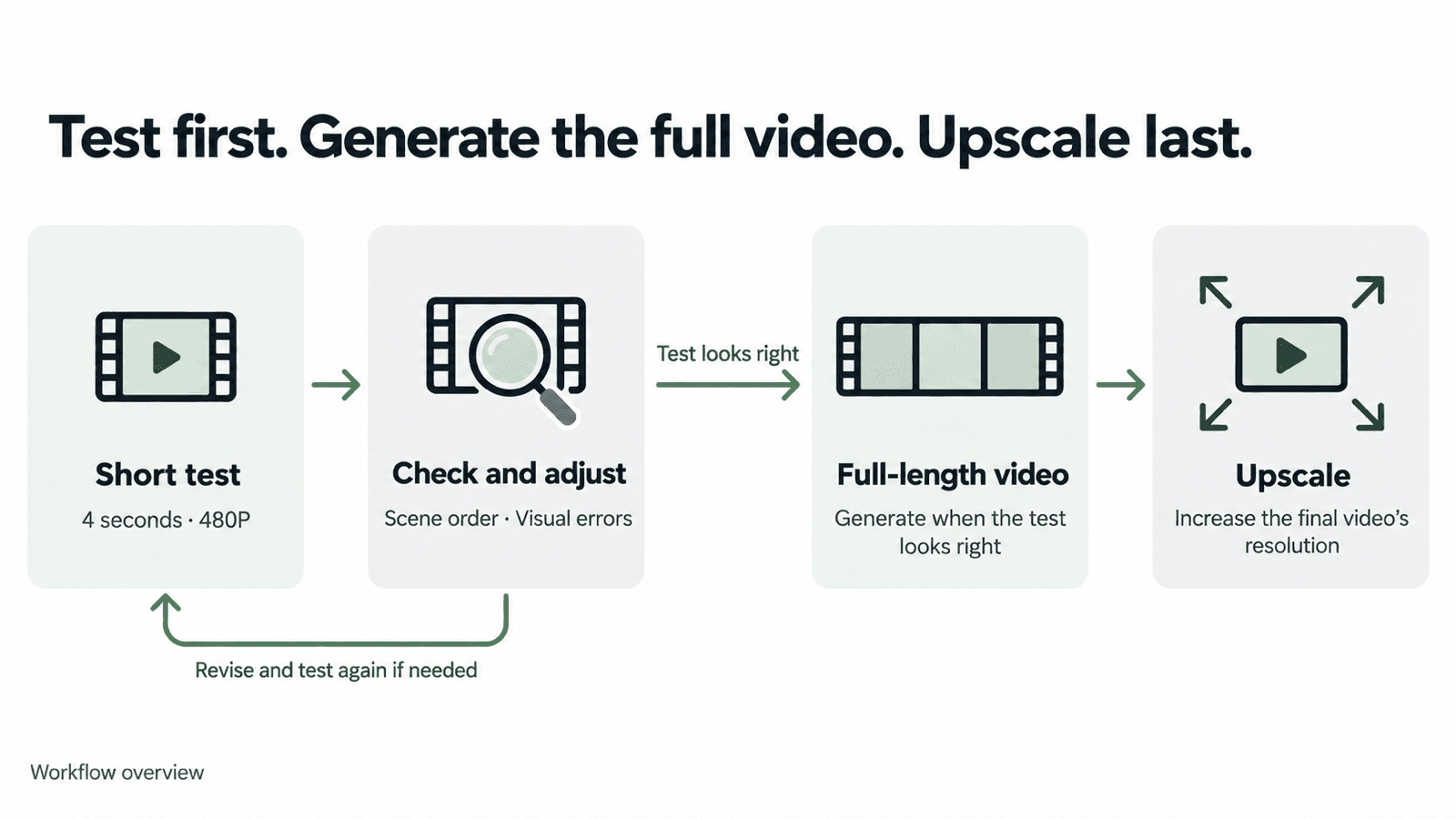
AI 제작 비용을 줄이려면 짧은 저해상도 영상으로 프롬프트와 참조 자료를 먼저 테스트하세요. 원하는 결과가 나오면 전체 길이의 영상을 생성합니다. 더 높은 출력 해상도가 필요할 때는 최종본을 업스케일링하세요.
1. 짧은 저해상도 영상으로 테스트하기
DomoAI에는 여러 영상 제작 도구가 있습니다. 준비한 자료에 맞는 도구를 선택하세요.
- 옴니 레퍼런스: 이미지, 영상, 오디오 참조 자료를 조합해 새 영상의 생성을 유도합니다.
- 이미지 투 비디오: 정지 이미지에 피사체와 카메라의 움직임을 더합니다.
- 프레임-비디오 변환: 모델에 따라 시작·종료 프레임이나 여러 키프레임으로 영상의 흐름을 잡습니다.
- 캐릭터를 비디오로: 참조 영상의 동작을 이용해 이미지 속 캐릭터를 움직입니다.
- 텍스트 투 비디오: 글로 설명한 장면을 영상으로 생성합니다.
- 비디오 투 비디오: 원본 영상의 움직임을 유지하면서 시각적 스타일을 바꿉니다.
이 튜토리얼에서는 옴니 레퍼런스의 Seedance 2.5를 사용합니다. 참조 이미지나 영상을 넣고 모델을 선택한 뒤, 먼저 4초·480P로 테스트하세요. 화면 비율과 오디오 설정을 선택하고 생성 전에 예상 크레딧 사용량을 확인합니다.
짧은 영상에서는 프롬프트에 적은 여러 장면이 빠른 흐름으로 압축될 수 있습니다. 장면이 의도한 순서대로 나오는지, 피사체의 모습이 일관적인지, 눈에 띄는 화면 오류가 없는지 확인해 보세요.
480P에서 작은 글씨나 제품의 세부 모습이 잘 보이지 않는다면 해당 테스트는 720P로 진행하세요.
2. 테스트 영상 확인하기
영상을 정상 속도로 재생한 뒤, 이상해 보이는 부분에서 일시 정지하세요.
- 장면 순서가 의도한 대로인가요? 빠진 장면, 예상하지 못한 컷 전환, 뒤바뀐 사건 순서가 없는지 확인하세요.
- 눈에 띄는 화면 오류가 있나요? 얼굴이 바뀌거나 몸이 뒤틀리는지, 소품이 사라지거나 엉뚱한 곳에 물체가 나타나는지 살펴보세요.
- 동작이 실제로 이루어지나요? 인물이 컵을 들어 올리나요, 아니면 손만 뻗나요? 동작이 끝까지 이어지는지 확인하세요.
- 필요한 장면이 화면에 담기나요? 원치 않는 줌이 있는지, 중요한 동작이 화면 밖으로 벗어나지 않는지 확인하세요.
- 오디오가 의도대로 나오나요? 소리가 필요하다면 대사, 목소리, 배경음, 입 모양과 음성의 동기화를 확인하세요.
다음 테스트 전에 가장 먼저 고칠 문제를 정하세요. 문제가 영상 끝의 짧은 순간에만 나타난다면 그 부분을 잘라내는 것으로 충분한지도 살펴보세요.
3. 참조 자료와 지시를 명확하게 다듬기
지시가 모호하다면 프롬프트를 수정하고, 참조 자료에 중요한 세부 정보가 빠졌다면 자료를 교체하세요. 한 번에 한 가지만 바꾸고 모델과 설정은 그대로 유지합니다.
참조 자료별 역할 정하기
참조 자료는 글만으로 전달하기 어려운 세부 정보를 보완합니다. 자료마다 역할을 지정하는 예시는 Seedance 2.5 제작 가이드에서 확인하세요.
캐릭터 이미지는 필요한 얼굴, 의상, 액세서리가 선명하게 보이는 것으로 선택하세요. 동작 참조에는 원하는 움직임이 잘 드러나야 합니다. 서로 다른 의상처럼 세부 내용이 충돌하는 자료는 빼세요.
화면에 표시된 참조 라벨을 사용해 각 파일에서 무엇을 가져올지 설명하세요. 아래 생일 영상 예시에서는 @Image1로 강아지의 정체성과 외모를 지정하고, 배경·포즈·조명은 새롭게 만들도록 지시합니다.
장면과 카메라 움직임 구체적으로 쓰기
각 부분의 목적이 명확하다면 상세한 프롬프트도 효과적일 수 있습니다. 생일 영상 프롬프트는 참조 자료 사용 지침, 시각적 스타일, 일곱 개 장면, 카메라 규칙을 나누어 설명합니다.
장면마다 어떤 일이 일어나고 카메라가 어떻게 움직이는지 적으세요. 순서를 명확하게 정리하고 서로 충돌하는 지시는 삭제합니다. 짧은 테스트로 모델이 전체 장면 구성을 어떻게 처리하는지 확인할 수 있습니다.
입력 모드에 맞게 지시하기
이미지를 영상으로 만들 때는 시작 이미지에 피사체와 구도가 이미 담겨 있으므로 프롬프트를 움직임에 집중할 수 있습니다. 여러 참조 자료를 사용한다면 각 자료에서 가져올 요소를 설명해야 합니다. 이미지 편집 프롬프트에는 바꿀 부분과 유지할 부분을 적으세요.
프롬프트와 참조 자료가 AI 생성에 어떤 영향을 주는지 이해하면 어떤 입력을 바꿔야 할지 판단하기 쉽습니다.
MiniMax H3로 변경한다면 MiniMax H3 프롬프트 가이드에서 모드별 예시를 확인하세요.
4. 전체 길이의 영상 생성하기
테스트 영상이 원하는 결과와 맞으면 같은 프롬프트와 참조 자료로 전체 길이의 영상을 생성하세요. 필요한 길이와 생성 해상도를 선택한 뒤 크레딧 사용량을 확인하고 생성합니다.
예시: 강아지 생일 영상
짧은 테스트에서는 클로즈업에서 강아지의 모습이 드러나는 장면, 머리 쓰다듬기, 선물 가방, 강아지 다섯 마리가 나란히 선 장면, 생일 엔딩이 빠르게 이어집니다. 장면 순서와 강아지의 외모, 눈에 띄는 화면 오류를 먼저 살펴볼 수 있습니다.
4초 테스트에서는 의도한 순서대로 장면이 이어졌고 눈에 띄는 화면 오류는 없었습니다. 이후 같은 프롬프트로 20초 영상을 생성했습니다.
4초 테스트 · 세로형
20초 영상 · 가로형
긴 버전에서는 각 장면을 더 여유 있게 보여 줍니다. 강아지가 선물 가방에서 고개를 내미는 장면과 나란히 선 다섯 마리를 따라 카메라가 수평으로 이동하는 장면도 더 길게 펼쳐집니다.
전체 프롬프트 보기
Create a premium minimalist birthday film featuring the dog from @Image1.

REFERENCE USAGE

@Image1 defines the dog’s exact identity and appearance.

Preserve the same dog throughout the entire film:
- same face and facial proportions
- same eyes, nose, ears, and expression style
- same fur color, markings, texture, and coat length
- same body proportions, size, and age

Use @Image1 only as the dog’s identity reference.
Do not copy its background, pose, lighting, camera angle, or composition.

Every dog shown in the film must clearly be the same dog from @Image1.

VISUAL STYLE

Pure white seamless studio background, soft white floor, subtle natural contact shadows, bright diffused lighting, extremely clean composition, generous negative space, and precise centered framing.

The entire film should feel elegant, playful, modern, and highly designed — like a premium product reveal rather than a traditional birthday party.

Use a pure white and warm ivory palette.

Avoid colorful party decorations, crowded props, busy backgrounds, excessive balloons, heavy confetti, or childish birthday styling.

SHOT 1 — MACRO REVEAL

Begin with an extreme macro close-up of @Image1 dog’s nose filling most of the frame.

Slowly and smoothly pull the camera backward.

Reveal the eyes, then the full face, then the entire dog sitting perfectly centered in the white studio.

Preserve the dog’s exact facial identity throughout the pullback.

The dog wears only a very minimal birthday collar with one small elegant ivory accent.

SHOT 2 — PORTRAIT INTERACTION

Clean centered medium portrait of the same dog.

Large amounts of empty white space surround the dog.

The dog slowly looks slightly upward.

A human hand gently enters from above and softly pats the dog once on the head.

Keep the dog calm and natural.

No change to the dog’s face, fur, proportions, or identity.

SHOT 3 — GIFT REVEAL

Hard cut.

A large minimalist ivory-white gift bag stands alone in the center of the studio.

The same dog from @Image1 slowly lifts its head out of the bag and naturally rests both front paws over the edge.

Keep the dog fully recognizable.

No extra decorations.

SHOT 4 — BIRTHDAY COLLECTION

Hard cut to an extreme wide shot.

One tiny version of the same dog sits alone in the center of a huge white space.

After a brief pause, the lineup expands outward from the center.

First, one matching dog appears on the left and one on the right of the original center dog.

Then, one more matching dog appears farther to the left and one more farther to the right.

Finish with five versions of the exact same dog standing side by side in a perfectly symmetrical horizontal lineup, with the original dog remaining in the center.

All five must share exactly the same face, fur, body proportions, and identity from @Image1.

Only the birthday styling changes:

1. minimal ivory party hat
2. small white bow tie
3. tiny ivory birthday cape
4. soft minimal ivory outfit
5. original clean look

All five dogs face forward.

Even spacing.
Perfect symmetry.
No variation in breed, face, fur color, or body shape.

SHOT 5 — LINEUP DETAIL

Cut closer.

Perform one slow, perfectly smooth horizontal camera move across the five identical versions of the dog from left to right.

Each dog remains calm and mostly still.

Emphasize the same recognizable face, detailed fur texture, and subtle styling differences.

The movement should feel like a luxury product commercial.

SHOT 6 — THE BIRTHDAY MOMENT


Hard cut away from the five-dog lineup.


Return to one single dog only — the original dog from @Image1.


The dog sits alone in the center of the white studio, wearing a simple elegant birthday hat.


A small minimalist white birthday cake sits directly in front of the dog.


On top of the cake is one clearly visible number “6” candle with a soft glowing flame.


The dog looks at the cake, then looks toward the camera with a happy, gentle expression, as if celebrating its birthday.


Only one dog appears in this scene.


SHOT 7 — FINAL BIRTHDAY PULLBACK


Continue with the same single dog wearing the birthday hat and the same birthday cake.


The camera slowly and continuously pulls backward.


Medium shot → full body → wide shot → extreme wide shot.


The single dog and cake gradually become smaller while remaining centered in the large white studio.


In the final 1–2 seconds, display:


“Happy Birthday!”


Add a few subtle ivory ribbons, tiny stars, and delicate celebratory accents around the outer edges of the frame.


Keep the dog, cake, number “6” candle, and text clearly visible.


End with only the single birthday dog and cake in the center of the frame.

CAMERA RULES

Smooth controlled camera movement only.
No handheld movement.
No random zooms.
No fisheye distortion.
No dramatic camera shake.

Mostly frontal and symmetrical compositions.

Use hard cuts between major setups.

Within each shot, use only one clear camera movement.

CHARACTER CONSISTENCY — STRICT

The dog from @Image1 is the only character identity reference.

Do not change:
breed,
face,
eye shape or color,
nose,
ear shape,
fur color,
fur markings,
fur texture,
coat length,
body proportions,
size,
or age.

The five-dog lineup consists of five identical versions of the same dog, not five different dogs.

DESIGN RULES

Pure white and warm ivory color palette.
Soft realistic contact shadows.
Premium commercial studio lighting.
Minimal props.
Large negative space.
Clean geometry.
Photorealistic dog and fur.
No visible logos.
No clutter.
No colorful birthday-party background.
No excessive decorations.

OVERALL FEELING

The dog from @Image1 is presented like the most important new product of the year — elegant, slightly humorous, extremely cute, premium, and unmistakably birthday-themed.
5. 최종 영상 업스케일링하기
최종 영상에 더 높은 출력 해상도가 필요하다면 비디오 업스케일러에 업로드하세요. 출력 해상도를 선택하고 크레딧 사용량을 확인한 뒤, 실제로 사용할 버전을 처리합니다.
비용 계산 예시: 20초 영상 생성 전에 짧게 테스트하기
Seedance 2.5로 20초·720P 영상을 만드는 경우를 예로 들어 보겠습니다.
첫 번째 방법은 전체 길이의 영상을 세 번 생성하고 세 번째 결과를 사용하는 것입니다. 두 번째 방법은 짧게 세 번 테스트한 뒤 전체 길이의 영상을 한 번 생성하는 것입니다.
| 단계 | 전체 길이로 반복 생성 | 짧은 테스트 먼저 진행 |
|---|---|---|
| 테스트 | 20초·720P 영상 3회: 625 × 3 = 1,875크레딧 | 4초·480P 영상 3회: 30 × 3 = 90크레딧 |
| 최종 20초·720P 영상 | 세 번째 생성에 포함 | 625크레딧 |
| 합계 | 1,875크레딧 | 715크레딧 |
이 조건에서는 짧은 테스트를 먼저 진행하면 총 사용량을 1,160크레딧, 약 61.9% 줄일 수 있습니다. 두 방법 모두 최종 결과물은 720P로 직접 생성한 영상입니다.
이 계산은 짧은 테스트 세 번으로 만족스러운 결과를 얻고, 전체 길이의 영상은 한 번만 생성한다고 가정합니다. 추가로 시도하면 총 사용량은 늘어납니다.
다른 방법: 480P로 생성한 뒤 업스케일링하기
전체 길이의 영상을 480P로 생성한 뒤 1080P로 업스케일링할 수도 있습니다.
| 단계 | 예상 사용량 |
|---|---|
| 4초·480P 테스트 3회 | 90크레딧 |
| 20초·480P 영상 1회 생성 | 280크레딧 |
| 비디오 업스케일러 V2로 1080P 업스케일링 | 40크레딧 |
| 합계 | 410크레딧 |
이 방법은 세 가지 중 예상 크레딧 사용량이 가장 적습니다. 다만 1080P로 업스케일링한 영상은 720P로 직접 생성한 영상과 세부 표현이나 움직임이 다를 수 있습니다. 해상도 숫자만으로 어느 쪽이 더 보기 좋은지 판단할 수는 없습니다.
작성일: 2026년 10월 22일.