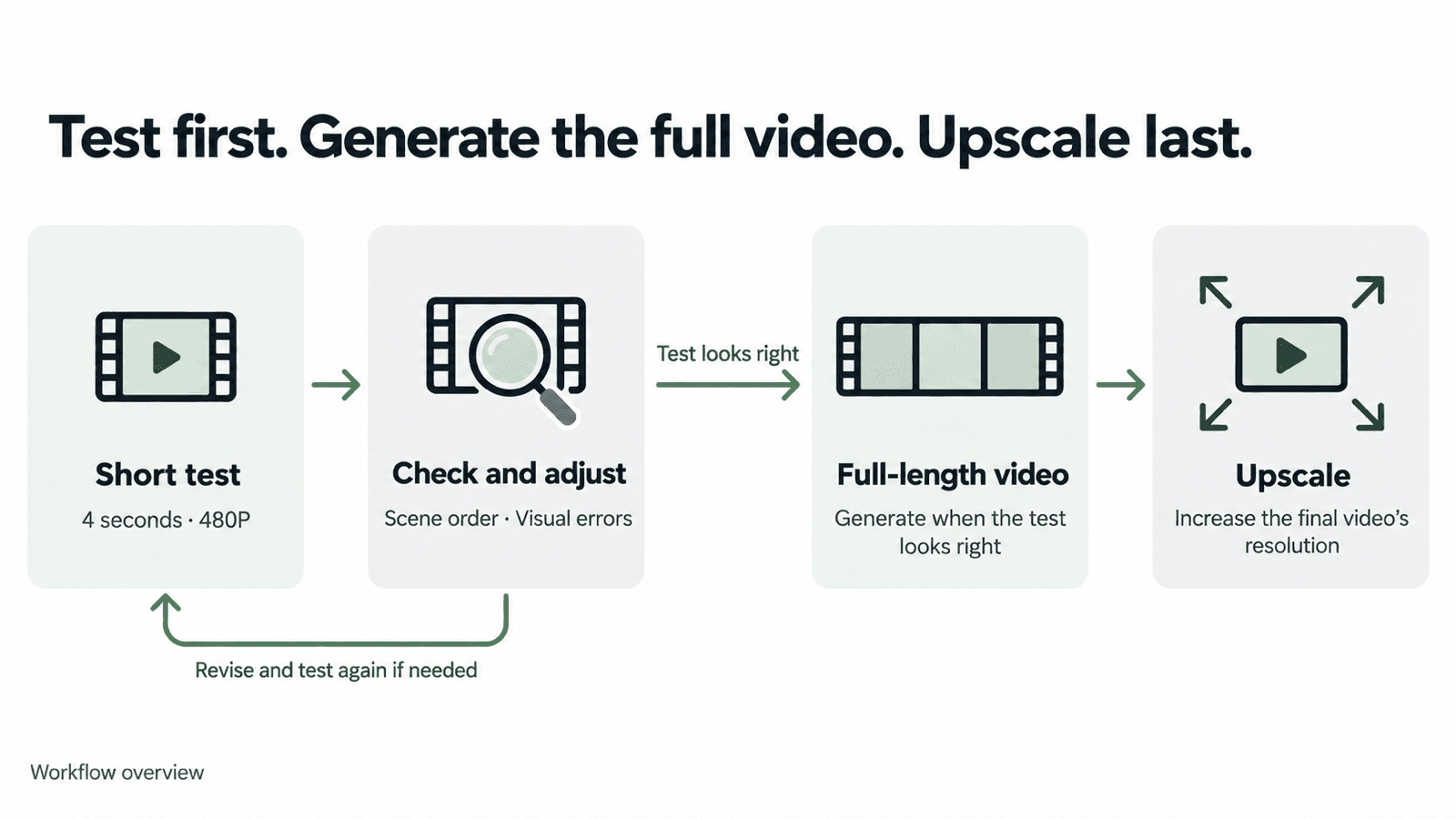
AI制作のコストを抑えるには、まず短い低解像度の動画でプロンプトと参照素材を試しましょう。仕上がりが狙いどおりになったら、本番の長さで生成します。より高い出力解像度が必要な場合は、最後にアップスケールします。
1. 短い低解像度の動画で試す
DomoAIには複数の動画制作ツールがあります。手元の素材に合うものを選びましょう。
- オムニリファレンス:画像・動画・音声の参照素材を組み合わせ、新しい動画の生成をガイドします。
- 画像から動画:静止画の被写体やカメラに動きを加えます。
- フレームから動画:モデルに応じて、開始・終了フレームや複数のキーフレームを使い、動画の生成をガイドします。
- キャラクターから動画へ:参照動画の動きを使い、画像内のキャラクターを動かします。
- テキストから動画:文章で描写したシーンから動画を生成します。
- 動画から動画:元の映像の動きを保ちながら、見た目のスタイルを変えます。
ここでは、オムニリファレンスでSeedance 2.5を使います。参照画像や動画を追加し、モデルを選んだら、まず4秒・480Pで試しましょう。アスペクト比と音声の設定を選び、生成前に必要なクレジット数を確認します。
短い動画では、プロンプトに書いた複数のシーンが速い展開にまとめられる場合があります。シーンの順序が正しいか、被写体の見た目が一貫しているか、明らかな映像の乱れがないかを確認し、意図が伝わっているかを見極めましょう。
480Pでは小さな文字や商品の細部を確認しにくい場合、そのテストは720Pで行いましょう。
2. テスト動画を確認する
通常の速度で再生し、気になる箇所で一時停止します。
- シーンは意図した順序になっていますか? シーンの抜け、意図しないカット、出来事の順序の入れ替わりがないかを確認します。
- 明らかな映像の乱れはありませんか? 顔の変化、体のゆがみ、小道具の消失、本来ない場所に物が現れる現象に注意します。
- 動作は実行されていますか? 人物はカップを持ち上げていますか。それとも、手を伸ばしただけでしょうか。動作が最後まで完了しているかを確認します。
- 必要なものがカメラに映っていますか? 意図しないズームがないか、重要な動作がフレーム内に収まっているかを確認します。
- 音声は狙いどおりですか? 音が必要な場合は、セリフ、声、背景音、口の動きと音声の同期を確認します。
次のテストの前に、最も直したい問題を1つ選びましょう。問題が末尾の一瞬だけなら、そこをカットするだけで済むかも検討します。
3. 参照素材と指示をわかりやすくする
指示が曖昧ならプロンプトを修正し、参照素材に重要な情報が足りなければ素材を差し替えます。一度に変えるのはどちらか一方にし、モデルや設定は同じにしておきましょう。
参照素材ごとの役割を決める
参照素材は、文章だけでは伝わりにくい細部を補います。各素材に役割を割り当てる例は、Seedance 2.5の制作ガイドをご覧ください。
キャラクター画像には、必要な顔、服装、アクセサリーがはっきり写ったものを使います。動きの参照には、狙った動作がわかる素材を選びましょう。服装が異なるなど、細部が矛盾する素材は外します。
画面に表示される参照ラベルを使い、各ファイルから何を取り入れるかを説明します。後述の誕生日動画では、@Image1で犬の外見を指定し、背景・ポーズ・照明は新たに作るよう指示しています。
シーンとカメラの動きを具体的に書く
各部分の役割が明確なら、詳しいプロンプトも有効です。誕生日動画のプロンプトでは、参照素材の使い方、ビジュアルスタイル、7つのシーン、カメラのルールを分けて記述しています。
シーンごとに何が起こり、カメラがどう動くかを書きましょう。順序を明確にし、矛盾する指示は削除します。短い動画で試すと、モデルが一連のシーンをどう扱うかを確認できます。
入力モードに合わせて指示を変える
画像から動画を作る場合、開始画像に被写体と構図がすでにあるため、プロンプトは動きに集中できます。複数の参照素材を使う場合は、それぞれから何を取り入れるかを説明します。画像編集では、変更する部分と残す部分を指定しましょう。
プロンプトと参照素材がAI生成にどう作用するかを理解すると、どの入力を調整すべきか判断しやすくなります。
MiniMax H3に切り替える場合は、MiniMax H3のプロンプトガイドでモード別の例を確認してください。
4. 本番の長さで動画を生成する
テスト動画が狙いどおりになったら、同じプロンプトと参照素材で本番の長さの動画を生成します。必要な長さと生成解像度を選び、クレジット数を確認してから生成しましょう。
制作例:犬の誕生日動画
短いテストでは、クローズアップから全体が見える導入、頭をなでる場面、ギフトバッグ、5匹の犬が並ぶ場面、誕生日の締めくくりがテンポよく展開します。シーンの順序や犬の見た目、明らかな映像の乱れを初期確認できます。
4秒のテストでは、意図した順序でシーンが展開し、明らかな映像の乱れはありませんでした。その後、同じプロンプトで20秒の動画を生成しました。
4秒のテスト · 縦型
20秒の動画 · 横型
長いバージョンでは、犬がギフトバッグから顔を出す場面や、横に並んだ5匹をカメラが横移動で映す場面などを、よりゆっくり見せられます。
プロンプト全文を見る
Create a premium minimalist birthday film featuring the dog from @Image1.

REFERENCE USAGE

@Image1 defines the dog’s exact identity and appearance.

Preserve the same dog throughout the entire film:
- same face and facial proportions
- same eyes, nose, ears, and expression style
- same fur color, markings, texture, and coat length
- same body proportions, size, and age

Use @Image1 only as the dog’s identity reference.
Do not copy its background, pose, lighting, camera angle, or composition.

Every dog shown in the film must clearly be the same dog from @Image1.

VISUAL STYLE

Pure white seamless studio background, soft white floor, subtle natural contact shadows, bright diffused lighting, extremely clean composition, generous negative space, and precise centered framing.

The entire film should feel elegant, playful, modern, and highly designed — like a premium product reveal rather than a traditional birthday party.

Use a pure white and warm ivory palette.

Avoid colorful party decorations, crowded props, busy backgrounds, excessive balloons, heavy confetti, or childish birthday styling.

SHOT 1 — MACRO REVEAL

Begin with an extreme macro close-up of @Image1 dog’s nose filling most of the frame.

Slowly and smoothly pull the camera backward.

Reveal the eyes, then the full face, then the entire dog sitting perfectly centered in the white studio.

Preserve the dog’s exact facial identity throughout the pullback.

The dog wears only a very minimal birthday collar with one small elegant ivory accent.

SHOT 2 — PORTRAIT INTERACTION

Clean centered medium portrait of the same dog.

Large amounts of empty white space surround the dog.

The dog slowly looks slightly upward.

A human hand gently enters from above and softly pats the dog once on the head.

Keep the dog calm and natural.

No change to the dog’s face, fur, proportions, or identity.

SHOT 3 — GIFT REVEAL

Hard cut.

A large minimalist ivory-white gift bag stands alone in the center of the studio.

The same dog from @Image1 slowly lifts its head out of the bag and naturally rests both front paws over the edge.

Keep the dog fully recognizable.

No extra decorations.

SHOT 4 — BIRTHDAY COLLECTION

Hard cut to an extreme wide shot.

One tiny version of the same dog sits alone in the center of a huge white space.

After a brief pause, the lineup expands outward from the center.

First, one matching dog appears on the left and one on the right of the original center dog.

Then, one more matching dog appears farther to the left and one more farther to the right.

Finish with five versions of the exact same dog standing side by side in a perfectly symmetrical horizontal lineup, with the original dog remaining in the center.

All five must share exactly the same face, fur, body proportions, and identity from @Image1.

Only the birthday styling changes:

1. minimal ivory party hat
2. small white bow tie
3. tiny ivory birthday cape
4. soft minimal ivory outfit
5. original clean look

All five dogs face forward.

Even spacing.
Perfect symmetry.
No variation in breed, face, fur color, or body shape.

SHOT 5 — LINEUP DETAIL

Cut closer.

Perform one slow, perfectly smooth horizontal camera move across the five identical versions of the dog from left to right.

Each dog remains calm and mostly still.

Emphasize the same recognizable face, detailed fur texture, and subtle styling differences.

The movement should feel like a luxury product commercial.

SHOT 6 — THE BIRTHDAY MOMENT


Hard cut away from the five-dog lineup.


Return to one single dog only — the original dog from @Image1.


The dog sits alone in the center of the white studio, wearing a simple elegant birthday hat.


A small minimalist white birthday cake sits directly in front of the dog.


On top of the cake is one clearly visible number “6” candle with a soft glowing flame.


The dog looks at the cake, then looks toward the camera with a happy, gentle expression, as if celebrating its birthday.


Only one dog appears in this scene.


SHOT 7 — FINAL BIRTHDAY PULLBACK


Continue with the same single dog wearing the birthday hat and the same birthday cake.


The camera slowly and continuously pulls backward.


Medium shot → full body → wide shot → extreme wide shot.


The single dog and cake gradually become smaller while remaining centered in the large white studio.


In the final 1–2 seconds, display:


“Happy Birthday!”


Add a few subtle ivory ribbons, tiny stars, and delicate celebratory accents around the outer edges of the frame.


Keep the dog, cake, number “6” candle, and text clearly visible.


End with only the single birthday dog and cake in the center of the frame.

CAMERA RULES

Smooth controlled camera movement only.
No handheld movement.
No random zooms.
No fisheye distortion.
No dramatic camera shake.

Mostly frontal and symmetrical compositions.

Use hard cuts between major setups.

Within each shot, use only one clear camera movement.

CHARACTER CONSISTENCY — STRICT

The dog from @Image1 is the only character identity reference.

Do not change:
breed,
face,
eye shape or color,
nose,
ear shape,
fur color,
fur markings,
fur texture,
coat length,
body proportions,
size,
or age.

The five-dog lineup consists of five identical versions of the same dog, not five different dogs.

DESIGN RULES

Pure white and warm ivory color palette.
Soft realistic contact shadows.
Premium commercial studio lighting.
Minimal props.
Large negative space.
Clean geometry.
Photorealistic dog and fur.
No visible logos.
No clutter.
No colorful birthday-party background.
No excessive decorations.

OVERALL FEELING

The dog from @Image1 is presented like the most important new product of the year — elegant, slightly humorous, extremely cute, premium, and unmistakably birthday-themed.
5. 完成動画をアップスケールする
より高い出力解像度が必要な場合は、完成動画を動画アップスケーラーにアップロードします。出力解像度を選び、クレジット数を確認して、実際に使うバージョンを処理しましょう。
コスト試算:20秒の動画を作る前に短いテストを行う
Seedance 2.5で20秒・720Pの動画を作る場合を例に考えます。
1つ目の方法では本番の長さで3回生成し、3回目を採用します。2つ目では短いテストを3回行ってから、本番の長さで1回生成します。
| 工程 | 本番の長さで試す | 短いテストから始める |
|---|---|---|
| テスト | 20秒・720Pの動画を3回:625 × 3 = 1,875クレジット | 4秒・480Pの動画を3回:30 × 3 = 90クレジット |
| 完成動画(20秒・720P) | 3回目の生成に含む | 625クレジット |
| 合計 | 1,875クレジット | 715クレジット |
この条件では、短いテストを先に行うことで合計を1,160クレジット(約61.9%)削減できます。どちらも最終的には720Pで直接生成した動画が得られます。
この計算は、短いテスト3回で満足でき、本番の長さでの生成が1回で済むことを前提としています。試行回数が増えれば、合計クレジット数も増えます。
別の方法:480Pで生成してからアップスケールする
本番の長さの動画を480Pで生成し、その後1080Pにアップスケールする方法もあります。
| 工程 | 推定クレジット数 |
|---|---|
| 4秒・480Pのテストを3回 | 90クレジット |
| 20秒・480Pの動画を1回生成 | 280クレジット |
| 動画アップスケーラーV2で1080Pにアップスケール | 40クレジット |
| 合計 | 410クレジット |
この方法は、3つの中で推定消費クレジット数が最も少なくなります。ただし、1080Pにアップスケールした動画は、720Pで直接生成した動画と細部や動きの表現が異なる場合があります。解像度の数値だけでは、どちらの見栄えがよいかは判断できません。
執筆日:2026年10月22日。