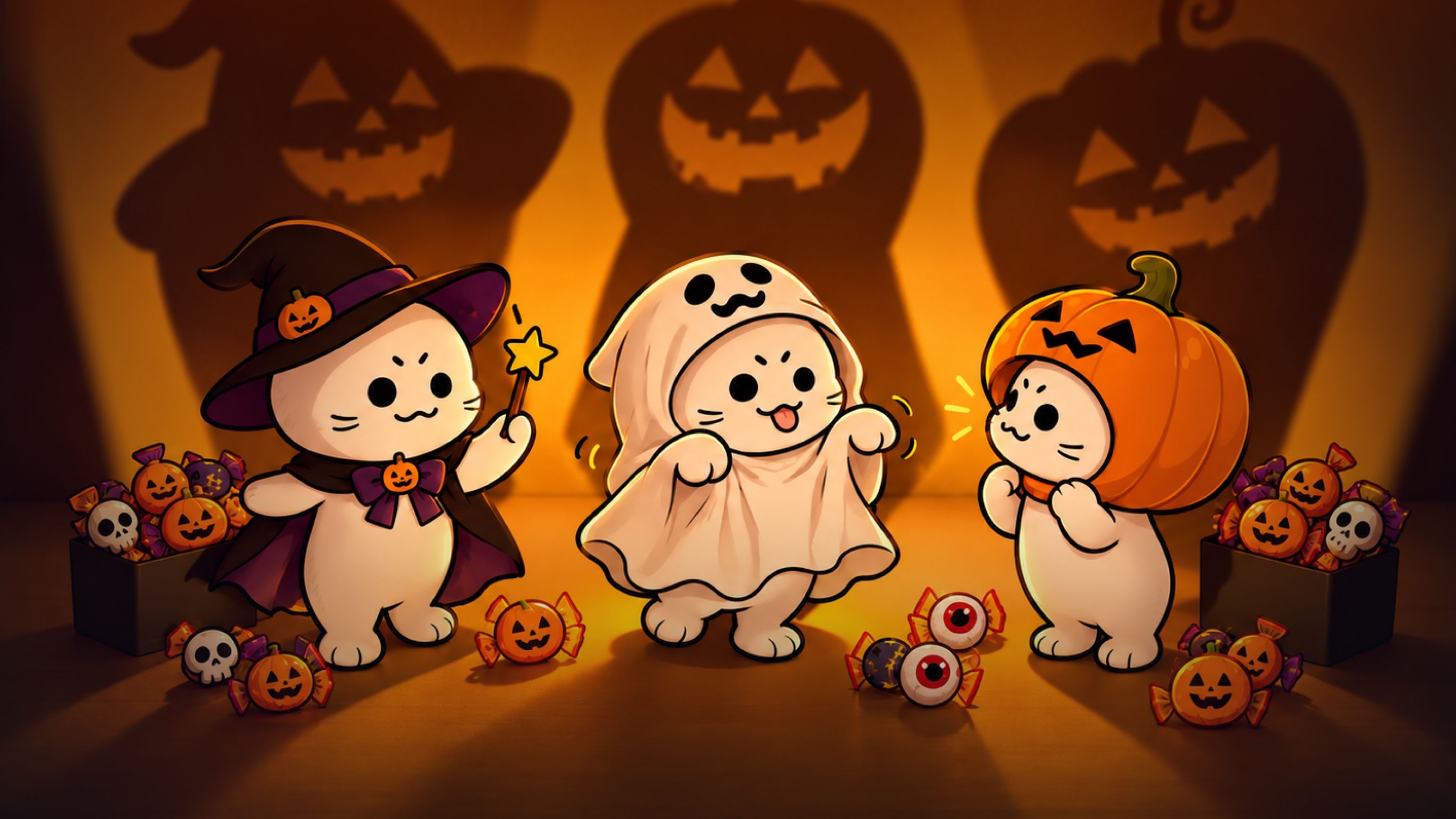
用 AI 可以試穿萬聖節服裝、製作寵物海報,或創作恐怖短片。商家也能製作活動海報、預覽店面佈置。以下整理十個 AI 萬聖節創作點子,搭配範例與建議提示詞,幫助你開始創作。
許多作品都能從現有的照片開始。你可以更換服裝、加入裝飾,或把主角放進新的場景。以下範例提供一些創作方向,也可以換成其他服裝、角色和地點。
選擇照片或影片創作
想呈現造型或設計時,照片很合適。可以用來製作萬聖節大頭貼、寵物海報、派對邀請卡,或店面佈置提案。
想呈現動作或事件時,影片更合適。可以切換服裝、讓角色跳舞,或讓幽靈出現在某人身後。
也可以先製作照片,再加入動態效果。例如,先為狗狗製作一張萬聖節肖像,再用這張圖片生成短片。
開始之前,先決定原始照片中有哪些細節要保留,例如臉孔、寵物的毛色花紋,或店內格局。描述修改內容時,記得一併寫入這些細節。
8 個值得嘗試的萬聖節點子
1. 製作萬聖節變裝影片
用自己的照片試穿不同的萬聖節服裝,再把換裝過程製作成短片。可以比較各種裝扮,也可以發文問朋友:「我該穿哪一套?」
先準備一張清晰的照片,再選擇想嘗試的服裝,例如女巫、吸血鬼或骷髏造型。也可以選擇正式服裝、遊戲角色風格的裝扮,或自己設計的服裝。
這個變裝範例用披風和帽子在不同造型之間遮擋畫面,讓換裝發生在影片中明確的時間點。
創作範例提示詞的英文版:
展開完整提示詞
9:16 portrait format, 12 seconds, ultra-clear 4K. Use only the boyfriend's first-person viewpoint throughout, with no cuts. The boyfriend is also sitting on the tatami, and the camera is at his eye level, equivalent to a 35mm lens with a wide aperture. Keep the focus locked on his girlfriend's face, with round, warm bokeh in the background. Give the camera a subtle breathing quality: it dips slightly when she tugs his sleeve, gently rises when she stands, and smoothly moves backward when she approaches. Do not switch to a third-person view or show the boyfriend's face, including in the mirror. His hands appear only briefly along the bottom edge of the frame.

The girlfriend is an adult woman around twenty-two years old, with shoulder-length dark brown hair, wispy bangs, a soft round face, light, fresh makeup, and a natural lip color. Keep the same face throughout; only her clothes change. She is worrying about Halloween and complains in a sweet, affectionate tone: she gently tugs his sleeve and looks up into the camera, speaking in a soft, sweet voice. Her manner should be cute, natural, and fresh, appealing to a Japanese audience without making her look childlike or exaggerated.

Limit the setting to a small Japanese-style room in a quiet residential neighborhood in Tokyo, about six tatami mats in size, with light-colored tatami flooring. It is not a hotel or an empty studio set. On one side is a warm-white shoji window; beyond its fine wooden lattice are blurred blue-hour twilight and distant streetlights. A low wooden cabinet holds only neatly arranged orange ribbon, a small pumpkin bag, and spare hair clips. An off-white paper-shade floor lamp stands in the corner, and a narrow wardrobe has light wooden sliding doors. A full-length mirror with a thin black frame leans beside the wardrobe. The wall has only one string of small pumpkin lights, glowing steadily without flickering. The main light is warm-white side lighting from the floor lamp. Cool blue twilight from the window gives the hair a soft rim, while the pumpkin lights create tiny orange highlights in her eyes. Use an overall low-saturation palette of persimmon orange, ink black, milky white, and twilight blue. Keep skin tones clean, with a slight soft bloom around highlights and fine film grain.

All three outfits are complete and appropriate. For the first costume change, use a cape to cover the camera. For the second, use the witch hat she has removed to cover the camera before revealing the new outfit.

Seconds 0–3: She is already sitting sideways on the tatami, both knees bent and her lower legs together, with both legs extending diagonally toward the side and front of the camera and her toes resting on the tatami. One hand supports her at her side, and her upper body turns toward her boyfriend. Her legs occupy the lower half of the frame and her face the upper half, both fully visible. She wears the first outfit: a loose orange cardigan, a white shirt, a short black skirt, white ankle socks, and a small pumpkin brooch on her chest. She lightly holds her skirt hem, puffs her cheeks slightly, looks up into the camera with a complaining expression, and softly says, 「ねえ、普通すぎない?」

Seconds 3–6: She first draws her legs back, then stands as the camera rises with her. She lifts a wide black cape to cover the camera, filling the lens with fabric. When the fabric drops, she is wearing the second outfit, strictly following image1: a black, pointed, wide-brimmed witch hat with a slightly bent crown, a purple hatband, a purple bow on the side, and a small orange pumpkin ornament. Her black long-sleeved dress has a square neckline, purple lacing on the chest, and a purple ribbon at the waist. The cuffs have purple ruffles, and the two-layer skirt reveals a purple lining underneath. She wears white mid-calf socks and black platform Mary Jane shoes. With both hands, she holds a small orange pumpkin bag decorated with a black bow. Standing in the center of the tatami, she takes half a step closer and makes a half-turn, but the wide brim falls over her eyebrows and eyes. She lifts the brim slightly, frowns with a disappointed expression, tilts her head toward the camera, and says even more softly, 「これも、なんか違うの」. The camera moves gently backward as she stands and approaches.

Seconds 7–12: She removes the black witch hat and brings its wide brim toward the lens. The black hat completely covers the frame, leaving only a ring of warm light around the brim. When the hat moves away, she is wearing the third outfit from image2: a short persimmon-orange capelet over a black dress, a thin black belt, and white mid-calf socks. A small paper-lantern hair clip sits at the side of her hair, and she holds a round pumpkin bag. She is no longer wearing the witch hat. She takes small steps toward the camera, looks down to straighten the capelet, then raises her eyes.

She slowly turns all the way around in front of the camera, with the capelet and skirt settling half a beat after her body. After the turn, she sits sideways on the tatami again, drawing her still-bent legs slightly back toward the side and front, bringing her face closer to the camera. With both hands, she gently holds the boyfriend's fingers as they appear along the bottom edge of the frame, gives them one small shake, leans her upper body slightly forward, and says with a sweet smile, 「これにしよ?ね」. Keep the focus on her eyes as the camera comes to a smooth stop, retaining both the blue twilight outside and the warm indoor light in the frame.

Use a live-action cinematic look, ultra-clear detail, and shallow depth of field. Skin texture, the weave of the tatami, and woven fabric must look realistic, without skin smoothing or a plastic appearance. Include only these three short spoken lines, with synchronized lip movements. No subtitles, no logos, and no horror sound effects.
若要用這份範例提示詞呈現自己的服裝,請替換兩張服裝參考圖,並更新對應的服裝描述。在這份提示詞中,Image 1 和 Image 2 指的是服裝。更換衣服時,請刪除不再適用的細節,例如紫色帽帶或橘色披風。
也可以把房間描述改成臥室、派對入口或佈置過的街道。想保留相同的轉場效果,就保留披風和帽子的動作。如果服裝沒有帽子,也要更換第二次遮擋畫面的動作。三套造型只是範例;如果只想呈現一次前後變裝,請刪除最後一套服裝的段落及對白。
2. 製作寵物萬聖節海報
把貓咪或狗狗的照片變成萬聖節海報。加入服裝、選擇背景,再配上一個簡短標題。可以分享、列印,或用作萬聖節大頭貼。
這個寵物萬聖節海報範例以貓咪為主角。也可以把點子用在狗狗或其他寵物身上,選擇適合牠們的服裝和姿勢。
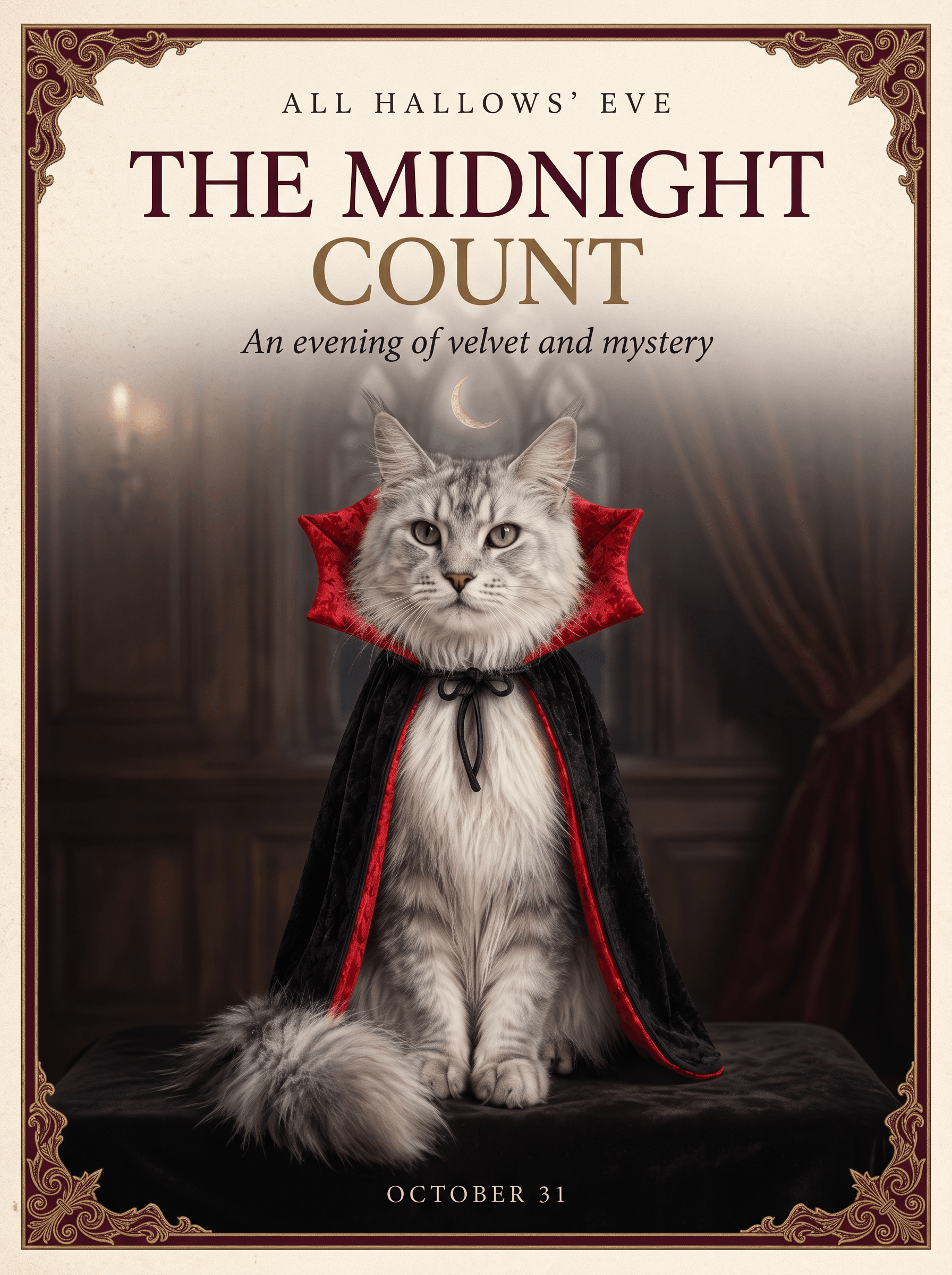
吸血鬼披風是一種選擇,也可以嘗試南瓜裝、女巫帽,或簡單的橘色領巾。請使用能清楚看見臉部與毛色花紋的照片。
這個創作範例使用 Nano Banana 2.1,以及呈現貓咪與服裝的參考設定圖。可以從這些參考素材和下方提示詞開始。若上傳自己的寵物照片,請同步修改寵物與參考素材的描述,使其符合照片內容。
創作範例的提示詞:
展開完整提示詞
Create an elegant luxury Halloween editorial poster in a 3:4 portrait aspect ratio. Use the supplied reference sheet to preserve the exact silver Maine Coon's facial features, green eyes, tufted ears, long fur, and black brocade vampire cape with its dramatic crimson collar. Feature only one cat, seated regally in a frontal three-quarter portrait. Do not reproduce the reference sheet layout or its labels.
Art direction: restrained Gothic elegance, warm ivory paper, deep burgundy accents, subtle antique-gold detailing, soft cinematic lighting, exquisite fur and fabric texture. Use generous negative space, precise alignment, refined high-contrast serif typography, and a clear editorial hierarchy. Add a delicate ornamental border and a discreet crescent moon. Keep the composition sophisticated and uncluttered.
Render only these exact English words: a small top line, “ALL HALLOWS’ EVE”; a prominent headline, “THE MIDNIGHT COUNT”; a delicate subtitle, “An evening of velvet and mystery”; and a small footer, “OCTOBER 31”. All visible text must be English, beautifully typeset and clearly legible. No additional text, logos, or watermarks.
想做出自己的版本,可以修改以下部分:
| 提示詞中的部分 | 修改方式 |
|---|---|
| 「supplied reference sheet」(提供的參考設定圖) | 如果只使用一張寵物照片,請改為「uploaded pet photo」(上傳的寵物照片)。 |
| 「silver Maine Coon」(銀色緬因貓)及列出的特徵 | 描述寵物的品種或外觀、毛色、眼睛和耳朵。若是狗狗,可以寫「有棕色眼睛、垂耳和金色毛髮的黃金獵犬」。 |
| 「black brocade vampire cape with its dramatic crimson collar」(黑色織錦吸血鬼披風,搭配醒目的深紅色衣領) | 描述想要的服裝。如果照片中沒有這套服裝,請要求加入服裝,而非保留服裝。 |
| 「warm ivory paper, deep burgundy accents」(暖象牙色紙張、深酒紅色點綴) | 如果想要不同的風格,可以換成其他顏色,例如橘色與黑色。 |
| 引號內的四行文字 | 替換成自己的標題、訊息和日期,並保留只呈現這些文字的指示。 |
例如,使用未穿服裝的狗狗照片時,可以把第二句改為:「使用上傳的寵物照片,保留狗狗的臉孔、棕色眼睛、垂耳和金色毛髮。加入一件紅領黑色吸血鬼披風。」
想製作類似的海報,可以保留單隻寵物的構圖和清楚的文字版面。生成後,請檢查臉部與文字拼寫。如果之後想把肖像用在影片中,請另存一份不含文字的版本。
3. 製作萬聖節舞蹈影片
用骷髏、女巫、幽靈或自己的角色製作舞蹈短片。可以安排獨舞,也可以讓一小群角色穿上相互搭配的萬聖節服裝。
在這個萬聖節骷髏舞蹈中,舞者會隨著燈光明暗切換外觀。可以運用這個點子,在跳舞過程中變換服裝。
範例提示詞使用兩張團體圖片:Figure 1 是一般服裝,Figure 2 是骷髏造型,並使用一段舞蹈參考影片。若想更換角色,請替換兩張圖片,並讓相同角色在每張圖片中維持相同位置。
創作範例的提示詞:
展開完整提示詞
16:9 landscape format, continuous single-shot, 3D Halloween animation. The shot begins with full-body views of all five characters; there are no breaks, cuts, or split-screen effects throughout the sequence. All five characters remain in the frame at all times, with their hats and feet kept fully visible. The boy in the pumpkin cape at the center serves as the visual focal point, while the others are positioned to his sides and behind him without obscuring anyone's face. The focus tracks the active movements, allowing for slight background blurring.

Camera movement must synchronize with the dance choreography. When the action or formation shifts to the right, the camera pans right to follow—avoid remaining static; the same applies to movements to the left, forward, or backward. The tracking movement should be distinct but must not cause the characters to drift out of the frame. Rapid zooms-in are appropriate for sudden bursts of energy, close-ups, or pauses on heavy beats; rapid zooms-out suit moments where the group disperses, jumps apart, or concludes a sequence. All zooming occurs within the same continuous shot via speed changes, not through jump cuts. Do not cut to a different shot when toggling the lights.

When the lights are on, the characters' faces, costumes, hair, heights, and positions must strictly match Figure 1. When the lights are off, they must strictly transform into the appearance shown in Figure 2: the specific skeletons, hats, tattered clothing, and red hair must be retained as depicted, with skeletal structures visible through the gaps in the clothing. Do not simply darken the image or switch to a different skeleton design. There are no changes to the characters or their positions during the light transitions, and the dance does not restart.

All characters should display natural, lively expressions—avoiding both blank stares and puppet-like stiffness. When the lights are on, expressions should shift with the choreography; characters may smile, look at one another or the camera, blink, and relax their mouths. Even as skeletons in the dark, they should remain animated—heads and shoulders swaying to the rhythm, and jaws opening and closing slightly with the drumbeats—while strictly maintaining the appearance from Figure 2. Body weight should be grounded, with natural follow-through on arms, capes, hair, and skirt hems, ensuring smooth transitions between movements.

The setting remains the outdoor night scene depicted in Figures 1 and 2. When the lights are on, the pumpkin lanterns and handheld lanterns cast a warm orange glow; when the lights go out, they instantly dim in sync with the drumbeat, shifting the primary illumination to a cool blue moonlight. The background remains a night sky featuring the moon and lanterns throughout.

The five characters dance based on the reference video, adopting only its rhythm, intensity, and dynamic flow; they should not replicate the live-action movements, costumes, or settings frame-by-frame. Each character retains a touch of their own lively personality: the boy in the center is more light-footed; the red-haired witch incorporates slight turns and hair-tossing; the tall character takes longer strides with natural joint movement; the sheet ghost is more airy and weightless; and the remaining character uses a slightly smaller range of motion. Everyone stays perfectly in sync with the beat. The camera follows the direction of the characters' movements rather than the original setting from the reference video.

The music is strictly synchronized with the dance. Accents such as stomps, pauses, arm flicks, and turns align with the bass drum beats, while claps or subtle movements fall between the beats. There must be no misalignment between the music and the actions. Lighting changes occur only on the heavy bass drum beats, never between beats. Upon a lighting change, facial expressions, movements, and camera motion continue seamlessly from the previous state.

Begin dancing with the lights on, as shown in Figure 1. Upon the next distinct drumbeat, the lights go out, and the five characters instantly shift to the pose in Figure 2. At the following distinct drumbeat, the lights come back on, returning to the Figure 1 pose. Continue alternating in this pattern with the drumbeats until the dance concludes. The final switch lands on a drumbeat, leaving the five characters frozen in the skeletal pose from Figure 2, maintaining lively expressions.

4K resolution, detailed 3D animation with clear rendering of fabric, hair, and skeletal structures; not live-action. Warm orange lighting when on; low-saturation cool blue when off. No dialogue, lyrics, or subtitles.
接著更新提示詞中的角色描述。如果使用三個角色而非五個,請修改數量,並刪除多餘角色的描述。想保留相同的服裝切換效果,就保留開燈與關燈的指示。
可以用明亮色彩和微笑的角色營造親切氛圍,也可以用較暗的燈光製作萬聖節派對影片。剪輯完成的片段時,再加入喜歡的音樂。
4. 為自拍加入恐怖細節
保留前景中的自己,在身後加入奇怪的事物,例如門口的幽靈、窗外的蒙面身影,或鏡子裡多出的一個人。
先選擇一張能看見部分背景的人像照片。請圖片編輯工具保留臉孔與姿勢,再描述新細節出現的位置。例如:「在我身後的門口加入一隻站著的小幽靈。」
可以加入直打閃光燈與少量顆粒感,營造老相機的效果。也可以保留原始光線,讓照片看起來仍像是在家中拍攝的。
若想要輕鬆一點的版本,可以讓幽靈拿著糖果桶或戴上派對帽。這個點子適合製作單張貼文,也能用原圖與修改後的照片組成兩張輪播圖片。
5. 製作萬聖節恐怖短片
恐怖短片可以從日常場景加上一個意外變化開始。有人在電梯裡等待,燈光閃爍,身後出現一個身影。
這段鬧鬼電梯影片採用固定監視器視角,不需切換鏡頭,就能清楚看見背景的變化。
原始場景以乘客參考圖作為 Image 1,電梯參考圖作為 Image 2。乘客留在原處,殭屍在監視器畫面第一次故障時出現,第二次故障後消失。
在全方位參考中選擇 Seedance 2.5,並使用這兩張參考圖,即可從範例設定開始。以下是原始提示詞:
展開完整提示詞
9:16 vertical aspect ratio, continuous single-take shot, fixed-camera elevator surveillance perspective, with the aesthetic of a realistic Hollywood horror film. The camera is positioned in the top corner of the elevator car; the camera placement, angle, and spatial layout strictly adhere to Image 2, with no zooming, panning, or cutting from start to finish. The frame is bounded by the metal walls with no foreground obstructions; the young woman remains at the visual center throughout, with her full body and mobile phone clearly visible, and the character blends seamlessly with the environmental lighting/filter. Zombies appearing during the malfunction phase are positioned only beside, behind, or at her feet; they do not obscure her face or upper body, nor do they replace her.

The young woman’s facial features, skin tone, and face shape strictly replicate Image 1; her hairstyle and color match Image 1 exactly (long, slightly wavy, light golden-brown hair), as does her outfit (loose grey top, dark wide-leg jeans, light-colored shoes). Her expression remains relaxed as she looks down at her phone; there is no significant change in her mouth, and the cool light from the phone illuminates the lower half of her face. The zombies have a realistic, gruesome appearance and appear only during the surveillance malfunction; the woman herself does not transform into a zombie. There are multiple zombies, varying in gender, physique, and positioning, moving slowly.

The setting is the modern elevator car from Image 2: dark metal walls, dark flooring, and the button panel on the right with the red floor display remain unchanged. The woman enters from outside the elevator doors (at the far side of the frame) and eventually leans against the wall on the right side of the frame. Lighting is primarily cool-white diffuse light from the ceiling; the metal walls show only faint reflections, creating an overall cool, slightly dim atmosphere. The overhead light strobes briefly during the malfunction but immediately returns to the original steady cool light once the malfunction ends.

Seconds 0–2: The elevator doors open, and the woman walks in with a natural gait; her hair and the hem of her top sway slightly with her movement, and she presses a floor button with one hand. Seconds 2–3: She walks to the bottom-right corner of the frame, leans her back against the right-hand elevator wall, and looks down at her phone. One leg is slightly bent, and she shifts her weight against the corner wall. The elevator doors close, the car remains stationary, and the red floor indicator changes to "2"; she does not look at the camera.
Seconds 3–6: The shot remains the same, but the surveillance feed glitches; scan lines, static, and brightness fluctuations appear. Once the flickering stops, the camera angle remains unchanged, and the woman’s position, clothing, and posture (looking at her phone) remain consistent. Suddenly, multiple zombies appear surrounding her (they appear instantly, without a gradual fade-in); some are even touching her body. She remains unaware, continuing to use her phone as before. Seconds 6–7: The image glitches and flickers again; the zombies vanish during the flicker, leaving no afterimages. Seconds 7–8: The feed returns to normal. The woman is alone in the elevator, still leaning in the same spot and looking at her phone; the walls and floor are clean, and the overhead light is steady. The shot holds on this quiet surveillance view.
4K resolution; retains slight surveillance-style grain while keeping the subject and elevator details sharp. Textures of skin, fabric, metal, and bloodstains appear realistic. Low-saturation, cool gray color palette; fixed wide-angle shot covering the entire elevator car. Audio consists primarily of low-level ambient elevator noise; brief static/electrical interference occurs during the glitch, followed immediately by silence. No dialogue; the visual quality is completely realistic.
可以修改以下部分,變換場景內容:
- 乘客:替換 Image 1,並更新描述女性髮型、服裝與外觀的段落。例如,把「loose grey top, dark wide-leg jeans, light-colored shoes」(寬鬆灰色上衣、深色寬管牛仔褲、淺色鞋子)替換成照片中的服裝。請保留人物不會變身的指示。
- 恐怖元素:把提示詞中的所有「zombies」替換成想要的角色,例如「穿著萬聖節服裝的幽靈」。也要更新外觀與動作,避免其他段落仍在描述殭屍。
- 地點:替換 Image 2,並更新場景、進入的位置與站立位置。如果改成走廊,請刪除樓層按鈕和電梯門相關的動作,改成描述人物走入並停在牆邊。
- 結尾:如果想讓南瓜燈留在現場,請在角色出現的場景中加入南瓜燈,並更改結尾。例如:「身影在第二次畫面故障時消失,將南瓜燈留在地上。」請刪除地板乾淨無物的指示,以免與新結尾衝突。
想保留原本的監視器效果,就維持固定鏡頭、同一名乘客和兩次畫面故障。請讓時間段落符合所選片長,並在工具中選擇輸出解析度;在提示詞中寫「4K」並不會設定解析度。
檢查背景中的身影是否正常出現和消失,而沒有取代乘客。每次只修改一個部分,會更容易看出需要調整的地方。
6. 製作南瓜出場影片
讓角色或寵物從大南瓜裡出現。成品可以用作萬聖節問候影片,或角色的簡短登場介紹。
這個南瓜出場範例把場景設在森林中。你的版本也可以發生在門廊、派對現場,或寵物的床邊。
先從範例的參考素材和提示詞開始。若想更換人物,請替換角色參考圖,並更新描述女孩的部分。若想更換地點,請把森林描述和開場穿梭樹林的鏡頭動作,改成符合新場景的細節。
創作範例的提示詞:
展開完整提示詞
A six-second, cinematic, first-person FPV tracking shot. Filmed with an 8mm ultra-wide-angle fisheye lens in a single, continuous take without cuts. The footage retains the authentic feel of FPV flight; rapid shaking, slight rolling, dynamic tilting, and high-speed weaving create a powerful sense of presence. Natural lens breathing, slight edge distortion, subtle vignetting, and realistic motion blur are preserved, lending the forest setting deep immersion and a fairytale-movie aesthetic.

The setting is a forest at night, with faint mist drifting in the air. Moonlight filters through the canopy, creating dappled light patterns, while warm orange jack-o'-lanterns illuminate the surrounding grass, mushrooms, vines, and wildflowers, crafting a dreamy Halloween atmosphere.

0–1 second

The video begins with an explosive burst of speed as the FPV camera surges forward. The camera shakes rapidly and rotates slightly while weaving at high speed through layers of trees. Thick trunks streak past on either side; a tangle of branches, vines, wildflowers, and tall grass repeatedly obscures the view before being swept aside by the camera's rapid movement. Leaves graze the edge of the frame, creating intense foreground occlusion, motion blur, and realistic parallax.

1–1.25 seconds

The flight begins to slow, and the camera stabilizes. The trees ahead part naturally, revealing the subject from Image 1 in the center of the frame. The camera drifts slowly forward; moonlight and warm orange light illuminate the subject, while the background forest remains softly out of focus, creating an atmosphere of quiet anticipation.

1.25–6 seconds

The shot transitions naturally to the girl shown in Image 2, maintaining the same continuous take.

The girl gives the lid of a giant jack-o'-lantern a firm push; the heavy lid merely wobbles slightly with a faint scraping sound but does not open. She pauses for a moment, stunned, before trying again.

This time, she uses both hands to grip the lid and heaves upward with all her might. Her brows furrow and her eyes squeeze shut, as if her entire face is straining with the effort. The pumpkin lid finally began to loosen, pushed open bit by bit by the girl; with one last burst of effort, she lifted it off completely.

As she struggled to open the lid, the camera smoothly rose about a meter, transitioning naturally from eye-level to a high-angle view. Warm orange light spilled out from inside the pumpkin, illuminating the girl's cheeks.

She tilted her head up and looked just off-camera; her eyes crinkled into crescents as she smiled—a sweet, relieved expression—and she gave her head a gentle tilt, exuding a charming, fairytale-like aura. The camera maintained a subtle, floating, "breathing" motion.

Sound Effects:

Uses only synchronous ambient sound. Sounds include the wind; the rustle of leaves brushing against the lens; the sound of grass; the chirping of night insects; the creak of wood as the lid first wobbled; the continuous friction and soft, muffled thud as she pushed it open; the sound of the lid finally coming free; and the girl's sweet vocalizations as she exerted effort.

No music. No narration. No subtitles. No text.
原本的動作是女孩費力推動南瓜蓋、將它舉起,然後露出微笑。可以保留這段動作,也可以改得更簡單。若改成寵物版本,也要調整手部動作,例如讓寵物向上頂起蓋子,再四處張望。請更新所有相關動作描述,避免提示詞仍要求動物用雙手抓住蓋子。
若要製作個人問候影片,可以在剪輯工具中為完成的影片加入祝福文字。文字要夠簡短,讓觀眾在影片結束前讀完。
7. 製作萬聖節團體合照
為朋友或一群原創角色製作萬聖節合照。可以讓每個人穿不同服裝,也可以選擇共同主題,例如女巫、吸血鬼或鬧鬼學校。
可以使用團體照、已取得許可且適合的個人照片,或角色插畫。生成圖片前,先決定服裝和背景。選擇佈置過的門口等簡單場景,可以為人物保留更多畫面空間。
這些穿著萬聖節服裝的動漫角色可以提供團體造型靈感。範例影片讓三名角色依序登場,也可以借用他們的服裝主題,製作靜態團體肖像。
若想改編影片本身,請替換角色參考圖,並修改提示詞中每名角色的外觀、服裝與道具。角色順序要與參考圖片一致。如果把南瓜桶換成提燈,要同時修改道具描述,以及角色舉起道具的動作。
創作範例提示詞的英文版:
展開完整提示詞
16:9 landscape format, 12 seconds, a single continuous take showcasing cute Halloween characters. Each character stands in the center of the frame and rotates from side to side around a vertical axis. Normally, use a standard-lens full-body view with the entire head and feet visible. Only when the character turns to face the center should the lens become ultra-wide and the camera instantly push into an extreme close-up, almost touching the face, within the same continuous movement. The face fills much of the close-up, with the hat brim, veil, or hair slightly exaggerated around the frame edges, but do not distort the facial features beyond recognition. Immediately pull back to the full-body view after the action, then continue the rotation. No jump cuts or white flashes at any point. Keep the background softly blurred.

Strictly reuse the faces, hairstyles, outfits, and props of the three characters from the reference image, introducing them in order from left to right. The first is an elegant witch with long silver-white hair and purple eyes: an oversized purple-and-black witch hat, purple flowers, a black corset, white puff sleeves, and a long layered purple skirt. One hand may rest against her cheek while the other holds a pumpkin bucket. The second is a lively cat-girl with mint-green hair and cyan eyes: a cat-eared hood, an orange bow, a short black-and-orange cape and shorts, a crossbody pumpkin bag, and a dark cat tail. The third is a gentle ghost girl with long pale-blonde hair and purple eyes: a small witch hat, a white veil, a flowing white dress, a little ghost beside her shoulder, and a ghost lantern in her hand. Do not swap their outfits.

The setting is a clean, dark display platform with a ring of pale orange light at the character's feet and only blurred pumpkin lanterns in the background. Normally, use soft frontal lighting; during the extreme close-ups, the eyes and expressions must remain clearly visible.

The rotation speed should feel like a small ball swinging in the air, not a constant-speed turn. Accelerate from slow to fast after leaving the center, slow down and pause briefly near a side angle of about 60 degrees, then accelerate back toward the center. Clothing hems, hair, and the cat tail follow half a beat behind the body. Each character passes through the center twice, performing a different action in each ultra-wide close-up. Change characters as the camera pulls back at the end of the previous character's second close-up: the face, hair, and clothes naturally transition into the next character while continuing in the same direction. Do not stop in a static pose or dissolve into a different image.

Seconds 0–2: The witch turns to the center for the first time. The camera instantly pushes into an ultra-wide extreme close-up. She lowers the hand resting against her cheek and calmly looks into the lens, with the hat brim sweeping across the edges of the frame and a restrained smile.

Seconds 2–4: The camera pulls back. She swings quickly to one side, slows down, then accelerates through the center for the second time. In this close-up, she lifts the pumpkin bucket beside her face to display it, keeping a gentle gaze.

Seconds 4–6: As the camera pulls back, she naturally changes into the cat-girl, followed immediately by the cat-girl's first extreme close-up. She raises both hands beside her cheeks, curls her fingers into claws, opens her eyes wide, and forms a cute little circle with her mouth, pretending to be a tiger for the camera.

Seconds 6–8: After the pullback, she swings to the opposite side, then enters the second extreme close-up. This time, she extends one clawed hand toward the camera as if about to give it a gentle tap, draws the other hand back, and winks once.

Seconds 8–10: During the pullback, she lowers both hands and naturally changes into the ghost girl, followed by the ghost girl's first extreme close-up. She lowers her eyes, then gently raises them. Her veil drifts past the frame edges, the lantern lights her chin, and her expression remains quiet.

Seconds 10–12: After the pullback, she swings back to the center for the second extreme close-up. The little ghost beside her shoulder floats into a corner of the frame. She looks toward the lens and gives a very faint smile. End on this close-up.

4K, detailed and cute anime-style 3D animation. Use low-saturation purple, black, orange, and white, with shallow depth of field. The music is a light, playful Halloween piece, with accents only at each instant push-in. No dialogue, no lyrics, and no subtitles.
完成的圖片可以用作派對邀請卡或群組聊天圖片。也可以為每個人製作一張肖像,再以輪播貼文一起分享。
8. 製作萬聖節短篇故事
跟著同一個人走過幾個萬聖節場景,例如在家準備、參加街頭派對,再到咖啡廳與朋友見面。
這段萬聖節夜遊用一段連續影片串起廚房、節慶街道、咖啡廳與舞廳。提示詞為每個地點安排了服裝和動作。
創作範例的提示詞:
展開完整提示詞
REFERENCE INPUT

@Image1 = the uploaded person. Preserve this person's identity, facial structure, skin tone, hair, apparent age, body proportions, and recognizable details throughout the entire video. The uploaded person replaces the original girl as the protagonist.

Do not de-age, gender-swap, beautify, clone, or morph the person. If the uploaded person is an adult, keep them visibly adult. Whenever the face is visible, it is unchanged. No masks over the eyes or mouth, no face paint that changes identity, no logos, and no readable text. Do not copy the background, pose, framing, or lighting from @Image1.

The protagonist must remain the same person in every moment. No duplicate versions of the protagonist. No workers, no uniforms, and no staff.

GLOBAL VISUAL RULES

Create a cinematic continuous walk through four connected Halloween places: a home kitchen, a festival street, a cafe, and a ballroom. The camera follows at a steady walking pace. No cuts, fades, dissolves, portals, teleportation, time jumps, or reset compositions.

Every scene has its own playful Halloween costume. A costume may change only while the body is hidden by something passing in the foreground, or at the top of a natural spin or jump the protagonist was already doing. The new clothes must finish that same motion: a cape completing the turn, a scarf settling from the jump, a hem landing with the step. No popping, flashing, morphing, or sudden wardrobe cuts.

NPCs are only two kinds. Cute little ghosts: small, round, soft white sheets with simple smiling faces, floating at knee height, playful and never scary. Human guests: every person in the background wears a different extravagant Halloween costume. No ordinary clothes, no workers, and no one operating machinery.

Festive Halloween at early dusk. Amber jack-o'-lantern light, violet sky, round string bulbs, candy colors, laughter, paper bats, pumpkins, and ribbons. Fun and lively, not horror: no gore, lunging monsters, jump scares, or dark abandoned places.

No readable text, subtitles, logos, watermarks, or generated writing.

15-SECOND TEMPLATE VIDEO — “ONE LANTERN NIGHT”

Use the shared template setup above.

[00:00–00:03] THE KITCHEN

START STATE — The protagonist, based on @Image1, stands in a small warm kitchen in the first costume: a playful black-cat look with a slim ear headband, a soft orange sweater, and a narrow tail belt. The face is completely clear. Pumpkin muffins cool beside a level glass of orange juice. One little ghost peeks from a teacup. Another hugs a muffin and drifts it toward the protagonist. The camera tracks backward at chest height.

ACTION — The protagonist gently boops the muffin ghost. The muffin settles back onto the plate, and the ghost tumbles in a happy loop. The protagonist picks up a trick-or-treat bucket and naturally turns toward the front door. A large pumpkin and the tumbling ghost cross the immediate foreground, covering the outfit for a moment.

CAMERA — Keep moving backward. The doorway and its pumpkin-lantern frame come into view without a cut.

END STATE — The body is still completing the same turn as the pumpkin leaves the lens.

[00:03–00:07] THE FESTIVAL STREET

START STATE — The turn finishes on a steep European street. The cat ears and tail are gone. The second costume is already in motion: a burgundy vampire cape with a high collar settles at the end of the same spin, over the orange sweater. The face is still bare and unchanged. The street is a lively Halloween parade.

ACTION — Every neighbor wears a different extravagant costume: a pumpkin knight, a candy-striped witch, a bat-wing coat, a mushroom hat, a starry jester. Little ghosts weave around their ankles. One ghost rides a balloon string and circles the protagonist. The protagonist gives the balloon a playful tap, then hops over a pumpkin painted on the pavement. At the top of the hop, the balloon ghost sweeps across the foreground and covers the outfit.

CAMERA — Stay centered on the protagonist. The hop carries them toward a glowing cafe door. No cut.

END STATE — They are landing as the ghost leaves the lens.

[00:07–00:11] THE CAFE

START STATE — The landing finishes inside the cafe doorway. The vampire cape is gone. The third costume completes the same hop: a soft pumpkin beret, a short black capelet, and a loose orange scarf settle from the downward motion. The face remains clear. The cafe is packed and cheerful.

ACTION — Guests in extravagant Halloween costumes laugh over pumpkin drinks. Little ghosts float between the tables. One balances a tiny cup. Another peeks from a table lantern and spins a cinnamon roll like a wheel. The protagonist twirls aside to let the cup ghost pass. At the height of the twirl, a pumpkin-bead garland swings through the foreground and covers the outfit.

CAMERA — Track beside the protagonist as the twirl carries them through the garland toward a heavy curtain at the back of the cafe. No cut.

END STATE — The spin is still turning as the garland clears.

[00:11–00:15] THE HALLOWEEN BALL

START STATE — The same twirl ends in a crowded Halloween ballroom. The cafe costume is gone. The fourth costume finishes the circle the body was already making: a short midnight-blue cape embroidered with gold stars flares out and settles, with a slim gold sash. The face stays uncovered and recognizable. No mask.

ACTION — Dancers in elaborate, mismatched Halloween costumes fill the floor. Little ghosts form a slow ring overhead and dip down around the protagonist. One small ghost catches the edge of the star cape and floats one dance step beside them. The protagonist completes that step, then looks up as the ghosts rise toward the lanterns.

CAMERA — Move with the last step and rise slightly, without cutting. Hold on the protagonist and the ring of ghosts.

END STATE — The star cape rests, the face is unchanged, and the ball continues around them for the final second.

AUDIO — Footsteps, a soft boop, muffin plate, balloon string, cafe cups, garland beads, shoes on a dance floor, distant laughter, and tiny bell-like ghost hums. A faint diegetic waltz is heard only inside the ballroom, with no lyrics. No dialogue and no generated text.
先從範例提示詞開始,替換人物參考圖,並保留維持人物臉孔與外觀的指示。接著選擇想修改的部分:
- 地點:修改各段的場景設定。如果把咖啡廳換成糖果店,也要調整桌子、飲料、杯子及相關動作,讓內容符合場景。
- 服裝:替換每套服裝的描述。依照原始提示詞的安排,讓換裝發生在身體短暫被遮擋或已經開始轉身的時刻。
- 動作:替換一個小互動,例如拿起桶子或輕碰氣球。請同步更新該場景的結尾與下一場景的開頭,讓動作保持連貫。
第一次嘗試時,可以先更換人物和一套服裝,保留原本的四個場景路線,之後再嘗試其他地點或動作。如果偏好照片故事,也可以用相同的場景點子分別生成圖片。
2 個適合商家的萬聖節點子
商家可以先從需要向顧客展示,或與團隊一起決定的內容著手。活動海報可以說明活動安排;佈置預覽則有助於比較空間設計的不同方案。
可以使用多模型圖片生成與編輯工具搭配 Nano Banana 2.1,創作圖片或編輯自己的照片。如果希望設計中包含店家的實際元素,請上傳店面或商品照片。
使用 Credits 計費生成時,Nano Banana 2.1 在提供 1 至 3 張參考圖的情況下,每張 2K 輸出圖片需 7 Credits,4K 則需 16 Credits。每增加一張參考圖,費用增加 1 Credit。如果方案包含 Relax Mode,兩種解析度都能在該模式下生成,不扣 Credits,也不會因增加參考圖而額外收費。
9. 製作萬聖節活動海報
為變裝比賽、萬聖節菜單、晚間活動或季節優惠製作海報。先準備店面照片,或想要主打的商品照片。
以咖啡廳活動為例,可以在吧台周圍加入南瓜和紙蝙蝠,在照片上方放活動名稱,下方放日期與時間。範例使用奶油色背景、深棕色文字和橘色點綴,呼應現場裝飾。
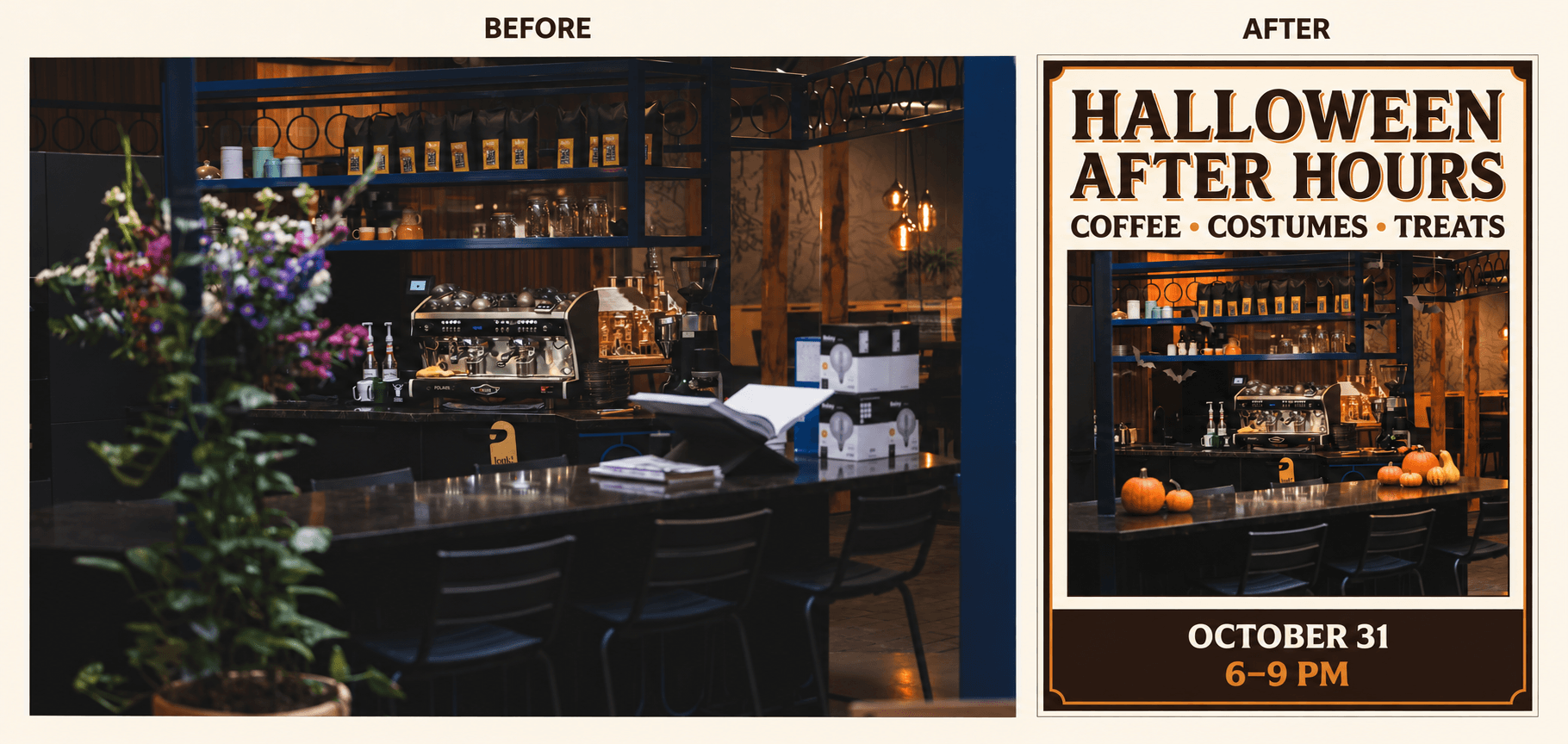
咖啡廳照片與萬聖節海報對比。活動名稱、日期與時間僅供示意。
上傳咖啡廳照片,選擇 Nano Banana 2.1,並嘗試以下提示詞:
展開完整提示詞
Create a vertical Halloween event poster using the uploaded café photo.

Keep the café recognizable. Preserve the black espresso machine, metal shelves, and counter. Remove the blurred flowers in the foreground and the cardboard boxes. Add a few small orange pumpkins on the counter, black paper bats near the shelves, and warm amber lighting. Keep the decorations realistic and leave the coffee equipment visible.

Use a simple cream-and-dark-brown layout with orange accents. Place a large headline above the café photo. Let the photo fill the middle of the poster. Put the date and time in a clear footer.

Include only this exact text:

HALLOWEEN AFTER HOURS
COFFEE • COSTUMES • TREATS
OCTOBER 31
6–9 PM

Make the headline the largest text. Keep all text sharp, readable, and away from the edges. Do not add other words, logos, addresses, prices, or watermarks.
若要修改海報,請把「Include only this exact text」(只包含以下指定文字)後面的四行,替換成自己的活動資訊。需要時,也可以在該段加入店名、地點或預約資訊。文字請保持簡短,為版面保留足夠空間。
把「cream-and-dark-brown」(奶油色與深棕色)和「orange accents」(橘色點綴)改成品牌配色。若是烘焙店,可以把咖啡設備換成蛋糕展示櫃;若是寵物店,可以使用寵物照片,把活動改成寵物變裝日。請同步修改要保留與移除的細節,使其符合上傳的照片。
分享前請檢查文字,尤其是日期、價格和聯絡資訊。需要完全正確的內容,請在排版工具中修正。若要用於 Instagram 限時動態或印刷告示,請另做適合的版面,確保文字清楚可讀。
這份Nano Banana 2.1 使用教學介紹如何把商品圖片放進新的場景,並用於廣告製作。
10. 預覽店面的萬聖節佈置
用店面照片預覽不同萬聖節裝飾的效果,再決定是否購買。
可以用同一張照片嘗試幾種點子。咖啡廳可以比較南瓜陳列與女巫主題角落;服飾店可以嘗試黑橘配色的櫥窗裝飾;書店則可以在展示桌周圍加入紙幽靈、蠟燭和秋葉。
若要規劃入口佈置,請上傳清晰的店面照片,並選擇 Nano Banana 2.1。建議提示詞:
展開完整提示詞
Add Halloween decorations to the shop in my photo. Keep the building, windows, door, shop sign, and camera angle the same. Place pumpkins beside the entrance, add warm string lights around the window, and put small paper bats inside the display. Keep the door and walkway clear. Use orange, cream, and black decorations. Do not change the shop name or add people.將生成結果與原始照片比較,確認門、窗戶和招牌都沒有改變。可以用圖片討論設計,再於訂購裝飾前確認實際尺寸。
如果想在開始前比較模型,這篇Nano Banana 2.1 與 Nano Banana 2 比較涵蓋海報文字、商品編輯等任務。這些範例有助於決定如何運用自己的圖片。
從萬聖節創作範例開始
選擇一個點子,準備要使用的照片或插畫。你可以尋找接近構想的AI 萬聖節照片與影片點子,並以其中的創作範例為起點。
開啟範例並選擇 Remix,即可從範例的參考素材與提示詞開始。替換相關圖片,再依照自己的構想修改服裝、場景或動作。
創作範例提供參考素材和提示詞作為基礎。先使用原始設定,再替換想修改的細節。如果同一人物、服裝、道具或地點在提示詞中出現多次,請更新每一處描述,讓指示保持一致。
將第一版結果與原本的照片和構想對照,再針對需要改善的部分調整,例如服裝、背景或影片動作。