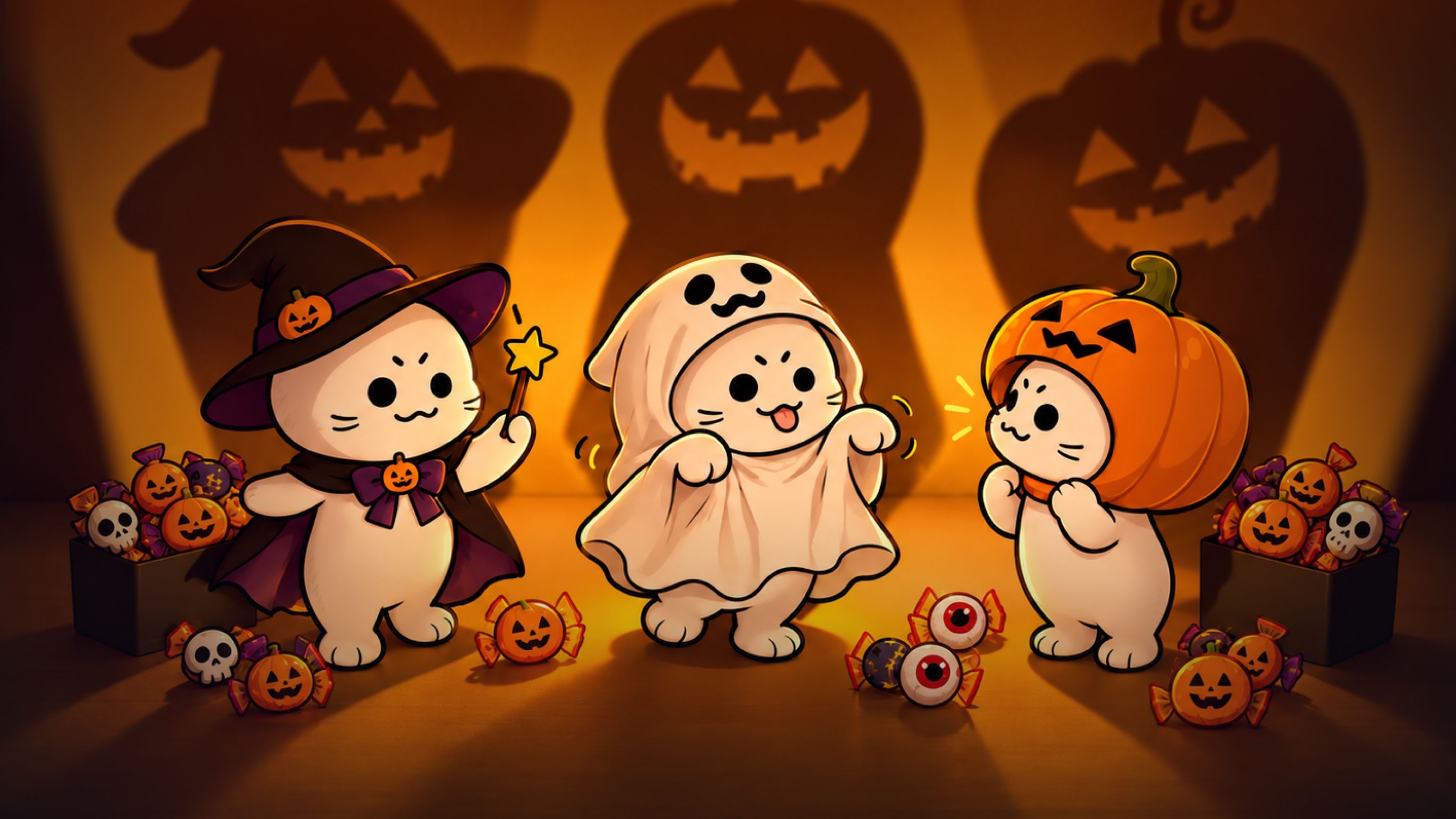
Puedes usar la IA para probar disfraces de Halloween, hacer un póster de tu mascota o crear un video corto de miedo. Los negocios también pueden diseñar pósteres para eventos y visualizar la decoración de sus tiendas. Aquí tienes diez ideas de Halloween con IA, con ejemplos y prompts sugeridos para empezar.
Muchos de estos proyectos pueden comenzar con una foto que ya tengas. Puedes cambiar la ropa, añadir decoraciones o colocar al protagonista en un entorno nuevo. Los ejemplos siguientes muestran algunas posibilidades; puedes elegir otras prendas, personajes y lugares.
Elige un proyecto de foto o video
Una foto funciona bien cuando quieres mostrar un atuendo o un diseño. Prueba con una foto de perfil de Halloween, un póster de tu mascota, una invitación a una fiesta o una idea de decoración para tu tienda.
Un video funciona bien cuando quieres mostrar una acción. Puedes cambiar de disfraz, hacer bailar a los personajes o mostrar un fantasma que aparece detrás de alguien.
También puedes empezar con una foto y añadir movimiento después. Por ejemplo, crea primero un retrato de Halloween de tu perro y luego usa esa imagen para un clip corto.
Antes de empezar, decide qué quieres conservar de la foto original: tu cara, las manchas del pelaje de tu mascota o la distribución de tu tienda. Incluye esos detalles al describir los cambios.
8 ideas de Halloween para probar
1. Crea un video de cambios de disfraz de Halloween
Usa una foto tuya para probar distintos atuendos de Halloween y luego convierte los cambios en un video corto. Puedes comparar ideas de disfraces o compartir una publicación con tus amigos para preguntar: «¿Cuál me pongo?».
Empieza con una foto nítida y elige los atuendos que quieres probar. Una bruja, un vampiro y un esqueleto son algunas opciones. También puedes usar un atuendo formal, un disfraz inspirado en un videojuego o un diseño propio.
El ejemplo de cambios de disfraz usa una capa y un sombrero para tapar la vista entre atuendos. Así, el cambio de ropa ocurre en un momento concreto del video.
Versión en inglés del prompt del ejemplo:
Ver el prompt completo
9:16 portrait format, 12 seconds, ultra-clear 4K. Use only the boyfriend's first-person viewpoint throughout, with no cuts. The boyfriend is also sitting on the tatami, and the camera is at his eye level, equivalent to a 35mm lens with a wide aperture. Keep the focus locked on his girlfriend's face, with round, warm bokeh in the background. Give the camera a subtle breathing quality: it dips slightly when she tugs his sleeve, gently rises when she stands, and smoothly moves backward when she approaches. Do not switch to a third-person view or show the boyfriend's face, including in the mirror. His hands appear only briefly along the bottom edge of the frame.

The girlfriend is an adult woman around twenty-two years old, with shoulder-length dark brown hair, wispy bangs, a soft round face, light, fresh makeup, and a natural lip color. Keep the same face throughout; only her clothes change. She is worrying about Halloween and complains in a sweet, affectionate tone: she gently tugs his sleeve and looks up into the camera, speaking in a soft, sweet voice. Her manner should be cute, natural, and fresh, appealing to a Japanese audience without making her look childlike or exaggerated.

Limit the setting to a small Japanese-style room in a quiet residential neighborhood in Tokyo, about six tatami mats in size, with light-colored tatami flooring. It is not a hotel or an empty studio set. On one side is a warm-white shoji window; beyond its fine wooden lattice are blurred blue-hour twilight and distant streetlights. A low wooden cabinet holds only neatly arranged orange ribbon, a small pumpkin bag, and spare hair clips. An off-white paper-shade floor lamp stands in the corner, and a narrow wardrobe has light wooden sliding doors. A full-length mirror with a thin black frame leans beside the wardrobe. The wall has only one string of small pumpkin lights, glowing steadily without flickering. The main light is warm-white side lighting from the floor lamp. Cool blue twilight from the window gives the hair a soft rim, while the pumpkin lights create tiny orange highlights in her eyes. Use an overall low-saturation palette of persimmon orange, ink black, milky white, and twilight blue. Keep skin tones clean, with a slight soft bloom around highlights and fine film grain.

All three outfits are complete and appropriate. For the first costume change, use a cape to cover the camera. For the second, use the witch hat she has removed to cover the camera before revealing the new outfit.

Seconds 0–3: She is already sitting sideways on the tatami, both knees bent and her lower legs together, with both legs extending diagonally toward the side and front of the camera and her toes resting on the tatami. One hand supports her at her side, and her upper body turns toward her boyfriend. Her legs occupy the lower half of the frame and her face the upper half, both fully visible. She wears the first outfit: a loose orange cardigan, a white shirt, a short black skirt, white ankle socks, and a small pumpkin brooch on her chest. She lightly holds her skirt hem, puffs her cheeks slightly, looks up into the camera with a complaining expression, and softly says, 「ねえ、普通すぎない?」

Seconds 3–6: She first draws her legs back, then stands as the camera rises with her. She lifts a wide black cape to cover the camera, filling the lens with fabric. When the fabric drops, she is wearing the second outfit, strictly following image1: a black, pointed, wide-brimmed witch hat with a slightly bent crown, a purple hatband, a purple bow on the side, and a small orange pumpkin ornament. Her black long-sleeved dress has a square neckline, purple lacing on the chest, and a purple ribbon at the waist. The cuffs have purple ruffles, and the two-layer skirt reveals a purple lining underneath. She wears white mid-calf socks and black platform Mary Jane shoes. With both hands, she holds a small orange pumpkin bag decorated with a black bow. Standing in the center of the tatami, she takes half a step closer and makes a half-turn, but the wide brim falls over her eyebrows and eyes. She lifts the brim slightly, frowns with a disappointed expression, tilts her head toward the camera, and says even more softly, 「これも、なんか違うの」. The camera moves gently backward as she stands and approaches.

Seconds 7–12: She removes the black witch hat and brings its wide brim toward the lens. The black hat completely covers the frame, leaving only a ring of warm light around the brim. When the hat moves away, she is wearing the third outfit from image2: a short persimmon-orange capelet over a black dress, a thin black belt, and white mid-calf socks. A small paper-lantern hair clip sits at the side of her hair, and she holds a round pumpkin bag. She is no longer wearing the witch hat. She takes small steps toward the camera, looks down to straighten the capelet, then raises her eyes.

She slowly turns all the way around in front of the camera, with the capelet and skirt settling half a beat after her body. After the turn, she sits sideways on the tatami again, drawing her still-bent legs slightly back toward the side and front, bringing her face closer to the camera. With both hands, she gently holds the boyfriend's fingers as they appear along the bottom edge of the frame, gives them one small shake, leans her upper body slightly forward, and says with a sweet smile, 「これにしよ?ね」. Keep the focus on her eyes as the camera comes to a smooth stop, retaining both the blue twilight outside and the warm indoor light in the frame.

Use a live-action cinematic look, ultra-clear detail, and shallow depth of field. Skin texture, the weave of the tatami, and woven fabric must look realistic, without skin smoothing or a plastic appearance. Include only these three short spoken lines, with synchronized lip movements. No subtitles, no logos, and no horror sound effects.
Para usar el prompt del ejemplo con tus propios atuendos, sustituye las dos referencias de vestuario y actualiza las descripciones de ropa correspondientes. En ese prompt, Image 1 e Image 2 se refieren a los atuendos. Si cambias la ropa, elimina los detalles que ya no correspondan, como la cinta morada del sombrero o la capa naranja.
También puedes sustituir la descripción de la habitación por un dormitorio, la entrada a una fiesta o una calle decorada. Conserva los movimientos de la capa y el sombrero si quieres las mismas transiciones. Si tu atuendo no incluye sombrero, cambia también esa segunda acción que tapa la vista. Los tres atuendos son un ejemplo; para mostrar un solo cambio de antes y después, elimina la sección del último atuendo y su diálogo.
2. Haz un póster de Halloween de tu mascota
Convierte la foto de tu gato o perro en un póster de Halloween. Añade un disfraz, elige un fondo y ponle un título corto. Puedes compartirlo, imprimirlo o usarlo como foto de perfil de Halloween.
El ejemplo de póster de Halloween de una mascota tiene a un gato como protagonista. Puedes adaptar la idea a un perro u otra mascota, con ropa y una pose adecuadas para el animal.
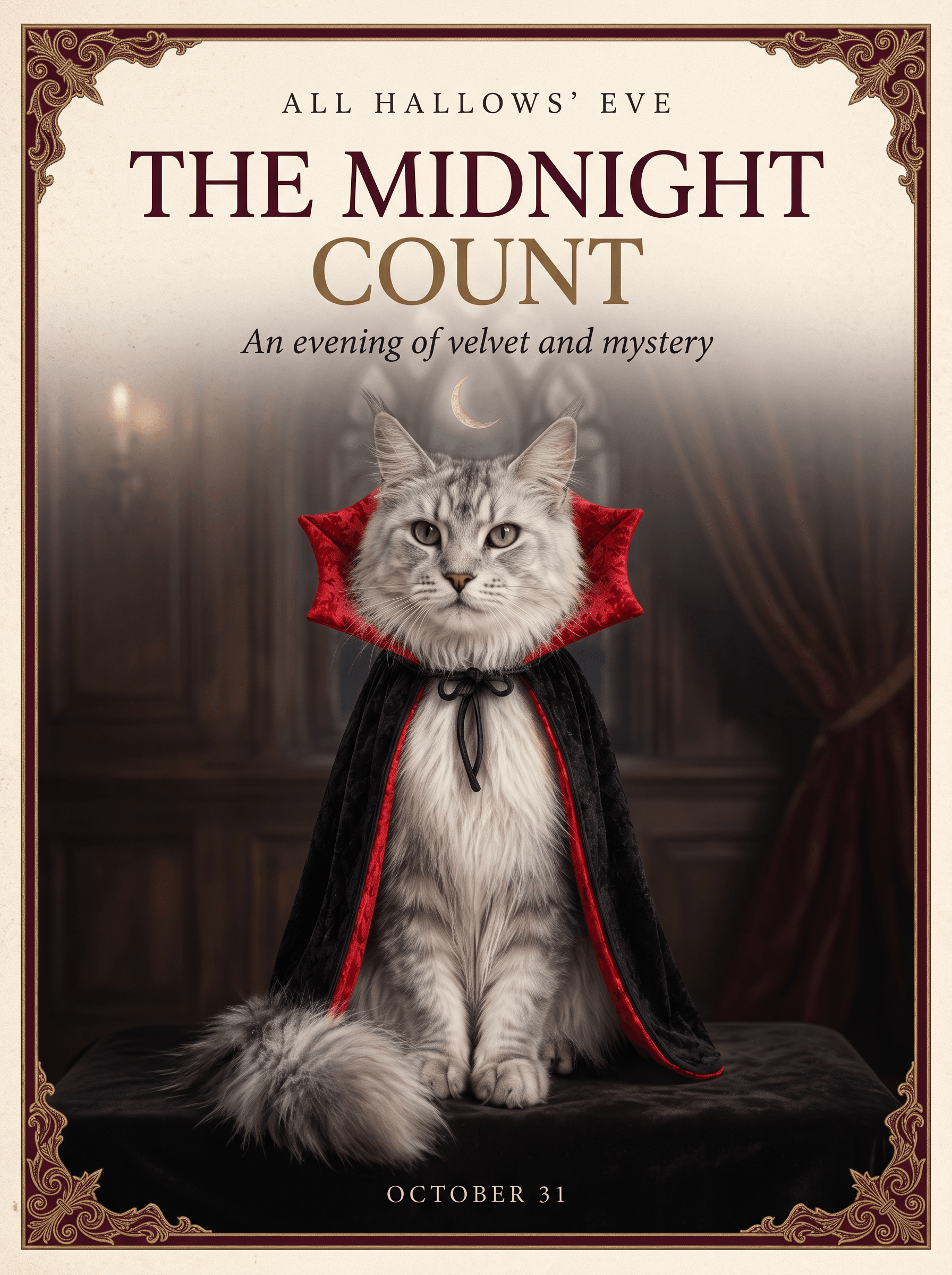
Una capa de vampiro es una opción. También puedes probar un disfraz de calabaza, un sombrero de bruja o un pañuelo naranja sencillo. Usa una foto donde se vean bien la cara y las marcas del pelaje.
El ejemplo usa Nano Banana 2.1 y una hoja de referencia que muestra al gato y su disfraz. Puedes empezar con esas referencias y el prompt siguiente. Si subes una foto de tu mascota, cambia las descripciones del animal y de las referencias para que coincidan con ella.
Prompt del ejemplo:
Ver el prompt completo
Create an elegant luxury Halloween editorial poster in a 3:4 portrait aspect ratio. Use the supplied reference sheet to preserve the exact silver Maine Coon's facial features, green eyes, tufted ears, long fur, and black brocade vampire cape with its dramatic crimson collar. Feature only one cat, seated regally in a frontal three-quarter portrait. Do not reproduce the reference sheet layout or its labels.
Art direction: restrained Gothic elegance, warm ivory paper, deep burgundy accents, subtle antique-gold detailing, soft cinematic lighting, exquisite fur and fabric texture. Use generous negative space, precise alignment, refined high-contrast serif typography, and a clear editorial hierarchy. Add a delicate ornamental border and a discreet crescent moon. Keep the composition sophisticated and uncluttered.
Render only these exact English words: a small top line, “ALL HALLOWS’ EVE”; a prominent headline, “THE MIDNIGHT COUNT”; a delicate subtitle, “An evening of velvet and mystery”; and a small footer, “OCTOBER 31”. All visible text must be English, beautifully typeset and clearly legible. No additional text, logos, or watermarks.
Para darle tu toque, modifica estas partes:
| Parte del prompt | Qué cambiar |
|---|---|
| «supplied reference sheet» (hoja de referencia proporcionada) | Si usas una sola foto de tu mascota, sustituye esta frase por «uploaded pet photo» (foto de la mascota subida). |
| «silver Maine Coon» (Maine Coon plateado) y sus características | Describe la raza o el aspecto de tu mascota, el color del pelaje, los ojos y las orejas. Para un perro, podrías escribir «golden retriever con ojos marrones, orejas caídas y pelaje dorado». |
| «black brocade vampire cape with its dramatic crimson collar» (capa de vampiro de brocado negro con un llamativo cuello carmesí) | Describe el disfraz que quieres. Si no aparece en la foto, pide que lo añada en lugar de conservarlo. |
| «warm ivory paper, deep burgundy accents» (papel marfil cálido, detalles en borgoña oscuro) | Sustituye estos colores si quieres otro aspecto, por ejemplo, naranja y negro. |
| Las cuatro líneas de texto entre comillas | Sustitúyelas por tu título, mensaje y fecha. Conserva la instrucción de incluir solo esas palabras. |
Por ejemplo, si usas una foto de un perro sin disfraz, sustituye la segunda oración por: «Usa la foto de la mascota subida para conservar la cara, los ojos marrones, las orejas caídas y el pelaje dorado del perro. Añade una capa negra de vampiro con cuello rojo».
Conserva la composición con una sola mascota y la distribución clara del texto si quieres un póster parecido. Revisa la cara y la ortografía después de generar la imagen. Guarda una versión sin texto si quieres usar el retrato en un video más adelante.
3. Crea un video de baile de Halloween
Crea un clip de baile con esqueletos, brujas, fantasmas o tus propios personajes. Puedes hacer un baile individual o reunir a un grupo pequeño con disfraces de Halloween a juego.
En este baile de esqueletos de Halloween, los bailarines cambian de aspecto cuando se encienden o se apagan las luces. Puedes usar esta idea para cambiar de atuendo durante el baile.
El prompt del ejemplo usa dos imágenes de grupo: Figure 1 para los atuendos normales y Figure 2 para los disfraces de esqueleto. También usa un video de referencia para el baile. Sustituye ambas imágenes si quieres otros protagonistas y mantén a los mismos personajes en las mismas posiciones en cada imagen.
Prompt del ejemplo:
Ver el prompt completo
16:9 landscape format, continuous single-shot, 3D Halloween animation. The shot begins with full-body views of all five characters; there are no breaks, cuts, or split-screen effects throughout the sequence. All five characters remain in the frame at all times, with their hats and feet kept fully visible. The boy in the pumpkin cape at the center serves as the visual focal point, while the others are positioned to his sides and behind him without obscuring anyone's face. The focus tracks the active movements, allowing for slight background blurring.

Camera movement must synchronize with the dance choreography. When the action or formation shifts to the right, the camera pans right to follow—avoid remaining static; the same applies to movements to the left, forward, or backward. The tracking movement should be distinct but must not cause the characters to drift out of the frame. Rapid zooms-in are appropriate for sudden bursts of energy, close-ups, or pauses on heavy beats; rapid zooms-out suit moments where the group disperses, jumps apart, or concludes a sequence. All zooming occurs within the same continuous shot via speed changes, not through jump cuts. Do not cut to a different shot when toggling the lights.

When the lights are on, the characters' faces, costumes, hair, heights, and positions must strictly match Figure 1. When the lights are off, they must strictly transform into the appearance shown in Figure 2: the specific skeletons, hats, tattered clothing, and red hair must be retained as depicted, with skeletal structures visible through the gaps in the clothing. Do not simply darken the image or switch to a different skeleton design. There are no changes to the characters or their positions during the light transitions, and the dance does not restart.

All characters should display natural, lively expressions—avoiding both blank stares and puppet-like stiffness. When the lights are on, expressions should shift with the choreography; characters may smile, look at one another or the camera, blink, and relax their mouths. Even as skeletons in the dark, they should remain animated—heads and shoulders swaying to the rhythm, and jaws opening and closing slightly with the drumbeats—while strictly maintaining the appearance from Figure 2. Body weight should be grounded, with natural follow-through on arms, capes, hair, and skirt hems, ensuring smooth transitions between movements.

The setting remains the outdoor night scene depicted in Figures 1 and 2. When the lights are on, the pumpkin lanterns and handheld lanterns cast a warm orange glow; when the lights go out, they instantly dim in sync with the drumbeat, shifting the primary illumination to a cool blue moonlight. The background remains a night sky featuring the moon and lanterns throughout.

The five characters dance based on the reference video, adopting only its rhythm, intensity, and dynamic flow; they should not replicate the live-action movements, costumes, or settings frame-by-frame. Each character retains a touch of their own lively personality: the boy in the center is more light-footed; the red-haired witch incorporates slight turns and hair-tossing; the tall character takes longer strides with natural joint movement; the sheet ghost is more airy and weightless; and the remaining character uses a slightly smaller range of motion. Everyone stays perfectly in sync with the beat. The camera follows the direction of the characters' movements rather than the original setting from the reference video.

The music is strictly synchronized with the dance. Accents such as stomps, pauses, arm flicks, and turns align with the bass drum beats, while claps or subtle movements fall between the beats. There must be no misalignment between the music and the actions. Lighting changes occur only on the heavy bass drum beats, never between beats. Upon a lighting change, facial expressions, movements, and camera motion continue seamlessly from the previous state.

Begin dancing with the lights on, as shown in Figure 1. Upon the next distinct drumbeat, the lights go out, and the five characters instantly shift to the pose in Figure 2. At the following distinct drumbeat, the lights come back on, returning to the Figure 1 pose. Continue alternating in this pattern with the drumbeats until the dance concludes. The final switch lands on a drumbeat, leaving the five characters frozen in the skeletal pose from Figure 2, maintaining lively expressions.

4K resolution, detailed 3D animation with clear rendering of fabric, hair, and skeletal structures; not live-action. Warm orange lighting when on; low-saturation cool blue when off. No dialogue, lyrics, or subtitles.
Después, actualiza las descripciones de los personajes en el prompt. Si usas tres personajes en lugar de cinco, cambia la cantidad y elimina las descripciones de los personajes sobrantes. Conserva las instrucciones de encender y apagar las luces si quieres el mismo efecto de cambio de disfraz.
Puedes darle un tono amigable a la escena con colores vivos y personajes sonrientes, o usar una iluminación más oscura para un video de una fiesta de Halloween. Añade la música que elijas cuando edites el clip terminado.
4. Añade un detalle de miedo a una selfie
Mantente en primer plano y añade algo extraño detrás de ti. Puede ser un fantasma en una puerta, una figura enmascarada al otro lado de la ventana o una persona extra en el espejo.
Empieza con un retrato que deje visible parte del fondo. Pide al editor de imágenes que conserve tu cara y tu pose y luego describe dónde debe aparecer el nuevo detalle. Por ejemplo: «Añade un fantasma pequeño de pie en la puerta detrás de mí».
Puedes darle a la foto un aspecto de cámara antigua con flash directo y un poco de grano. O conserva la iluminación original para que siga pareciendo una foto tomada en tu casa.
Para una versión menos aterradora, haz que el fantasma sostenga una cubeta de dulces o lleve un gorro de fiesta. La misma idea sirve para una publicación individual o un carrusel de dos imágenes con la foto original y la editada.
5. Crea un video corto de terror de Halloween
Un clip corto de terror puede empezar con una escena cotidiana y un cambio inesperado. Alguien espera en un ascensor. Las luces parpadean. Una figura aparece detrás.
Este video de un ascensor embrujado usa una vista fija de cámara de seguridad. Esto permite seguir el cambio del fondo sin pasar de una toma a otra.
La escena original usa una referencia de la pasajera como Image 1 y otra del ascensor como Image 2. La pasajera permanece en su sitio mientras unos zombis aparecen durante una interferencia de la cámara y desaparecen después de una segunda interferencia.
Usa esas dos referencias en Referencia integral con Seedance 2.5 para partir de la configuración del ejemplo. Este es su prompt original:
Ver el prompt completo
9:16 vertical aspect ratio, continuous single-take shot, fixed-camera elevator surveillance perspective, with the aesthetic of a realistic Hollywood horror film. The camera is positioned in the top corner of the elevator car; the camera placement, angle, and spatial layout strictly adhere to Image 2, with no zooming, panning, or cutting from start to finish. The frame is bounded by the metal walls with no foreground obstructions; the young woman remains at the visual center throughout, with her full body and mobile phone clearly visible, and the character blends seamlessly with the environmental lighting/filter. Zombies appearing during the malfunction phase are positioned only beside, behind, or at her feet; they do not obscure her face or upper body, nor do they replace her.

The young woman’s facial features, skin tone, and face shape strictly replicate Image 1; her hairstyle and color match Image 1 exactly (long, slightly wavy, light golden-brown hair), as does her outfit (loose grey top, dark wide-leg jeans, light-colored shoes). Her expression remains relaxed as she looks down at her phone; there is no significant change in her mouth, and the cool light from the phone illuminates the lower half of her face. The zombies have a realistic, gruesome appearance and appear only during the surveillance malfunction; the woman herself does not transform into a zombie. There are multiple zombies, varying in gender, physique, and positioning, moving slowly.

The setting is the modern elevator car from Image 2: dark metal walls, dark flooring, and the button panel on the right with the red floor display remain unchanged. The woman enters from outside the elevator doors (at the far side of the frame) and eventually leans against the wall on the right side of the frame. Lighting is primarily cool-white diffuse light from the ceiling; the metal walls show only faint reflections, creating an overall cool, slightly dim atmosphere. The overhead light strobes briefly during the malfunction but immediately returns to the original steady cool light once the malfunction ends.

Seconds 0–2: The elevator doors open, and the woman walks in with a natural gait; her hair and the hem of her top sway slightly with her movement, and she presses a floor button with one hand. Seconds 2–3: She walks to the bottom-right corner of the frame, leans her back against the right-hand elevator wall, and looks down at her phone. One leg is slightly bent, and she shifts her weight against the corner wall. The elevator doors close, the car remains stationary, and the red floor indicator changes to "2"; she does not look at the camera.
Seconds 3–6: The shot remains the same, but the surveillance feed glitches; scan lines, static, and brightness fluctuations appear. Once the flickering stops, the camera angle remains unchanged, and the woman’s position, clothing, and posture (looking at her phone) remain consistent. Suddenly, multiple zombies appear surrounding her (they appear instantly, without a gradual fade-in); some are even touching her body. She remains unaware, continuing to use her phone as before. Seconds 6–7: The image glitches and flickers again; the zombies vanish during the flicker, leaving no afterimages. Seconds 7–8: The feed returns to normal. The woman is alone in the elevator, still leaning in the same spot and looking at her phone; the walls and floor are clean, and the overhead light is steady. The shot holds on this quiet surveillance view.
4K resolution; retains slight surveillance-style grain while keeping the subject and elevator details sharp. Textures of skin, fabric, metal, and bloodstains appear realistic. Low-saturation, cool gray color palette; fixed wide-angle shot covering the entire elevator car. Audio consists primarily of low-level ambient elevator noise; brief static/electrical interference occurs during the glitch, followed immediately by silence. No dialogue; the visual quality is completely realistic.
Puedes cambiar la escena modificando estas partes:
- La pasajera: Sustituye Image 1 y actualiza el párrafo que describe el cabello, la ropa y el aspecto de la mujer. Por ejemplo, sustituye «loose grey top, dark wide-leg jeans, light-colored shoes» (camiseta gris holgada, jeans oscuros de pierna ancha y zapatos claros) por la ropa de tu foto. Conserva la instrucción de que la persona no se transforme.
- El elemento de terror: Sustituye «zombies» en todo el prompt por la figura que quieras, por ejemplo, «fantasmas con disfraces de Halloween». Actualiza también su aspecto y sus movimientos para que el prompt no siga describiendo zombis en otras partes.
- El lugar: Sustituye Image 2 y actualiza el entorno, el punto de entrada y la posición de la persona. Para un pasillo, elimina las acciones relacionadas con los botones de los pisos y la puerta del ascensor y describe a alguien que entra caminando y se detiene junto a la pared.
- El final: Para dejar una calabaza iluminada en el lugar, añádela a la escena de aparición y cambia el final. Por ejemplo: «La figura desaparece durante la segunda interferencia y deja su calabaza iluminada en el suelo». Elimina la instrucción de que el suelo esté despejado, ya que entraría en conflicto con el nuevo final.
Conserva la cámara fija, la misma pasajera y las dos interferencias si quieres el efecto original de videovigilancia. Adapta los intervalos de tiempo a la duración elegida para el clip y selecciona la resolución de salida en la herramienta; escribir «4K» en el prompt no establece la resolución.
Comprueba que la figura del fondo aparezca y desaparezca sin sustituir a la pasajera. Cambia una parte cada vez para identificar mejor qué necesitas ajustar.
6. Crea un video de aparición desde una calabaza
Haz que un personaje o una mascota salga de una calabaza grande. Puedes usar el resultado como saludo de Halloween o como una presentación breve de tu personaje.
El ejemplo de aparición desde una calabaza sitúa la escena en un bosque. Tu versión podría ocurrir en un porche, en una fiesta o junto a la cama de tu mascota.
Empieza con las referencias y el prompt del ejemplo. Para cambiar a la persona, sustituye la referencia del personaje y actualiza las partes que describen a la chica. Para cambiar el lugar, sustituye la descripción del bosque y el movimiento inicial de la cámara entre los árboles por detalles que encajen con tu entorno.
Prompt del ejemplo:
Ver el prompt completo
A six-second, cinematic, first-person FPV tracking shot. Filmed with an 8mm ultra-wide-angle fisheye lens in a single, continuous take without cuts. The footage retains the authentic feel of FPV flight; rapid shaking, slight rolling, dynamic tilting, and high-speed weaving create a powerful sense of presence. Natural lens breathing, slight edge distortion, subtle vignetting, and realistic motion blur are preserved, lending the forest setting deep immersion and a fairytale-movie aesthetic.

The setting is a forest at night, with faint mist drifting in the air. Moonlight filters through the canopy, creating dappled light patterns, while warm orange jack-o'-lanterns illuminate the surrounding grass, mushrooms, vines, and wildflowers, crafting a dreamy Halloween atmosphere.

0–1 second

The video begins with an explosive burst of speed as the FPV camera surges forward. The camera shakes rapidly and rotates slightly while weaving at high speed through layers of trees. Thick trunks streak past on either side; a tangle of branches, vines, wildflowers, and tall grass repeatedly obscures the view before being swept aside by the camera's rapid movement. Leaves graze the edge of the frame, creating intense foreground occlusion, motion blur, and realistic parallax.

1–1.25 seconds

The flight begins to slow, and the camera stabilizes. The trees ahead part naturally, revealing the subject from Image 1 in the center of the frame. The camera drifts slowly forward; moonlight and warm orange light illuminate the subject, while the background forest remains softly out of focus, creating an atmosphere of quiet anticipation.

1.25–6 seconds

The shot transitions naturally to the girl shown in Image 2, maintaining the same continuous take.

The girl gives the lid of a giant jack-o'-lantern a firm push; the heavy lid merely wobbles slightly with a faint scraping sound but does not open. She pauses for a moment, stunned, before trying again.

This time, she uses both hands to grip the lid and heaves upward with all her might. Her brows furrow and her eyes squeeze shut, as if her entire face is straining with the effort. The pumpkin lid finally began to loosen, pushed open bit by bit by the girl; with one last burst of effort, she lifted it off completely.

As she struggled to open the lid, the camera smoothly rose about a meter, transitioning naturally from eye-level to a high-angle view. Warm orange light spilled out from inside the pumpkin, illuminating the girl's cheeks.

She tilted her head up and looked just off-camera; her eyes crinkled into crescents as she smiled—a sweet, relieved expression—and she gave her head a gentle tilt, exuding a charming, fairytale-like aura. The camera maintained a subtle, floating, "breathing" motion.

Sound Effects:

Uses only synchronous ambient sound. Sounds include the wind; the rustle of leaves brushing against the lens; the sound of grass; the chirping of night insects; the creak of wood as the lid first wobbled; the continuous friction and soft, muffled thud as she pushed it open; the sound of the lid finally coming free; and the girl's sweet vocalizations as she exerted effort.

No music. No narration. No subtitles. No text.
En la acción original, la chica tiene dificultades para levantar la tapa de la calabaza, luego la levanta y sonríe. Puedes conservar esa secuencia o sustituirla por una acción más sencilla. Para una versión con una mascota, cambia también los movimientos de las manos; por ejemplo, haz que la tapa suba cuando el animal empuje hacia arriba y luego deje que mire a su alrededor. Actualiza todas las indicaciones relacionadas para que el prompt no siga pidiendo al animal que sujete la tapa con ambas manos.
Para un saludo personal, añade tu mensaje al video terminado en tu editor. Procura que sea lo bastante breve para leerlo antes de que termine el clip.
7. Crea una foto de grupo de Halloween
Crea una imagen de Halloween de tus amigos o de un grupo de personajes originales. Dale un disfraz distinto a cada persona o elige un tema común, como brujas, vampiros o una escuela embrujada.
Usa una foto de grupo, fotos individuales adecuadas con permiso o ilustraciones de personajes. Decide los atuendos y el fondo antes de generar la imagen. Un entorno sencillo, como una puerta decorada, deja más espacio para las personas.
Estos personajes de anime con disfraces de Halloween ofrecen ideas para el aspecto del grupo. El video del ejemplo presenta a los tres personajes uno por uno. Puedes tomar su temática de vestuario para un retrato grupal estático.
Si quieres adaptar el propio video, sustituye la referencia de los personajes y modifica el aspecto, el atuendo y el accesorio de cada uno en el prompt. Mantén el mismo orden que en tu imagen de referencia. Cuando sustituyas una cubeta de calabaza por una linterna, actualiza tanto la descripción del accesorio como la acción en la que el personaje lo levanta.
Versión en inglés del prompt del ejemplo:
Ver el prompt completo
16:9 landscape format, 12 seconds, a single continuous take showcasing cute Halloween characters. Each character stands in the center of the frame and rotates from side to side around a vertical axis. Normally, use a standard-lens full-body view with the entire head and feet visible. Only when the character turns to face the center should the lens become ultra-wide and the camera instantly push into an extreme close-up, almost touching the face, within the same continuous movement. The face fills much of the close-up, with the hat brim, veil, or hair slightly exaggerated around the frame edges, but do not distort the facial features beyond recognition. Immediately pull back to the full-body view after the action, then continue the rotation. No jump cuts or white flashes at any point. Keep the background softly blurred.

Strictly reuse the faces, hairstyles, outfits, and props of the three characters from the reference image, introducing them in order from left to right. The first is an elegant witch with long silver-white hair and purple eyes: an oversized purple-and-black witch hat, purple flowers, a black corset, white puff sleeves, and a long layered purple skirt. One hand may rest against her cheek while the other holds a pumpkin bucket. The second is a lively cat-girl with mint-green hair and cyan eyes: a cat-eared hood, an orange bow, a short black-and-orange cape and shorts, a crossbody pumpkin bag, and a dark cat tail. The third is a gentle ghost girl with long pale-blonde hair and purple eyes: a small witch hat, a white veil, a flowing white dress, a little ghost beside her shoulder, and a ghost lantern in her hand. Do not swap their outfits.

The setting is a clean, dark display platform with a ring of pale orange light at the character's feet and only blurred pumpkin lanterns in the background. Normally, use soft frontal lighting; during the extreme close-ups, the eyes and expressions must remain clearly visible.

The rotation speed should feel like a small ball swinging in the air, not a constant-speed turn. Accelerate from slow to fast after leaving the center, slow down and pause briefly near a side angle of about 60 degrees, then accelerate back toward the center. Clothing hems, hair, and the cat tail follow half a beat behind the body. Each character passes through the center twice, performing a different action in each ultra-wide close-up. Change characters as the camera pulls back at the end of the previous character's second close-up: the face, hair, and clothes naturally transition into the next character while continuing in the same direction. Do not stop in a static pose or dissolve into a different image.

Seconds 0–2: The witch turns to the center for the first time. The camera instantly pushes into an ultra-wide extreme close-up. She lowers the hand resting against her cheek and calmly looks into the lens, with the hat brim sweeping across the edges of the frame and a restrained smile.

Seconds 2–4: The camera pulls back. She swings quickly to one side, slows down, then accelerates through the center for the second time. In this close-up, she lifts the pumpkin bucket beside her face to display it, keeping a gentle gaze.

Seconds 4–6: As the camera pulls back, she naturally changes into the cat-girl, followed immediately by the cat-girl's first extreme close-up. She raises both hands beside her cheeks, curls her fingers into claws, opens her eyes wide, and forms a cute little circle with her mouth, pretending to be a tiger for the camera.

Seconds 6–8: After the pullback, she swings to the opposite side, then enters the second extreme close-up. This time, she extends one clawed hand toward the camera as if about to give it a gentle tap, draws the other hand back, and winks once.

Seconds 8–10: During the pullback, she lowers both hands and naturally changes into the ghost girl, followed by the ghost girl's first extreme close-up. She lowers her eyes, then gently raises them. Her veil drifts past the frame edges, the lantern lights her chin, and her expression remains quiet.

Seconds 10–12: After the pullback, she swings back to the center for the second extreme close-up. The little ghost beside her shoulder floats into a corner of the frame. She looks toward the lens and gives a very faint smile. End on this close-up.

4K, detailed and cute anime-style 3D animation. Use low-saturation purple, black, orange, and white, with shallow depth of field. The music is a light, playful Halloween piece, with accents only at each instant push-in. No dialogue, no lyrics, and no subtitles.
La imagen terminada puede servir como invitación a una fiesta o como imagen de un chat grupal. También puedes hacer un retrato de cada persona y compartirlos juntos en un carrusel.
8. Crea una historia corta de Halloween
Sigue a una persona por varios lugares de Halloween. Puedes mostrar cómo se prepara en casa, visita una fiesta callejera y se reúne con amigos en una cafetería.
Un paseo nocturno de Halloween conecta una cocina, una calle de festival, una cafetería y un salón de baile en un video continuo. Su prompt asigna un disfraz y una acción a cada lugar.
Prompt del ejemplo:
Ver el prompt completo
REFERENCE INPUT

@Image1 = the uploaded person. Preserve this person's identity, facial structure, skin tone, hair, apparent age, body proportions, and recognizable details throughout the entire video. The uploaded person replaces the original girl as the protagonist.

Do not de-age, gender-swap, beautify, clone, or morph the person. If the uploaded person is an adult, keep them visibly adult. Whenever the face is visible, it is unchanged. No masks over the eyes or mouth, no face paint that changes identity, no logos, and no readable text. Do not copy the background, pose, framing, or lighting from @Image1.

The protagonist must remain the same person in every moment. No duplicate versions of the protagonist. No workers, no uniforms, and no staff.

GLOBAL VISUAL RULES

Create a cinematic continuous walk through four connected Halloween places: a home kitchen, a festival street, a cafe, and a ballroom. The camera follows at a steady walking pace. No cuts, fades, dissolves, portals, teleportation, time jumps, or reset compositions.

Every scene has its own playful Halloween costume. A costume may change only while the body is hidden by something passing in the foreground, or at the top of a natural spin or jump the protagonist was already doing. The new clothes must finish that same motion: a cape completing the turn, a scarf settling from the jump, a hem landing with the step. No popping, flashing, morphing, or sudden wardrobe cuts.

NPCs are only two kinds. Cute little ghosts: small, round, soft white sheets with simple smiling faces, floating at knee height, playful and never scary. Human guests: every person in the background wears a different extravagant Halloween costume. No ordinary clothes, no workers, and no one operating machinery.

Festive Halloween at early dusk. Amber jack-o'-lantern light, violet sky, round string bulbs, candy colors, laughter, paper bats, pumpkins, and ribbons. Fun and lively, not horror: no gore, lunging monsters, jump scares, or dark abandoned places.

No readable text, subtitles, logos, watermarks, or generated writing.

15-SECOND TEMPLATE VIDEO — “ONE LANTERN NIGHT”

Use the shared template setup above.

[00:00–00:03] THE KITCHEN

START STATE — The protagonist, based on @Image1, stands in a small warm kitchen in the first costume: a playful black-cat look with a slim ear headband, a soft orange sweater, and a narrow tail belt. The face is completely clear. Pumpkin muffins cool beside a level glass of orange juice. One little ghost peeks from a teacup. Another hugs a muffin and drifts it toward the protagonist. The camera tracks backward at chest height.

ACTION — The protagonist gently boops the muffin ghost. The muffin settles back onto the plate, and the ghost tumbles in a happy loop. The protagonist picks up a trick-or-treat bucket and naturally turns toward the front door. A large pumpkin and the tumbling ghost cross the immediate foreground, covering the outfit for a moment.

CAMERA — Keep moving backward. The doorway and its pumpkin-lantern frame come into view without a cut.

END STATE — The body is still completing the same turn as the pumpkin leaves the lens.

[00:03–00:07] THE FESTIVAL STREET

START STATE — The turn finishes on a steep European street. The cat ears and tail are gone. The second costume is already in motion: a burgundy vampire cape with a high collar settles at the end of the same spin, over the orange sweater. The face is still bare and unchanged. The street is a lively Halloween parade.

ACTION — Every neighbor wears a different extravagant costume: a pumpkin knight, a candy-striped witch, a bat-wing coat, a mushroom hat, a starry jester. Little ghosts weave around their ankles. One ghost rides a balloon string and circles the protagonist. The protagonist gives the balloon a playful tap, then hops over a pumpkin painted on the pavement. At the top of the hop, the balloon ghost sweeps across the foreground and covers the outfit.

CAMERA — Stay centered on the protagonist. The hop carries them toward a glowing cafe door. No cut.

END STATE — They are landing as the ghost leaves the lens.

[00:07–00:11] THE CAFE

START STATE — The landing finishes inside the cafe doorway. The vampire cape is gone. The third costume completes the same hop: a soft pumpkin beret, a short black capelet, and a loose orange scarf settle from the downward motion. The face remains clear. The cafe is packed and cheerful.

ACTION — Guests in extravagant Halloween costumes laugh over pumpkin drinks. Little ghosts float between the tables. One balances a tiny cup. Another peeks from a table lantern and spins a cinnamon roll like a wheel. The protagonist twirls aside to let the cup ghost pass. At the height of the twirl, a pumpkin-bead garland swings through the foreground and covers the outfit.

CAMERA — Track beside the protagonist as the twirl carries them through the garland toward a heavy curtain at the back of the cafe. No cut.

END STATE — The spin is still turning as the garland clears.

[00:11–00:15] THE HALLOWEEN BALL

START STATE — The same twirl ends in a crowded Halloween ballroom. The cafe costume is gone. The fourth costume finishes the circle the body was already making: a short midnight-blue cape embroidered with gold stars flares out and settles, with a slim gold sash. The face stays uncovered and recognizable. No mask.

ACTION — Dancers in elaborate, mismatched Halloween costumes fill the floor. Little ghosts form a slow ring overhead and dip down around the protagonist. One small ghost catches the edge of the star cape and floats one dance step beside them. The protagonist completes that step, then looks up as the ghosts rise toward the lanterns.

CAMERA — Move with the last step and rise slightly, without cutting. Hold on the protagonist and the ring of ghosts.

END STATE — The star cape rests, the face is unchanged, and the ball continues around them for the final second.

AUDIO — Footsteps, a soft boop, muffin plate, balloon string, cafe cups, garland beads, shoes on a dance floor, distant laughter, and tiny bell-like ghost hums. A faint diegetic waltz is heard only inside the ballroom, with no lyrics. No dialogue and no generated text.
Empieza con el prompt del ejemplo y sustituye la referencia de la persona. Conserva las instrucciones que mantienen su cara y su aspecto. Después, elige qué quieres cambiar:
- Lugares: Modifica el entorno de cada escena. Si sustituyes la cafetería por una tienda de dulces, cambia las mesas, las bebidas, las tazas y las acciones relacionadas para que encajen.
- Disfraces: Sustituye la descripción de cada atuendo. Mantén el cambio en el momento en que el cuerpo queda brevemente tapado o ya está girando, como indica el prompt original.
- Acciones: Cambia una interacción breve, como recoger una cubeta o tocar un globo. Actualiza el final de la escena y el inicio de la siguiente para que el movimiento siga conectado.
Para una primera versión, cambia a la persona y un disfraz, conservando el recorrido de cuatro escenas. Después puedes probar otros lugares o acciones. Si prefieres una historia en fotos, usa las mismas ideas de escenas para crear imágenes separadas.
2 ideas de Halloween para tu negocio
Para un negocio, empieza con algo que necesites mostrar a los clientes o decidir con tu equipo. Un póster de evento puede explicar qué va a ocurrir. Una vista previa de la decoración puede ayudarte a comparar ideas para tu espacio.
Puedes usar el generador y editor de imágenes con múltiples modelos con Nano Banana 2.1 para crear imágenes o editar tus propias fotos. Sube una foto de tu tienda o de un producto cuando quieras que el diseño incluya algo de tu negocio.
En la generación con cargo de créditos, Nano Banana 2.1 cuesta 7 créditos por imagen generada en 2K o 16 en 4K con una a tres imágenes de referencia. Cada referencia adicional añade 1 crédito. Si tu plan incluye Modo Relax, puedes generar en cualquiera de las dos resoluciones sin gastar créditos ni pagar más por añadir imágenes de referencia.
9. Haz un póster para un evento de Halloween
Crea un póster para un concurso de disfraces, un menú de Halloween, un evento nocturno o una oferta de temporada. Empieza con una foto de tu tienda o del producto que quieras destacar.
Para un evento en una cafetería, añade calabazas y murciélagos de papel alrededor de la barra, con el nombre del evento encima de la foto y la fecha y la hora debajo. El ejemplo usa un fondo color crema, letras marrón oscuro y detalles naranjas a juego con la decoración.
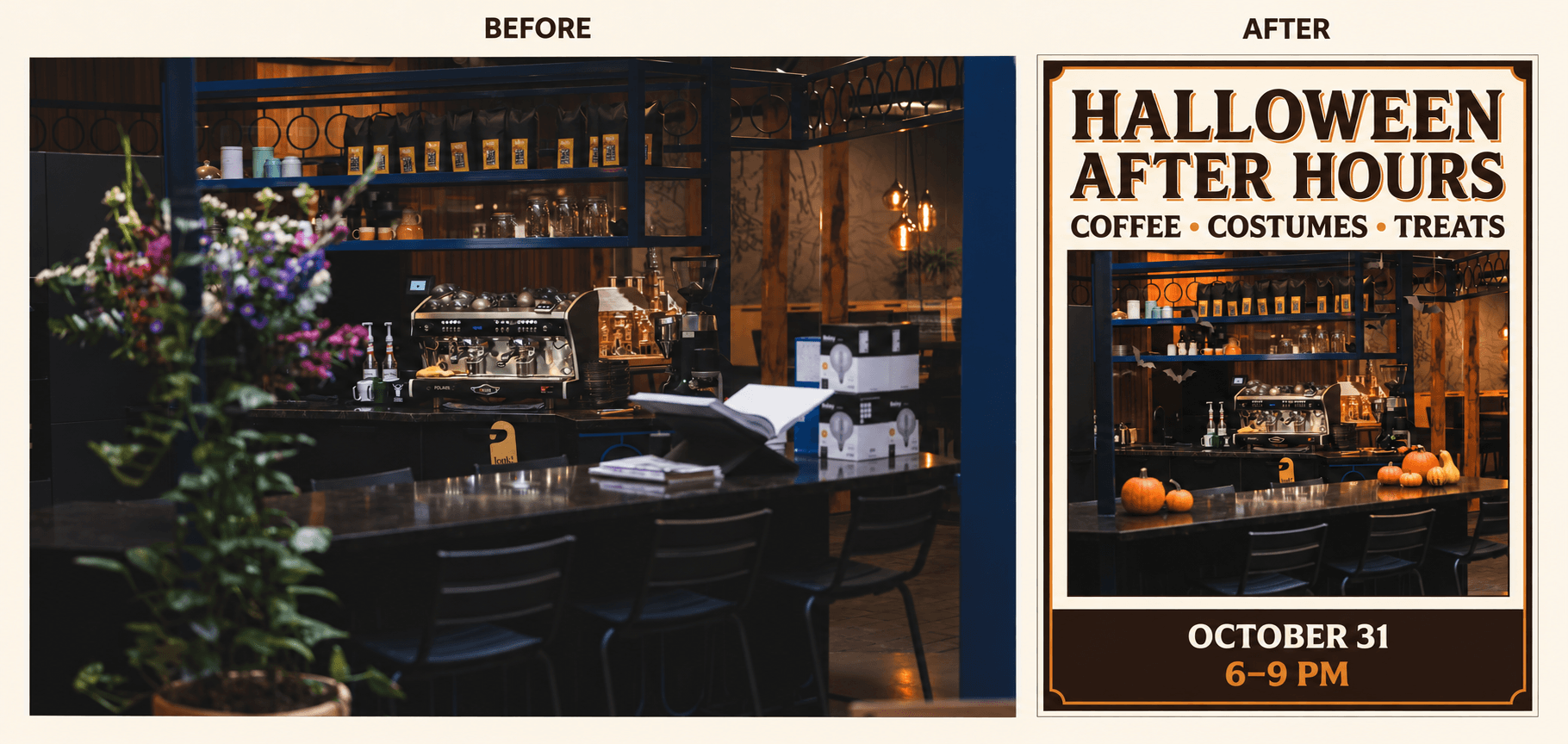
Comparación entre la foto de la cafetería y el póster de Halloween. El nombre, la fecha y la hora del evento son ilustrativos.
Sube la foto de tu cafetería, selecciona Nano Banana 2.1 y prueba este prompt:
Ver el prompt completo
Create a vertical Halloween event poster using the uploaded café photo.

Keep the café recognizable. Preserve the black espresso machine, metal shelves, and counter. Remove the blurred flowers in the foreground and the cardboard boxes. Add a few small orange pumpkins on the counter, black paper bats near the shelves, and warm amber lighting. Keep the decorations realistic and leave the coffee equipment visible.

Use a simple cream-and-dark-brown layout with orange accents. Place a large headline above the café photo. Let the photo fill the middle of the poster. Put the date and time in a clear footer.

Include only this exact text:

HALLOWEEN AFTER HOURS
COFFEE • COSTUMES • TREATS
OCTOBER 31
6–9 PM

Make the headline the largest text. Keep all text sharp, readable, and away from the edges. Do not add other words, logos, addresses, prices, or watermarks.
Para adaptar el póster, sustituye las cuatro líneas que siguen a «Include only this exact text» (incluye únicamente este texto exacto) por los datos de tu evento. Añade el nombre de tu tienda, la ubicación o la información de reserva a ese bloque si hace falta. Mantén el texto breve para que tenga espacio en el diseño.
Cambia «cream-and-dark-brown» (crema y marrón oscuro) y «orange accents» (detalles naranjas) por los colores de tu marca. Para una pastelería, sustituye el equipo de café por una vitrina de pasteles. Para una tienda de mascotas, usa la foto de un animal y cambia el evento por un día de disfraces de mascotas. Actualiza los detalles sobre qué conservar y qué eliminar para que coincidan con la foto que subiste.
Revisa el texto antes de compartirlo, especialmente las fechas, los precios y los datos de contacto. Corrige en tu editor de diseño cualquier dato que deba coincidir exactamente. Crea un diseño independiente para una historia de Instagram o un aviso impreso para que el texto siga siendo legible.
La guía sobre cómo usar Nano Banana 2.1 muestra cómo colocar la imagen de un producto en un entorno nuevo y usarla en un anuncio.
10. Visualiza la decoración de Halloween en tu tienda
Usa una foto de tu tienda para ver cómo podrían quedar distintas decoraciones de Halloween antes de comprarlas.
Prueba varias ideas con la misma foto. Una cafetería puede comparar una composición de calabazas con un rincón de brujas. Una tienda de ropa puede probar decoraciones negras y naranjas en el escaparate. Una librería puede añadir fantasmas de papel, velas y hojas de otoño alrededor de una mesa de exhibición.
Para decorar la entrada, sube una foto nítida de la fachada de tu tienda y selecciona Nano Banana 2.1. Prompt sugerido:
Ver el prompt completo
Add Halloween decorations to the shop in my photo. Keep the building, windows, door, shop sign, and camera angle the same. Place pumpkins beside the entrance, add warm string lights around the window, and put small paper bats inside the display. Keep the door and walkway clear. Use orange, cream, and black decorations. Do not change the shop name or add people.Compara el resultado con la foto original. Comprueba que la puerta, las ventanas y el letrero no hayan cambiado. Usa la imagen para comentar el diseño y luego verifica las dimensiones reales antes de pedir las decoraciones.
Si quieres comparar modelos antes de empezar, la comparación entre Nano Banana 2.1 y Nano Banana 2 cubre tareas como el texto de pósteres y la edición de productos. Estos ejemplos pueden ayudarte a decidir qué probar con tus propias imágenes.
Empieza con un ejemplo de Halloween
Elige una idea y reúne la foto o ilustración que quieras usar. Puedes encontrar ideas de fotos y videos de Halloween con IA que se acerquen a lo que tienes en mente, con ejemplos que puedes usar como punto de partida.
Abre un ejemplo y elige Remix para empezar con sus referencias y su prompt. Sustituye las imágenes correspondientes y cambia el atuendo, el entorno o la acción para adaptarlos a tu idea.
Los ejemplos te ofrecen referencias y prompts como base. Empieza con la configuración original y sustituye los detalles que quieras cambiar. Si una persona, un atuendo, un accesorio o un lugar aparece más de una vez en el prompt, actualiza cada mención para que las instrucciones sean coherentes.
Compara tu primer resultado con la foto y la idea iniciales. Después ajusta lo que necesite cambios, ya sea el disfraz, el fondo o la acción del video.