

In 2026, the FIFA World Cup was held across the United States, Canada and Mexico, with 48 teams competing in the largest tournament in its history.
As football fans around the world get swept up in the matches, the excitement reaches beyond stadiums and television screens.
On YouTube, TikTok and X, creators share match reactions, messages of support, tactical analysis and their experiences of watching football.
In recent years, generative AI has also given viewers tools to make and share their own visual stories.
AI video tools can help create an imagined stadium visit, a celebration surrounded by cheering crowds and confetti, or an original sequence with the feel of an international football highlight reel.
Hello, I’m Ny@Tech.
Alongside my work in web marketing, I have been exploring the creative possibilities of generative AI and testing video generation tools since around 2024.
In this article, I’ll show you how to use Seedance 2.0 in DomoAI, a video generation tool I regularly use, to create World Cup highlight–style videos and footage that looks like watching a match from a stadium.
What Is DomoAI? A Service for AI Image and Video Creation
DomoAI is an AI service for generating and editing video and images from text, images and video inputs.
Its tools let you describe a scene in text, add movement or camera work to a still image, and restyle existing footage with an anime or illustrated look.
An Overview of DomoAI and Its Features
DomoAI is operated by DOMOAI PTE. LTD. in Singapore.
The service was initially offered through Discord and later added a web application that can be used in a browser.
It is now used around the world and is known as one of the AI tools specializing in video and image generation.
Its main capabilities include:
- Text to Video: Generate an original video by describing the scene you want to create.
- Image to Video: Turn a still image into a short clip by adding subject movement, camera work or changes in lighting.
- Frames to Video: Use multiple images to guide a video through a sequence of visual moments.
- Character to Video: Apply movements such as walking, dancing or jumping from a reference video to a character image.
- Video to Video: Transform the style of existing footage into an anime, illustrated or realistic look.
- Talking Avatar: Create a video that makes a person or character appear to speak.
- Image and Video Upscaling: Increase the resolution of generated images or videos and prepare them for further use.
DomoAI brings together tools for anime-style video conversion and for adding motion or speech to characters.
The Seedance 2.0 workflow in this article also generates video with ambient sound and sound effects, alongside movement and camera work, from an image.
DomoAI Plans, Credits and Commercial Use
DomoAI offers free or trial access as well as several paid plans.
Paid plans provide credits that can be used for supported video, image and audio generation.
The number of credits required varies depending on the type and length of the video, the model used, and other factors.
| Plan feature | Basic | Standard | Pro |
|---|---|---|---|
| Monthly billing price | $9.99/month | $27.99/month | $69.99/month |
| Monthly equivalent with annual billing | $6.99/month | $19.59/month | $48.99/month |
| Monthly credits | 500 | 1,500 | 4,000 |
| Relax mode | Not included | Unlimited | Unlimited |
| Fast generation lanes | 3 | 3 | 6 |
| Watermarks | Watermark-free outputs | Watermark-free outputs | Watermark-free outputs |
| Commercial use | ○ | ○ | ○ |
Credits include the allowance supplied with a subscription and additional credits available for purchase when needed.
Unused subscription credits do not roll over to the next billing period.
Keep this in mind when planning your work: a quieter month does not mean that unused subscription credits will be available the following month.
Another feature available on eligible plans, including Standard and Pro, is Relax mode for supported models.
In this mode, eligible generations do not consume credits, but they may wait in a queue before processing.
Use Fast mode when turnaround time matters, and consider Relax mode for supported models when you have more time to compare variations.
DomoAI’s terms of service state that the rights to generated content belong to the user and that it may be used commercially provided applicable laws and third-party rights are respected.
About the New Seedance 2.0 Model
Seedance 2.0 is one of the models available through DomoAI for generating video and audio from an image.
Upload an image and describe the movement, camera direction, sound and atmosphere you want. The model can then generate subject and background motion, camera work, ambient audio and sound effects as part of the clip.
There are two versions of Seedance 2.0:
- Seedance 2.0: The standard version suited to creating high-quality videos
- Seedance 2.0 Fast: A lightweight version that is convenient for quickly creating prototypes
Although the Seedance 2.0 model can generate high-quality videos, generating just one 5-second video at 720p consumes 120 credits.
Repeated generations can use a substantial amount of credit, so leave room in your budget for revisions.
Creating a Football Highlight–Inspired Video with DomoAI
Here is the workflow I followed to create the project’s footage.
I took inspiration from a moment in the Argentina–England quarter-final at the 1986 World Cup in Mexico, played on June 22, 1986, and created an AI animation inspired by that match.
Because real players’ likenesses, team logos and other materials can involve third-party rights, I made the sequence as an animated interpretation using original characters. The rights considerations are discussed later in this article.
Writing a Storyboard Prompt
A storyboard is a blueprint for a video.
Use images and text to plan which scenes to show, their order, how the characters move and where the camera is placed.
Preparing a storyboard makes it easier to communicate your intended sequence to an AI tool.
The image below is the storyboard used for this project.
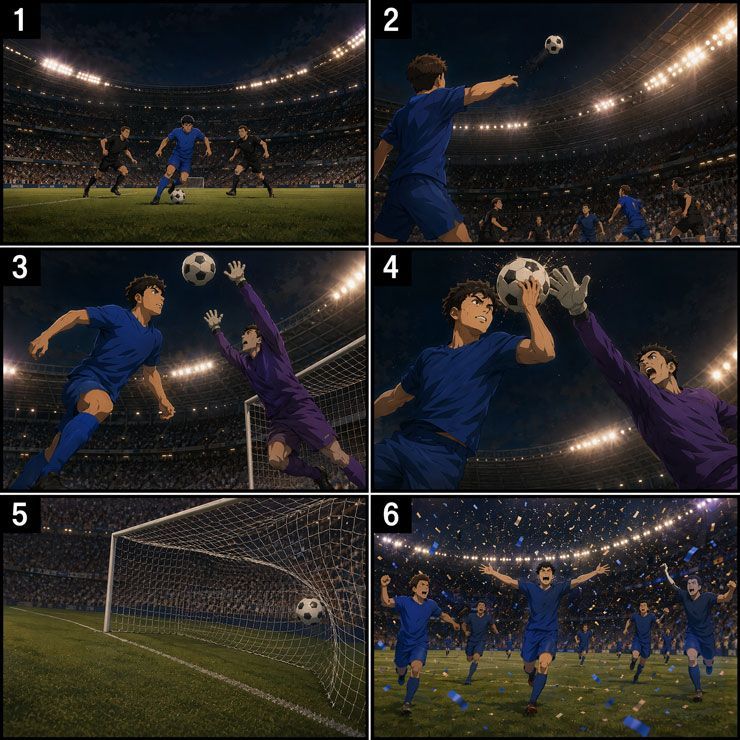
Building a storyboard like this entirely by hand can take time, so I worked through the ideas with tools such as ChatGPT and Gemini.
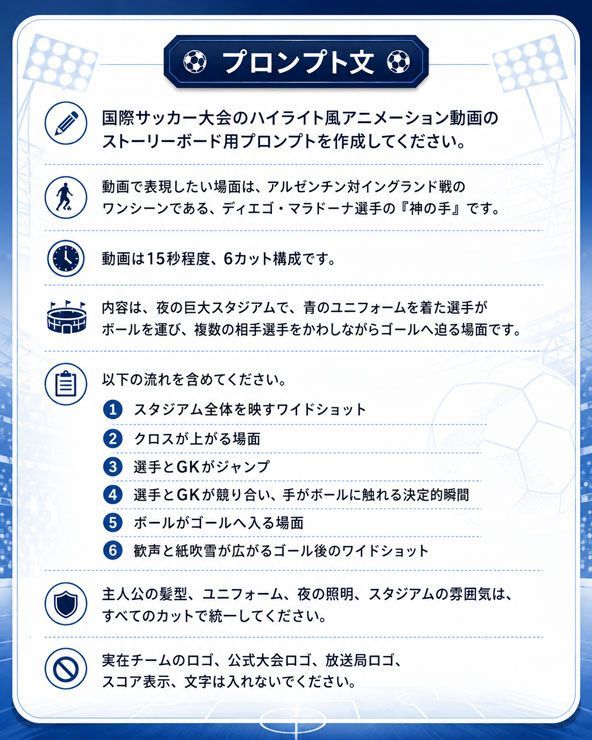
When asking an AI tool to help with a storyboard, useful details include:
- Number each image or shot.
- Describe the scene you want to show.
- Specify the video length and number of shots.
- Describe the visual style.
- Explain what should happen in each shot.
- Specify the camera work.
- List any elements you want to exclude.
The following image shows the prompt I used.
For a sport such as football, AI will not always reproduce the rules or the players’ positions accurately.
Instead of expecting the first generation to be final, review the storyboard and refine it until it is closer to the scene you have in mind.
Numbering the shots also makes it easier to request changes to an individual panel.
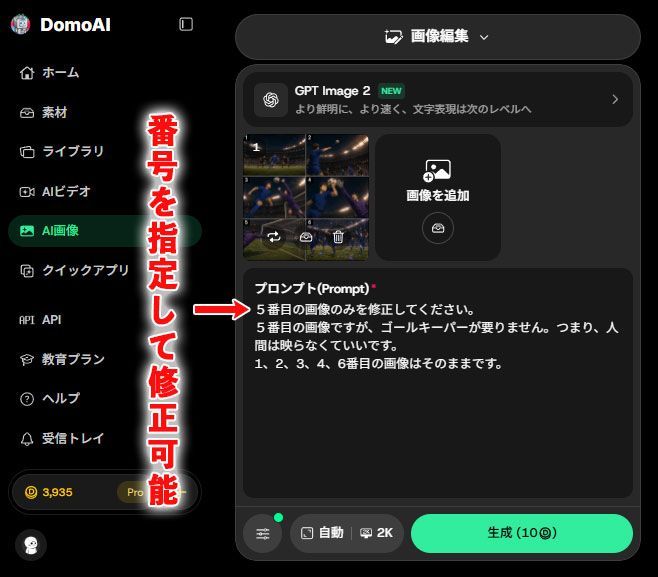
For this project, I opened AI Image > Image Editing from the left-hand menu and created the storyboard using GPT Image 2.
Generating the Video with Seedance 2.0
Once the storyboard is ready, use it to guide video generation.
If the result does not match your intention, ChatGPT or Gemini can also help you revise the video prompt.
In a scene with complex movement and spatial relationships, such as football, clear instructions are especially important.
Use that assistance to refine the action and camera direction, then review the generated result yourself.
I used Seedance 2.0 for this sequence to generate camera movement and action together with native audio such as stadium cheers and ambient sound.
In the interface shown in this project, I opened AI Video > Image to Video from the left menu and selected Seedance 2.0 as the model.
I then set the aspect ratio, duration, resolution and audio option, entered the prompt and started generation.
If your storyboard images contain shot numbers, ask the model to omit unwanted numbers and text from the finished clip, and check the result for any that remain.
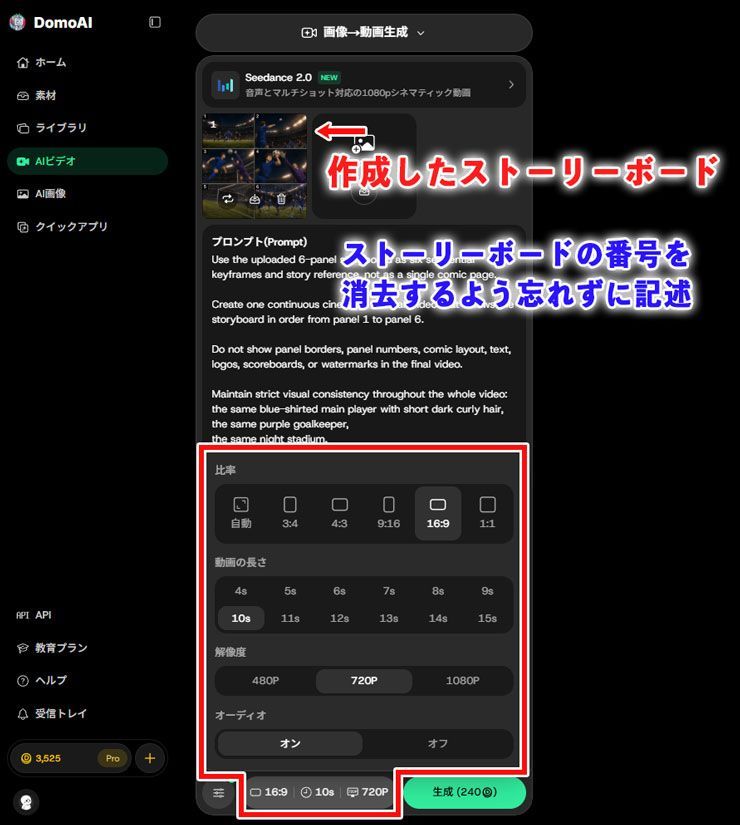
At the time of writing, Seedance 2.0 is not eligible for Relax mode.
One approach is to work on prompts and composition with Seedance 2.0 Fast, then use Seedance 2.0 for the final clips once the sequence is taking shape. Check the current model options and costs before choosing either variant.
Creating Commentary with Text to Speech
Seedance 2.0 can generate audio alongside video, including spoken content.
For narration that needs careful pronunciation or wording, such as Japanese commentary, producing the voice separately can give you more control over revisions.
DomoAI also includes a Text to Speech tool for generating spoken audio.
For this project, I generated the stadium cheers and sound effects with Seedance 2.0 and created the commentary separately with Text to Speech.
In the interface shown here, I selected AI Video from the left-hand menu, then chose Text to Speech from the menu at the top of the screen.
At the time of writing, you can choose from eight voices in total—four female and four male. Preview them and select a voice that suits the atmosphere of your video and the content of your commentary.
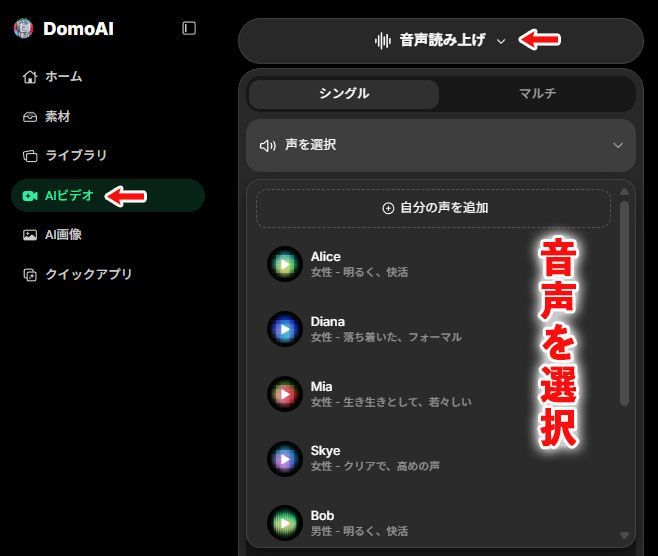
Next, enter the text you want the voice to read.
Where the selected voice supports it, you can also guide the emotion or tone of particular lines.
For example, a tense delivery before a shot and an excited delivery after a goal can help the commentary match the action.
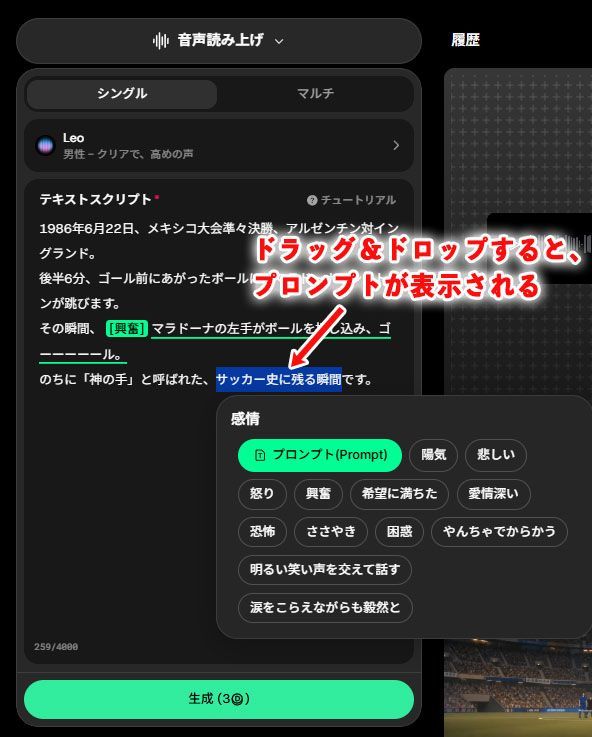
The project also demonstrated Japanese text-to-speech narration.
The generated narration came close to my intended delivery, including an extended “Gooooal!” call in Japanese.
Creating World Cup–Inspired Scenes
The project also used DomoAI’s World Cup AI Video Generator, a collection of football-themed templates and workflows.
About the World Cup AI Video Generator
This collection provides ways to create football-inspired clips from photographs, character art, AI-generated images and text prompts.
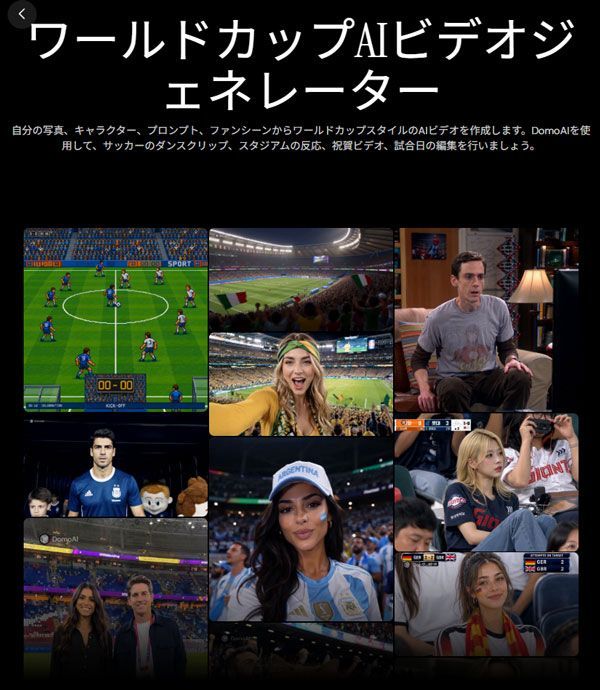
The examples in the collection included:
- Stadium scenes with lighting and crowd atmosphere, as if filmed from the stands.
- Players walking onto the pitch.
- Reaction clips with the feel of a broadcast cutaway.
- Football animation and retro, 8-bit-style pixel-art scenes.
For the next part of the project, I used the collection to create clips that captured the atmosphere of an international football tournament.
Creating a Scene That Imagines a Stadium Visit
Choose a template from the World Cup AI Video Generator collection that fits the scene you want to create.
Next, upload a photo of the person you want to substitute and simply press the generate button to create footage using the template’s movements and effects.
The templates include a preset prompt, which you can supplement with your own instructions where the interface allows.
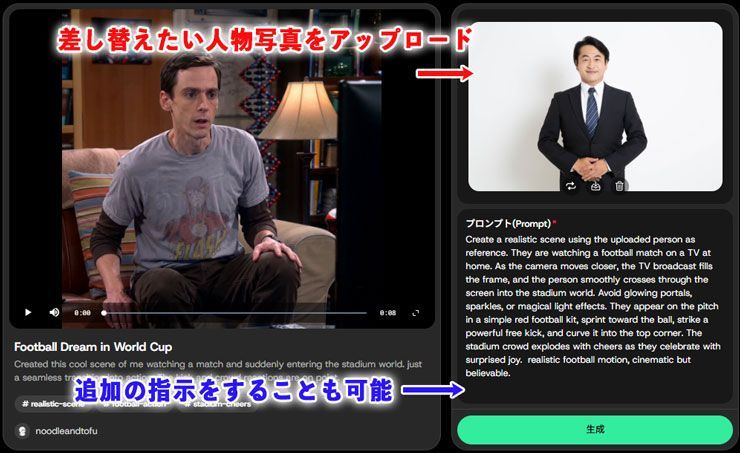
In the example below, the template turned a scene of someone watching football on television into an imagined moment in which that person scores at an international tournament.
The example also included generated audio to accompany the action.
I also created a clip that imagined taking a selfie at a stadium.
For that clip, I chose the template showing a woman wearing a bandana, then uploaded a replacement portrait in the same way.
The preset prompt described supporting Brazil, so I used Google Translate to change the supported team to Japan.
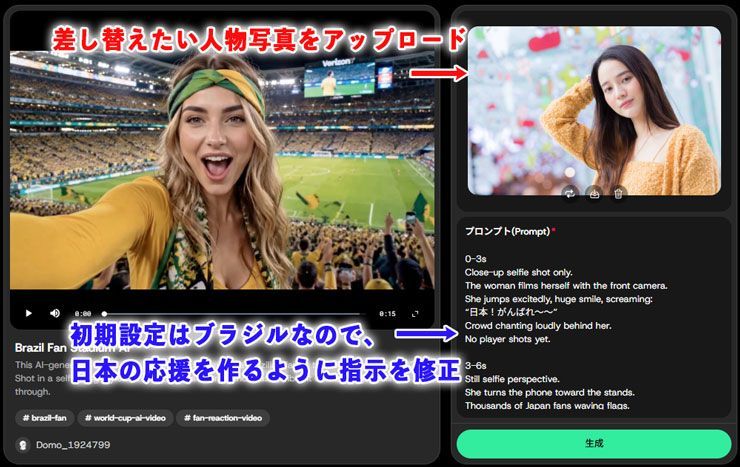
Here is the resulting clip.
The output included Japanese cheers meaning “Come on, Japan!” and excited speech at the end.
In this project, combining a single portrait with a template produced original scenes that imagined a stadium visit or a goal celebration.
Rights Considerations for AI Video Projects
When creating images or video with AI, consider the rights in the people, artwork, logos and other material you use.
World Cup–themed content may involve several kinds of protected material, including official logos and emblems, players’ likenesses, team uniforms and broadcast footage.
The following points are relevant when making original scenes inspired by international football.
Do Not Use Players’ Likenesses or Team Logos Without Permission
A football video may involve rights in official marks, footage, player likenesses, uniforms and other visual elements.
DomoAI’s World Cup AI Video Generator page likewise advises using official logos, protected marks, real players’ likenesses and broadcast footage only when you have permission from the relevant rights holders.
For this reason, using the following kinds of material is relatively safe when making a video.
- Photos you took yourself
- Portraits you have permission to use.
- Original characters you created.
- Plain uniforms without protected logos or emblems.
- Colour combinations that do not directly identify a particular team.
Rather than recreating the World Cup itself, it is important to make original footage inspired by the excitement of an international football tournament and the atmosphere of a stadium.
Reference: DomoAI’s World Cup AI Video Generator page.
Do Not Use Match or Broadcast Footage Without the Necessary Rights
Avoid using television broadcasts, official streams, highlight clips or match footage found on social media as production material without permission.
This applies to uploading footage into an AI service as well as to publishing the finished result.
Footage recorded at a stadium and posted by another person may also require permission from the creator or other rights holders.
FIFA’s intellectual property guidance explains its protected tournament assets and warns against creating an impression of official sponsorship, licensing or association without authorization.
Instead of using actual match footage, build original scenes with generated stadiums, crowds, fictional players, confetti and pitches, while still reviewing the result for third-party rights.
For a commercial campaign, advertisement, affiliate article or sales page involving tournament-related imagery, obtain advice appropriate to the assets and intended use before publication.
Reference: FIFA’s FIFA World Cup 26 Intellectual Property Guidelines.
Summary and Frequently Asked Questions
Finally, here are some frequently asked questions and answers about DomoAI’s basic features and video generation with Seedance 2.0.
Q1. Does DomoAI support Japanese?
You can also enter prompts in Japanese, but depending on the video content and the model, English instructions may make it easier to achieve the intended movement and effects.
Q2. Can videos created with DomoAI be used commercially?
Possible uses include social media videos, advertising materials, client work, and monetized video content. However, if you upload or use photographs of real people, other companies’ logos, official footage, copyrighted works, or broadcast material, you must check the relevant rights separately.
Q3. How do Seedance 2.0 and Seedance 2.0 Fast differ?
Seedance 2.0 Fast, on the other hand, is a lightweight model for generating prototype clips, but its cost is still relatively high compared with other models.
Q4. Can I edit the finished video in DomoAI?
A4: You cannot perform full-scale video editing with a timeline. If you want to combine multiple videos and audio tracks into one finished piece, use video editing software such as Adobe Premiere Pro, CapCut, or Final Cut Pro.
Q5. What is Relax mode?
Relax mode is available on the Standard and Pro plans, but not on the Basic plan. Some models and features may not be eligible for Relax mode, so check the on-screen settings before generating.
That concludes the frequently asked questions about DomoAI and Seedance 2.0.
Use the steps in this article as a guide and try AI video generation, starting with one image and a short prompt.
With DomoAI, you can bring all kinds of ideas to life, including videos that look like watching from a stadium, highlight-style animations, and messages of support.
If you’re interested, start by signing up for free and giving it a try.


