

With AI advancing rapidly in 2026 and so many AI video generation tools appearing, you may be wondering which one to choose.
Hello, I’m Ny@Tech, pronounced “Nya-Tech.”
I have mainly worked in web marketing, but became interested in the possibilities of generative AI around 2024. I now enjoy making videos while trying out different AI video generation tools.
Major companies such as Meta, Google, and Adobe have entered AI image and video generation in earnest, making this a fiercely competitive field.
Amid this competition, NoLang, an AI video generation tool developed in Japan, is attracting attention domestically.
When I tried it myself, I found it more intuitive and easier to use than I had expected.
This article introduces NoLang’s appeal and compares its pricing and features with DomoAI, which I regularly use, explaining their differences and when to use each.
The name is sometimes rendered as “No-rangu” in Japanese, but this article consistently uses “No-ran.”
An Overview of NoLang
Since its release in July 2024, NoLang has surpassed 150,000 registered users and been adopted by more than 60 companies, rapidly expanding its use in Japan.
It is developed and provided by Mavericks Inc., a Japanese company built around five founding members who graduated from the University of Tokyo and its graduate schools.
NoLang’s Features
NoLang is a cloud-based AI video generation service primarily used through a web browser.
There is no need to install dedicated software, so you can start using it immediately on a computer.
It also supports smartphones, though some features are limited, which is worth keeping in mind.
In addition to this convenience, its intuitive, easy-to-understand controls made me feel it had an edge over other services.
There are several ways to generate videos. You can enter text in a chat format or upload PDFs, PowerPoint presentations, audio files, and existing video files.
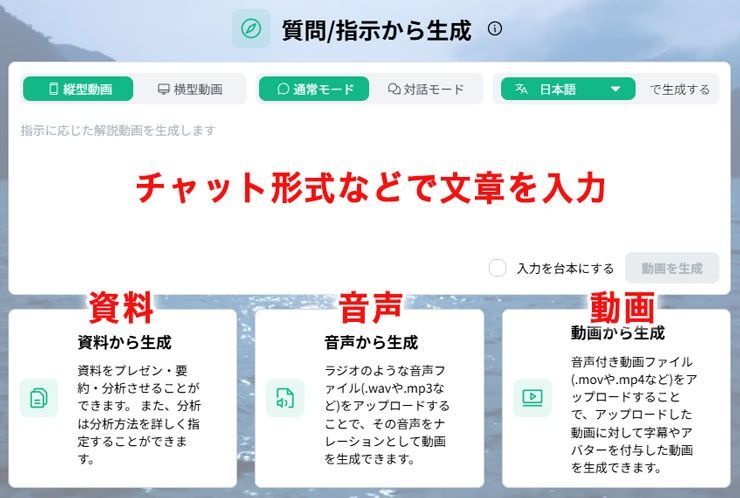
This makes it easy even for beginners to create videos smoothly.
An Advantage in Creating Explainer Videos
NoLang stands out from other AI video generators for its ability to create videos that organize information and communicate it clearly.
It is particularly strong at understanding Japanese context and producing natural phrasing. I think it is a highly polished service for creating explainer videos in Japanese.
Its use by government agencies and local authorities provides concrete examples of these capabilities.
For example, Hatsukaichi City in Hiroshima Prefecture uses it to communicate municipal information, using images and narration to help residents understand complex administrative systems that are difficult to explain through text alone.
Using It for Short Summary Videos
Demand for vertical short videos such as YouTube Shorts, TikTok, and Instagram Reels has increased further in recent years.
One reason may be the growing number of users who value efficient use of their time, increasing demand for video content that conveys key points concisely.
In this environment, NoLang’s automatic narration is particularly effective for popular YouTube genres such as Yukkuri explainers and trivia channels.
Producing these videos traditionally required scriptwriting, filming or recording audio, selecting images, and editing. NoLang can reduce production time to one-tenth or less.
It supports both horizontal videos and vertical shorts for Instagram Reels and TikTok, allowing you to distribute the same content across multiple social platforms.
Attracting Interest as a Side Hustle Tool
One reason for NoLang’s popularity is that commercial use is permitted even on its Free plan.
The Free plan allows three video generations. Although the resulting videos contain a watermark, monetization itself is permitted.
You also do not need separate video editing software. This keeps initial costs and risks low when you are just trying it out, and the low barrier to entry is another reason for its popularity.
On publishing platforms such as note, people share posts about making short videos with NoLang in the hope of monetizing them.
At the same time, some say it has not generated as much revenue as they expected.
I think this is because, although videos are easy to create, they tend to have similar content and structures.
To stand out, you may need to add animation or give your structure and themes a distinctive approach.
Comparing NoLang and DomoAI
This section compares NoLang and DomoAI in terms of pricing, how they work, commercial use, and their intended applications.
We will then look at which service to choose for different purposes and how each can be used.
Comparing Pricing, Features, and Functions
I put together the following comparison of the two services’ pricing, features, and functions, current as of January 2026.
| Comparison item | NoLang | DomoAI |
|---|---|---|
| Developer and operator | Mavericks Inc. (Tokyo, Japan) | DOMOAI PTE. LTD. (Singapore) |
| Platform | Web browser (Chrome extension available) | Web browser (Discord version available) |
| Approximate monthly pricing | • Standard: ¥2,980 • Premium: ¥7,980 • Business: Contact for pricing | • Basic: $9.99 (approx. ¥1,548) • Standard: $27.99 (approx. ¥4,338) • Pro: $69.99 (approx. ¥10,848) Calculated at ¥155 per US dollar |
| Free plan | Available | Available |
| Japanese support | ○ | Yes (English prompts tend to be recommended) |
| Subtitle generation | ○ | × |
| Audio generation | ○ | ○ |
| Image generation | ○ | ○ |
| Animation generation | × | ○ |
| Live-action video generation | × | ○ |
| AI avatar feature | ○ | ○ |
| Commercial use | Yes (conditions vary by plan and feature) | Yes (paid plans only) |
I compared the features to make the differences clearer, but these services have different underlying approaches and purposes.
Even similarly named features or comparison items may have different uses or workflows, so this comparison is only a guide.
How NoLang and DomoAI Differ in Purpose
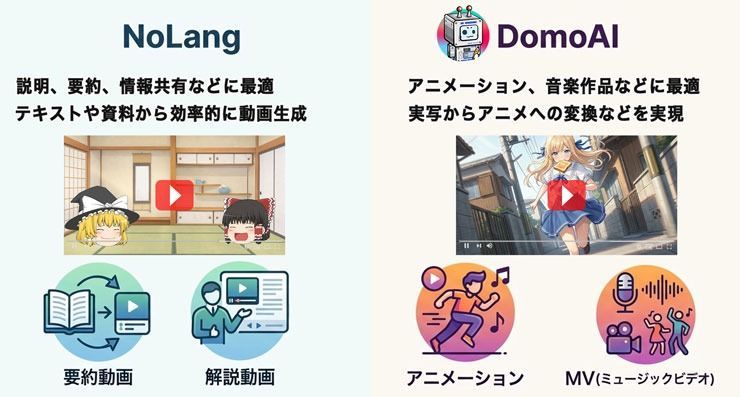
Both services fall under AI video generation, but their intended uses and design philosophies differ significantly.
NoLang specializes in creating explainer videos that organize existing information and communicate it clearly.
It is therefore well suited to videos intended to convey information, such as summaries of internal documents or educational content.
It is less suited to productions requiring detailed visual expression or carefully crafted direction.
DomoAI, by comparison, is a versatile AI platform that excels at generating and processing visual expression itself, including animating images and transforming videos.
It supports features such as connecting images into videos, AI avatars, and chroma key compositing, enabling highly creative video production.
This does require some experimentation and practice, and beginners may find certain aspects challenging.
Thinking of NoLang as a tool for communicating information efficiently and DomoAI as a tool for emphasizing visual expression may make their different uses easier to understand.
When NoLang Is a Good Choice
Based on the points above, I think NoLang is a suitable tool for beginners who have no video editing experience but want to start sharing video content.
Consider using it in situations such as these.
- You want to turn written content into videos to share information.
- You want to produce short social media videos efficiently at scale.
- You want to start making videos even without video production skills.
NoLang is particularly useful when you have clear information or a message to convey and want to present it concisely as a video.
When DomoAI Is a Good Choice
DomoAI is a suitable choice for those who care about the quality and originality of their visual expression.
For example, it is useful in the following situations.
- You want to create animation or music videos.
- You want to make creative videos with carefully crafted visuals.
- You want to incorporate AI into an existing production workflow.
DomoAI can be even more effective when used alongside other creative software rather than only on its own.
For example, you can use it to create variations of assets made in Adobe software or animate them, expanding your expressive options.
You can also use AI editing to upscale footage, or combine an AI avatar with a song made in Suno AI to make the character’s mouth move in time with the audio.
Overall, DomoAI is a powerful platform for people who want to use AI to develop their own distinctive video productions in depth.
How to Use NoLang
Let’s look at the basic workflow and main features for creating videos with NoLang.
Basic Steps for Creating a Video
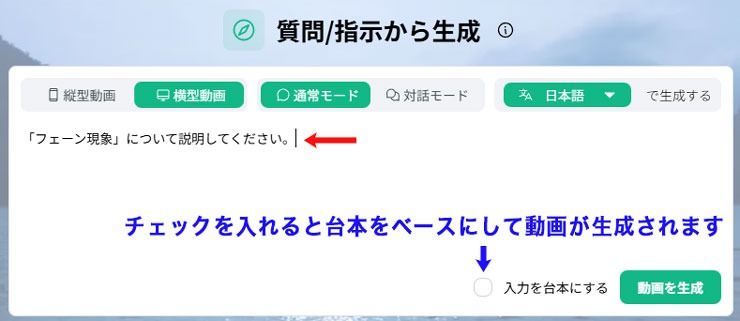
You can generate a video simply by entering the topic you want to explain or the information you want to communicate in the prompt field.
First, choose the video’s basic settings: size and orientation, whether to use a conversation format, and language.
Once these are set, enter your prompt and click Generate Video.
Checking Use Input as Script generates the video based on the text you entered.
Next, configure the video’s detailed settings.
You can adjust the following items here.
- Video length
- Background music
- Voice
- Prompt
- Avatar
- Image settings
- Subtitle and on-screen text pacing
- Background
- Sound effects
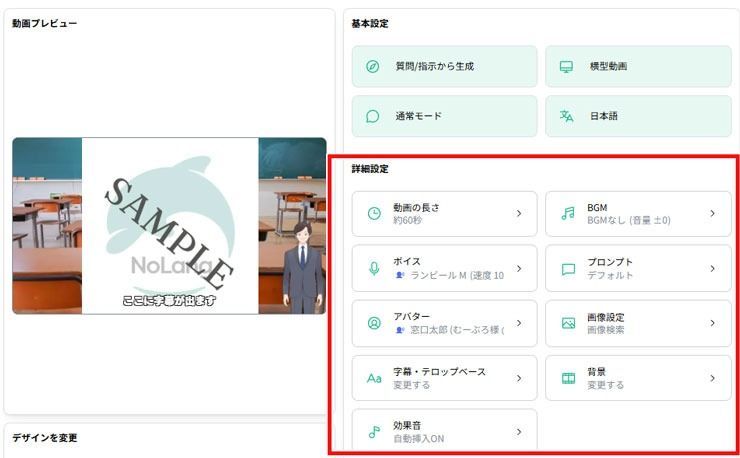
You can edit the video after generating it.
It is therefore fine to decide only the length at first and adjust the finer presentation details and settings after generation.
Once you configure these settings and start generation, the video is created automatically in a few minutes.
You can play the generated video directly in your browser. Review it and click Edit if you want to change anything.
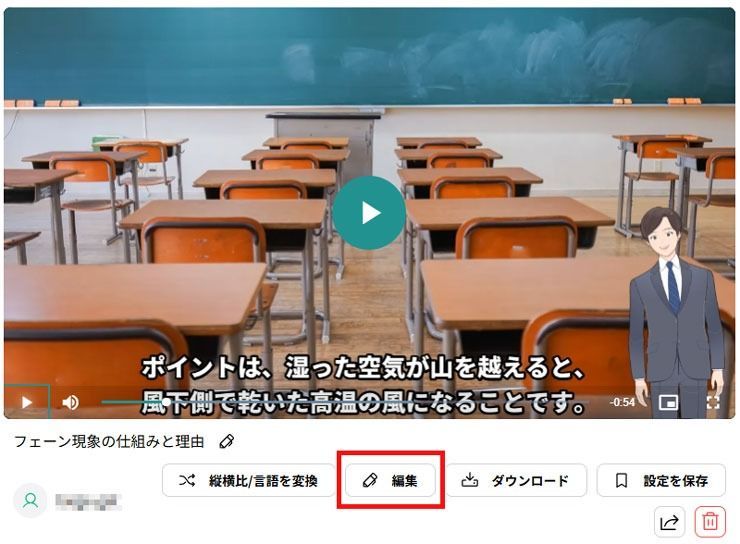
Clicking Edit switches to video editing mode.
A timeline appears at the bottom of the screen. Select the section you want to edit to insert images, change avatars, add scenes, and more.
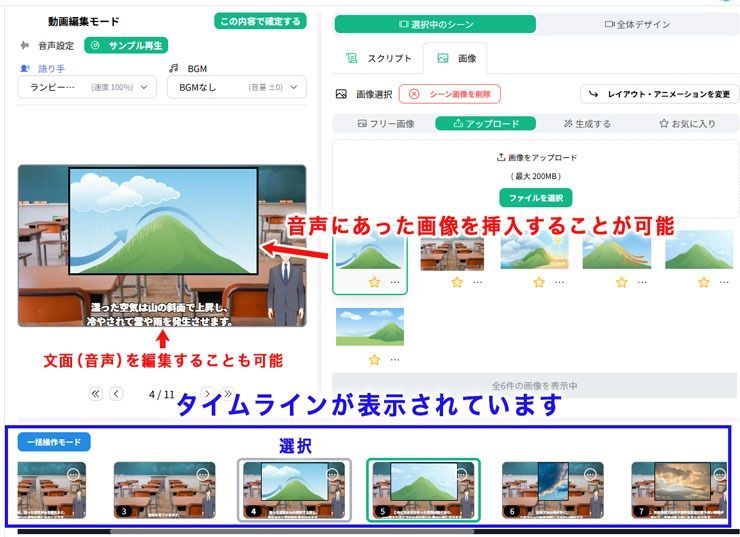
You can also adjust each scene’s interval or display time, correct subtitles, and change settings such as whether sound effects are enabled.
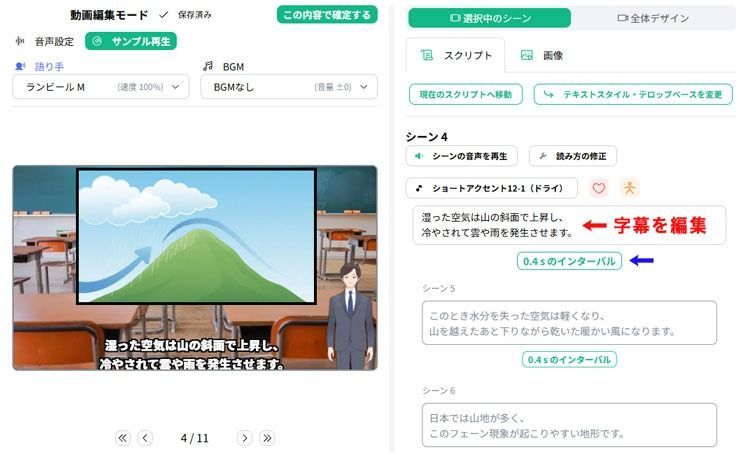
Although you cannot add sophisticated effects, you can edit a video generated in NoLang and finish it as a complete piece within the service.
Being able to complete video production without full-featured editors such as Adobe Premiere Pro or Final Cut Pro is a major attraction.
Creating Videos from Web Pages with the Chrome Extension
One of NoLang’s distinctive features is the NoLang extension available from the Google Chrome Web Store.
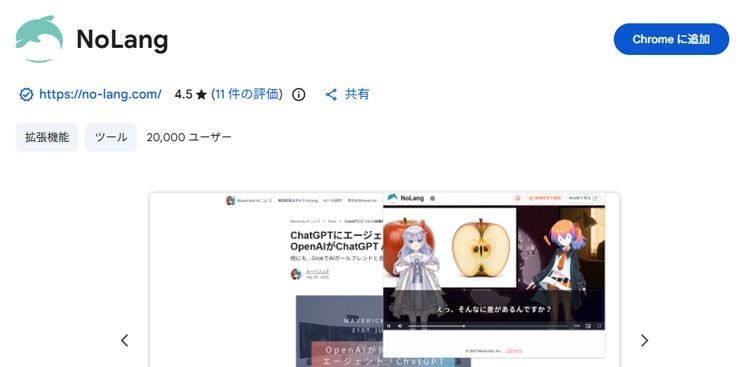
The extension reads text content on a website and automatically generates an explainer video based on it.
It is useful for turning existing web content, such as blog posts and news articles, into videos.
The basic steps are as follows.
- Install: Install the NoLang extension from the Chrome Web Store and add it to your Chrome browser.
- Run: Open the news article, blog post, or product page you want to summarize, then click the dolphin icon at the top right of the browser.
- Generate: The AI reads the page and creates an explainer video summarizing its key points in a few dozen seconds.
A major advantage is that it makes gathering information more efficient when you do not have time to read a long article.
It also lets you quickly turn your company’s blog posts into short promotional videos for social media and put them to use in marketing.
However, reading content from a third-party website without permission and publishing the resulting video may violate copyright or terms of use, so take care.
Generating Videos from Documents, Audio, and Video
You can also import PowerPoint documents in PPTX format or widely used PDFs and convert them into narrated presentation videos.
With the Premium plan or higher, you can choose a template suited to your purpose from options optimized for presentations.
It also supports analyzing uploaded audio files to create videos, and transcribing existing video files to add subtitles.
DomoAI’s Basic Features
DomoAI has many features, so understanding them all at once is not easy.
Here, I’ll highlight some that I particularly recommend.
Support for the Nano Banana Pro Image Generation Model
In a late-2025 update, DomoAI integrated Google’s high-precision Nano Banana Pro (Gemini 3 Pro Image) image generation model into its platform.
This lets you generate high-quality images with a recent model and use the results directly in video production.
Nano Banana Pro excels at character expression and fine detail. Compared with the previous model, it improves Japanese text rendering and stability in complex compositions.
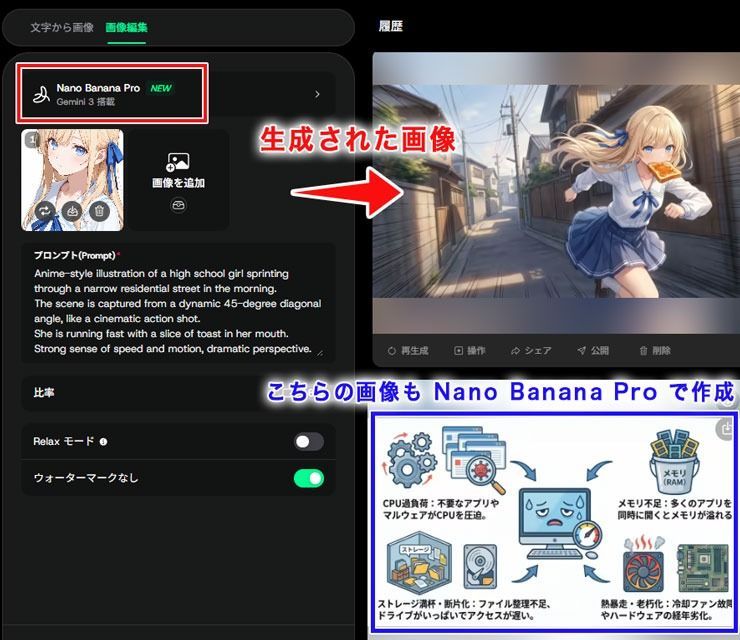
Its introduction also improves the accuracy and feasibility of depicting the same character consistently across multiple images, something AI image generation has traditionally struggled with.
DomoAI users on the Standard plan or higher can also use Relax mode to generate images without spending credits.
AI Avatar Feature
One of DomoAI’s popular features is AI Talking Avatar.
It lets you generate a lip-sync video of a person or character by uploading a single face image.
When you upload an audio file, the AI automatically generates mouth movements in the image, creating a video that looks as if the person is speaking the lines.
DomoAI’s AI avatar adds not only lip movements but also blinking and subtle changes in expression.
Although it does not offer extremely fine control over expressions, you can naturally direct emotions such as joy or sadness and movements such as smiling or small gestures.
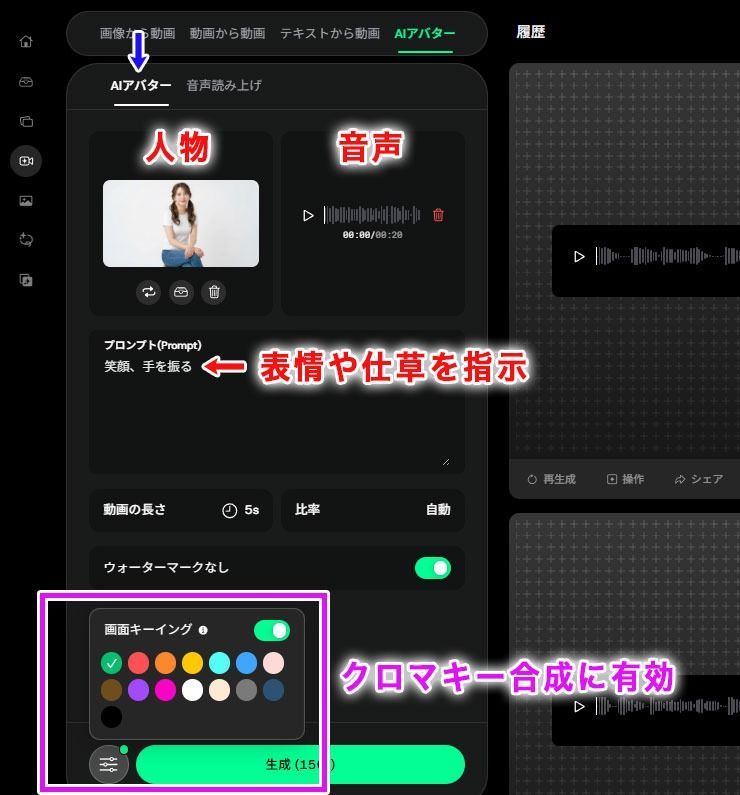
Chroma key compositing is another essential feature for video production.
DomoAI calls this Screen Keying, and it lets you choose a background from 15 colors.
The AI fills unwanted backgrounds in the footage with a single color, leaving a video of just the subject.
The GIF below shows an example of chroma key compositing applied to a female avatar generated with DomoAI.

I think AI avatars like these are useful not only for individual video production but also for businesses.
For example, a character could introduce a product in a promotional video, or an avatar instructor could appear in internal training and educational content.
Frames to Video
One of DomoAI’s video generation features is Frames to Video.
Uploading multiple still images, or frames, lets the AI generate animation to fill the gaps between them and output a continuous video clip.
In other words, it works like a more advanced version of Photoshop’s Tween Animation Frames feature, automatically visualizing the transitions between the images you specify.
Frames to Video has two main modes.
The first is Start & End Frame mode.
Simply upload a starting image and an ending image to automatically generate a video about 1–8 seconds long.
For example, selecting a daytime cityscape and a nighttime cityscape can produce a video in which the sky gradually darkens and the city lights turn on.
The other option is Multi-Frame mode.
In this mode, you can enter up to eight images in sequence and generate animation connecting each frame.
You can specify the duration of each segment, allowing you to create a video with multiple scenes, such as Image A → (2 seconds) → Image B → (5 seconds) → Image C.
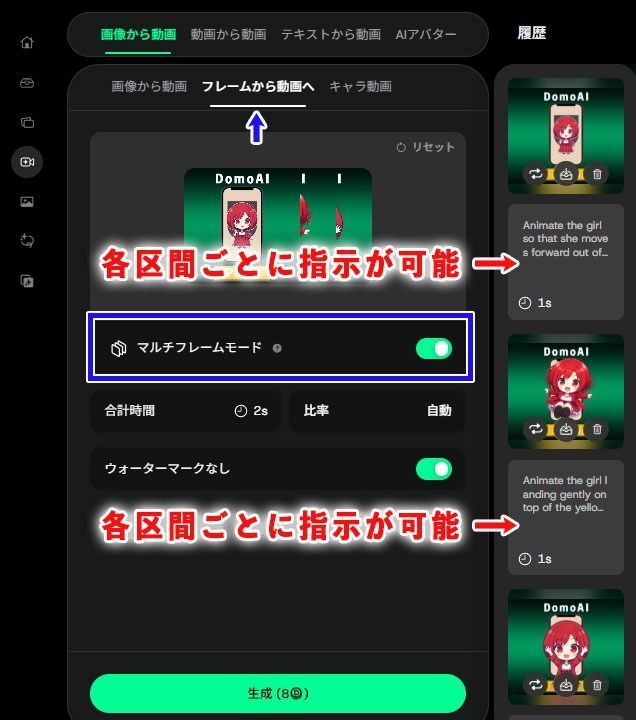
You can use this feature to create animation for music videos or animated banners for websites and landing pages.
Another possible use is animating the stages of an illustration, such as rough sketch → line art → coloring.
The example below is animation generated with DomoAI’s Frames to Video feature and exported as a GIF.
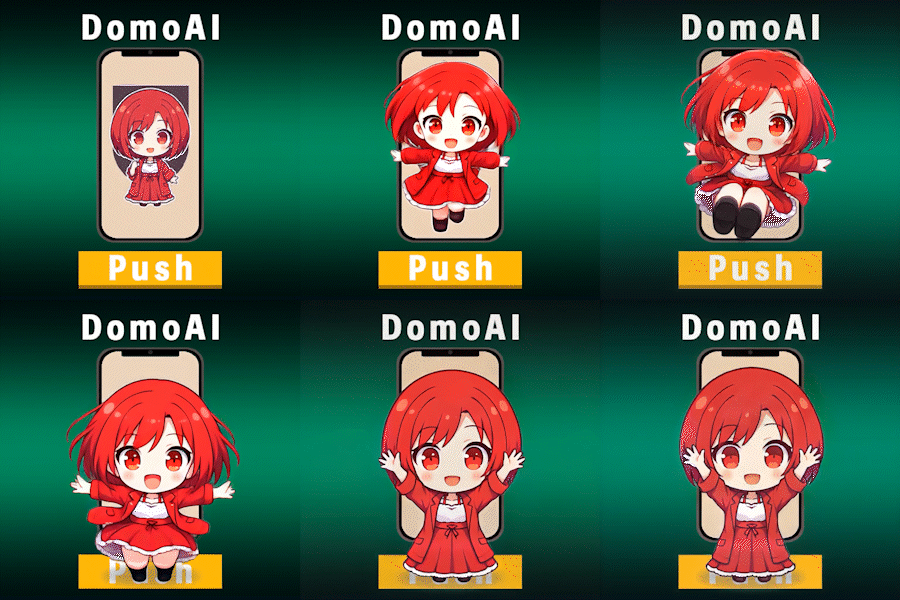
I find that DomoAI’s video generation excels at creating smooth motion while maintaining visual consistency between frames.
You can try generating a sample, so give it a go.
Precautions for AI Video Production
Generative AI tools such as NoLang and DomoAI are very useful, but there are several points to keep in mind when using them.
Videos That Summarize and Reorganize Web Pages
Tools such as NoLang’s Chrome extension can summarize online articles and turn them directly into videos.
However, take care when turning someone else’s article or content into a video and publishing it without permission.
Even a summary borrows the substance of the original article and may violate copyright or terms of use.
Before publishing, check whether you are allowed to turn the content into a video or republish it.
Do Not Use Social Media Images or Videos for Training Without Permission
Avoid using other people’s social media images or YouTube videos as training data without permission.
Social media content is subject to the copyright and portrait rights of its photographers and posters.
I also think that analyzing people’s publicly shared photos and videos with AI without asking may raise ethical privacy concerns.
Platform Restrictions on Mass-Produced Videos
With the spread of generative AI, YouTube and similar platforms have become flooded with AI-produced summary and explainer videos.
As a result, YouTube has strengthened its enforcement against low-quality, mass-produced content.
In early 2026, reports described multiple channels that had posted large numbers of summary-style YouTube Shorts losing monetization at the same time, often referred to as being banned.
YouTube had already raised concerns about such videos under its repetitive content policy. Its July 2025 guideline revision explicitly included mass-produced content in the prohibited category, strengthening enforcement further.
Although advances in AI allow large numbers of videos to be produced quickly, videos that depend on templates are now more likely to be classified by the system as low-quality mass production.
I therefore think adding a personal touch—such as using DomoAI to create an original animated opening or replacing some explanatory still images with animation—is one way to reduce the risk of enforcement.
Conclusion and Frequently Asked Questions
Finally, here is a brief recap of the article in a Q&A format addressing common beginner questions.
Q1. Can DomoAI be used in Japanese?
A1. Although some of the example images use English, you can also operate it using Japanese prompts.
Q2. Can I process videos made in NoLang later with editing software?
A2. Yes. You can download them in MP4 format and import them into a video editor such as Adobe Premiere Pro or Final Cut Pro for additional editing.
Q3. What should I keep in mind for commercial use?
A3. NoLang requires the specified credit or copyright notice in generated videos. DomoAI permits commercial use, and the rights belong to the user. However, its terms prohibit illegal uses and use for defamation or abuse.
Q4. What is Relax mode?
A4. DomoAI’s Relax mode generates content at a slower processing speed without consuming credits. It is suitable for experimenting with large numbers of images or videos, and Standard and Pro plan users can use it without limits.
Q5. Are there mobile apps?
A5. As of January 2026, I could not find a mobile app for either service.
That concludes this comparison of NoLang and DomoAI and how to use them.
Each has strengths and weaknesses, but both are powerful assistants for video production.
Use this article to choose the service that suits your purpose and enjoy exploring AI video generation.


