

In 2026, generative AI has advanced far beyond still image generation toward video generation that combines consistency with high-quality styles.
Against this backdrop, the sudden announcement in March 2026 that OpenAI’s Sora video generation service would shut down sent shock waves through the industry.
With such a major tool withdrawing, DomoAI is attracting renewed attention as a central service in AI video generation.
Hello, I’m Ny@Tech, pronounced “Nya-Tech.”
My background is in web marketing, but since 2024 I have been captivated by generative AI’s tremendous potential. I now test and research various AI video generation tools every day.
What sets DomoAI apart from competing tools, I think, is its style conversion—including Japanese anime styles—and its beginner-friendly user interface.
DomoAI offers a wealth of features for easily creating animation without special skills, and its development has accelerated further in 2026.
This article reviews DomoAI’s overview, pricing plans, and basic features, while introducing the new features added in February 2026 and explaining their appeal and uses.
An Overview of DomoAI
DomoAI is a high-performance AI video and image generation platform operated by DomoAI PTE. LTD., based in Singapore.
Supporting diverse styles including anime, live action, and illustration, it is attracting attention in social media and content production as a tool for turning still images into videos and generating high-quality video from text.
Differences Between the Discord and Browser Versions
DomoAI grew around a large Discord server with one of the world’s largest communities.
Join DomoAI’s official Discord server here
In the Discord version, you generate content by entering commands such as /model and /prompt in chat.
You can also receive information from creators around the world and the DomoAI team. It is well suited to drawing inspiration from other people’s work and repeatedly experimenting with generation.
The browser version makes more advanced video production possible through simple on-screen controls.
It provides visual controls for a library of past generations and assets, duration adjustments in seconds, and advanced processing such as lip sync.
You can also easily switch generation models on screen, such as V2.4 (Fast) and V2.4.1 (High Precision).
This gives even people who are uncomfortable with Discord’s distinctive workflow an accessible environment for serious AI video generation.
Pricing, Features, and Characteristics
DomoAI’s pricing comprises three main plans for different experience levels and generation frequencies.
As of March 2026, monthly billing is available, but annual billing offers a 30% discount. Discounts and other promotions may change.
The table below summarizes each plan’s specifications and the kinds of users it suits.
| Item | Basic | Standard | Pro |
|---|---|---|---|
| Monthly price (billed monthly) | $9.99 | $27.99 | $69.99 |
| Monthly equivalent (billed annually) | $6.99 | $19.59 | $48.99 |
| Monthly credits | 500 credits | 1,500 credits | 4,000 credits |
| Relax mode (unlimited generation) | Not supported | Supported | Supported |
| Concurrent generations (Fast lane) | 3 slots | 3 slots | 6 slots |
| Long video generation (30 or 60 seconds) | Not supported | Not supported | Supported |
| Recommended for | Light users trying it out or enjoying it as a hobby | Individual creators and social media managers using it seriously | Professionals and business users producing content frequently |
One of DomoAI’s major features is Relax mode, available on the Standard plan and higher.
This mode generates videos somewhat more slowly without spending your monthly credits.
Some features, such as AI avatar text-to-speech, are excluded, but basic features let you try generating images and videos repeatedly without worrying about credits.
AI video generation often involves many attempts before you reach the output you want.
Relax mode significantly reduces the cost of this trial-and-error process, allowing you to pursue the quality you want without worrying about your budget. This helps distinguish DomoAI from competitors.
About Quick Apps
Quick Apps are a set of shortcuts specializing in specific creative tasks.
The February 2026 update expanded the lineup, making it easier to carry out production tasks suited to your purpose.
Types of Quick Apps
Quick Apps broadly cover the following three categories.
- Animation and video generation: Features for creating moving content, including Image to Video, Character to Video, AI Avatar, and Text-to-Speech (Talking Avatar).
- Image editing and restoration: Features that improve or process assets, including Old Photo Restoration, image and video upscaling, and Image Editing.
- Special effects and templates: Features that transform content into distinctive formats or presentations, including Anime Card Maker, AI Image Extender, and Face Swap.
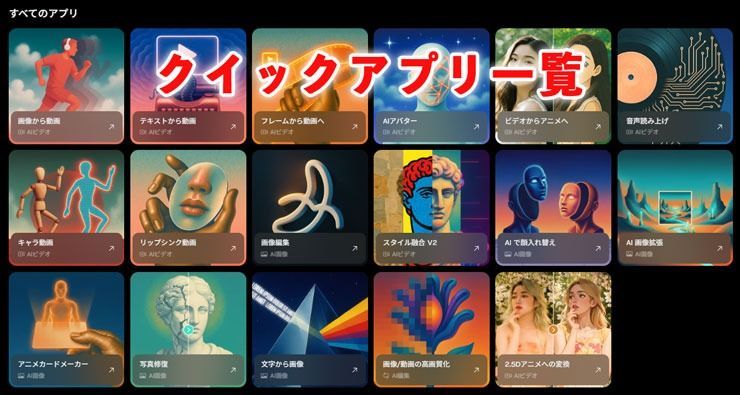
These apps can be used individually or together.
For example, you can restore an old photo, use it in Face Swap, and then make it speak with text-to-speech, completing the whole workflow within DomoAI.
Four Newly Added Features
The February 2026 update added the following four features.
Anime Card Maker transforms a character image into a design resembling a trading card or playing card.
Face Swap lets you swap faces naturally by uploading two photos.
AI Image Extender expands the composition by drawing new areas beyond the original image’s boundaries.
Old Photo Restoration processes uploaded faded or damaged photos with noise removal, contrast correction, colorization, and more.
These four features make this an appealing update that even people who have never used generative AI can enjoy intuitively.
What Is Anime Card Maker?
Anime Card Maker is a Quick App that automatically generates trading card-style visuals from a character image.
Several card-style templates are available, so you can create eye-catching card art without design skills.
How to Use Anime Card Maker
Using this feature is surprisingly simple.
- Select Anime Card Maker from the Quick Apps list.
- Drag and drop or paste the character image you want to turn into a card into the upload area.
- Choose your preferred template from the available card styles.
- If needed, add text instructions for the mood, background, or card content.
- Click Generate and wait a few seconds to a few dozen seconds for an image arranged in the card style.
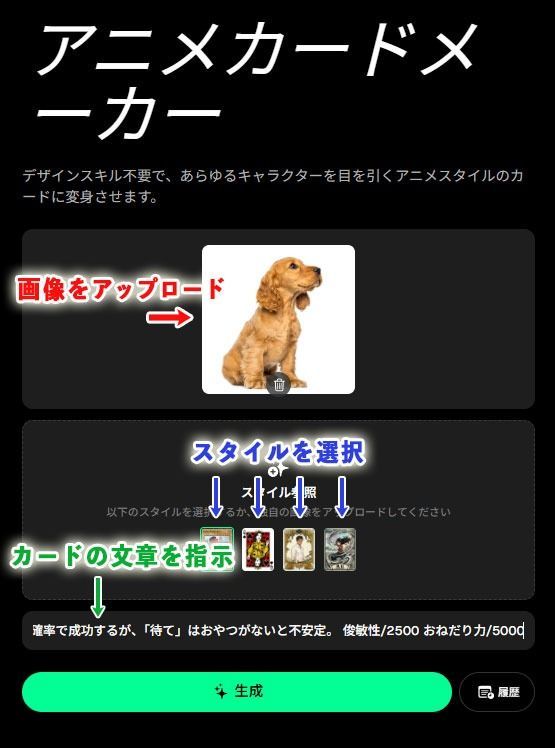
Even with the prompt left blank, the AI analyzes the source image and automatically turns it into a card. Specific text instructions let you set details such as the card name and character attributes more precisely.
For this example, I generated a card using the following prompt.
```
Character name: Yakumo
Attribute: Dog
Description: Detects the owner’s return home within 0.5 seconds and activates a super-fast tail wag. “Sit” succeeds with high probability, but “Stay” is unreliable without a treat.
Agility/2500 Begging power/5000
```
Here is the resulting image.

You can also give DomoAI revision instructions and regenerate the card. Repeated adjustments let you create a one-of-a-kind card you are happy with.
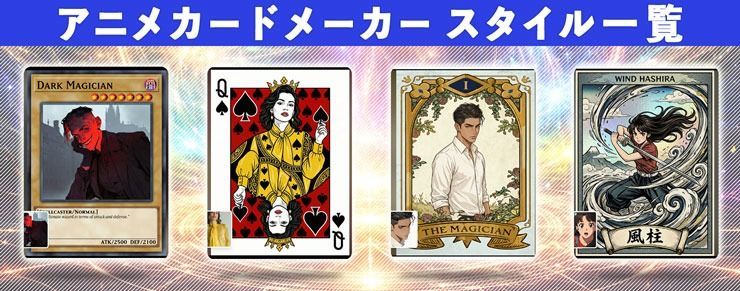
There are currently four style templates defining the overall card design, which you can choose to match your preferred world and aesthetic.
Ways to Use Anime Card Maker
Alongside the templates introduced above, Anime Card Maker can use original styles, backgrounds, and designs you create yourself.
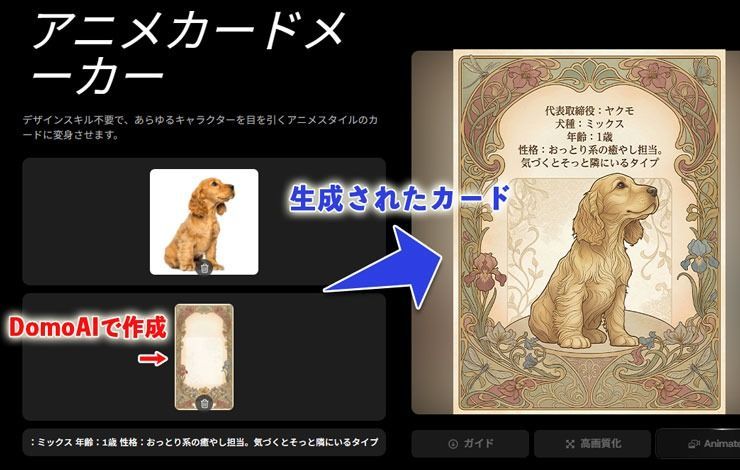
The card design used as the style for the image above was made with DomoAI’s Nano Banana 2 image generation model.
I think Anime Card Maker has applications in business and everyday life beyond simply creating trading card-style images.
For example, a pet grooming salon could photograph a visiting pet, create a one-of-a-kind pet card, and print the salon’s phone number and LINE QR code on the back. Handing this to customers could make a strong impression and encourage repeat visits.
You could also animate the card image with DomoAI’s video generation features and share it on social media to make a strong impression in people’s feeds.
What Is Face Swap?
Face Swap uses two images to replace the face in a base photo with the face in a target photo.
It detects facial features such as the eyes, nose, mouth, and outline in both images, automatically matches skin tones and lighting, and blends the boundaries naturally to generate a seamless image.
How to Use Face Swap
The steps are as follows.
- Select Face Swap from the Quick Apps list.
- Upload the original base photo whose face you want to replace in the Your Photo area.
- Upload the face photo you want to use as the replacement in the Target Face Image area.
- Click Generate to run the process.
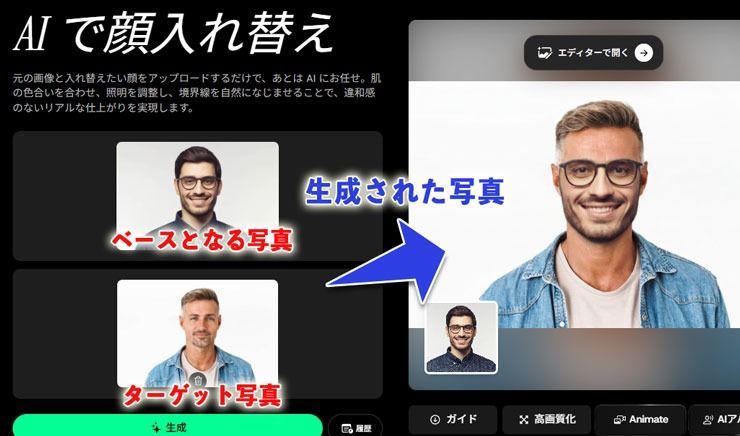
Using images with similar compositions improves the likelihood of a clean face swap.
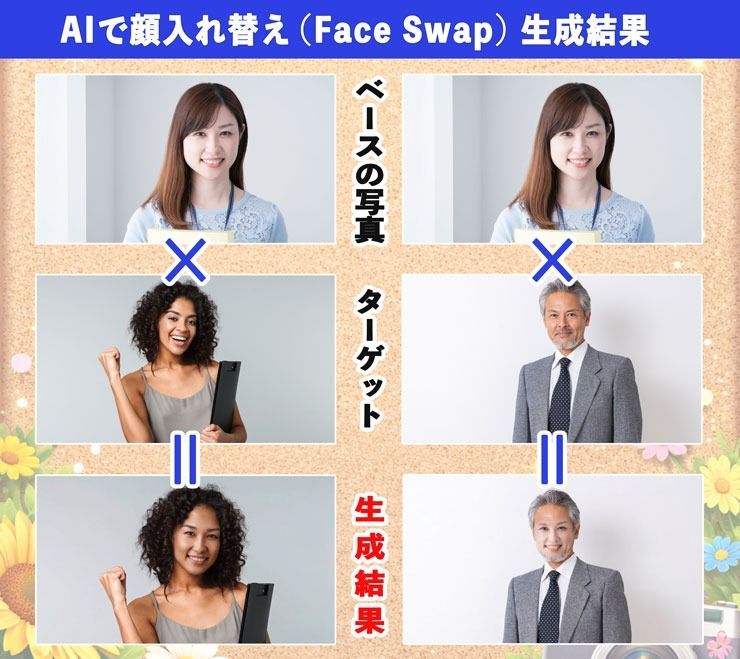
In my own tests, compositing tended to succeed more often with images of Western people than with images of Asian people.
I suspect this may reflect a greater proportion of Western images in the AI’s underlying training data.
I also felt the results naturally blended elements of the original and target images rather than replacing the face completely like a celebrity photo collage.
The results below should make this clearer.
Ways to Use Face Swap
Face Swap can be used in various ways depending on your approach.
For example, you could use it to:
- Combine your face with an artistic image or a historical character-style visual to create a distinctive profile picture or social media icon.
- Swap faces with friends and enjoy the results privately.
- Adjust a visual while keeping its composition and mood when you cannot find an image of a person that fits your needs.
When building a company website, for example, you may find an image with the right composition and mood but a subject who is not Japanese.
In that situation, combining the asset with an employee’s photo, with their permission, can efficiently create a visual suited to your company’s image.
However, I think this should be limited to use as an illustrative image.
Avoid presenting a nonexistent person as a real employee or using the image to deceive others.
Although Face Swap is very useful, improper use can infringe portrait rights or copyright and raise ethical issues.
I therefore think it is important to avoid misleading users and always use the feature appropriately and responsibly.
DomoAI’s Basic Features
The browser version of DomoAI is organized so you can quickly access the feature you need from the left-hand menu.
Here is the main purpose of each menu.
- Materials: Store the images, videos, and audio you upload as source data for generation and editing.
- Library: Manage an overview of images and videos generated in DomoAI and assets you have already worked on.
- AI Video: Access features for creating moving visual content, such as generating videos from images or text.
- AI Image: Access features for creating still images, such as generating images from text or transforming existing images into different artistic styles.
- AI Editing: Improve the quality of existing images and videos.
- Quick Apps: A list of shortcuts for specific purposes. Try tools intuitively without complex settings.
In actual production, you will switch between these menus according to your purpose.
Image to Video
Image to Video is one of DomoAI’s main features, generating a moving video from a single still image.
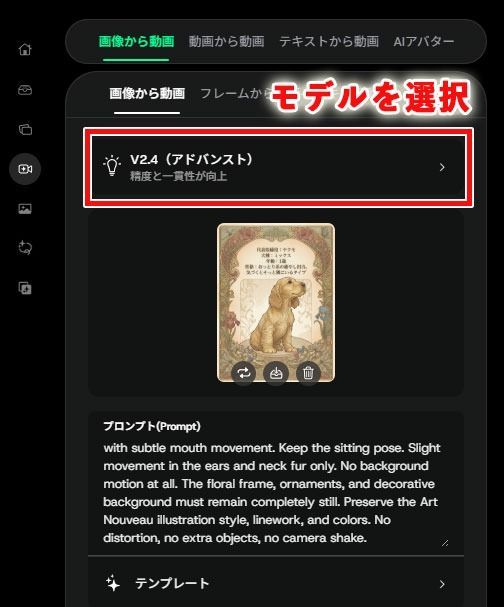
As an example, let’s animate the image we created earlier with Anime Card Maker.
First, upload the base image or retrieve a previous generation saved in your Library.
Here, select the V2.4 (Advanced) model, which is suitable for maintaining character consistency, and describe the movement in a prompt. V2.4.1 offers even higher precision.
The prompt essentially specifies two things.
- Specific instructions for the dog’s movements.
- An instruction to keep everything else in the background still.
In this example, I entered the prompt in English to convey finer nuances to the AI.
That said, DomoAI’s understanding of Japanese has improved considerably, so I think Japanese instructions can also generate images and videos that match your intent.
Here is the actual generated video converted into a GIF.

Using short videos and GIFs like these on websites and social media can have a stronger visual impact than still images, stopping users from scrolling and drawing their attention.
AI Avatar: Talking Avatar and Lip Sync
AI Talking Avatar generates a talking avatar video by combining an uploaded image of a person or character with audio.
The AI controls facial movements and mouth shapes in time with the audio, producing natural lip sync along with changes in expression and gaze.
The process is very simple: upload the image you want to make speak and an audio file.
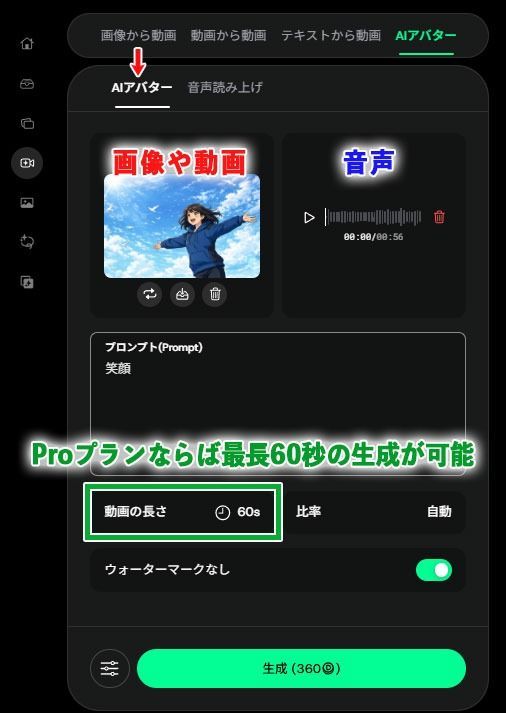
Users on the Pro plan or higher can create longer videos of up to 60 seconds, but Relax mode is unavailable for this feature.
Generating a 60-second video therefore spends the required credits all at once—360 credits at the time of writing.
If you immediately generate 60 seconds and the footage breaks down in the first two or three seconds, for example by introducing an unwanted item or changing the clothing, the remaining footage may also be wasted. This makes it somewhat risky.
For practical work, I recommend generating shorter clips of about 10–20 seconds and joining the successful takes.
For reference, however, I have included an unedited, uncut video generated as a full 60-second take.
Although the lip sync is slightly off in places, the video avoids major visual problems such as facial distortion overall, despite its 60-second length.
Generating such a long clip in one go while maintaining enough quality for use in parts of a music video is a major attraction.
For more natural lip sync, use clear audio containing only the human voice, without background music or noise. This reduces mismatches with the video.
The features introduced here are only a small part of what DomoAI offers.
Simply creating a free DomoAI account gives you trial credits.
If you are interested, try the latest AI video generation for yourself.
Precautions for AI Video Production
Generative AI services are advancing rapidly, but being technically able to create something and being legally allowed to use it are entirely different matters.
Users generally bear final responsibility for content they generate with AI, so careful attention is necessary.
Risks of Using Real People or Other People’s Work Without Permission
Using other people’s social media posts, scenes from anime or films, or celebrity photos as AI reference images without permission generally infringes copyright or portrait rights.
If the generated footage retains characteristics of the original work, rights holders may seek damages or an injunction against publication even when the content was generated by AI.
Deepfake technology can also be misused to make someone appear to say things they never said, prompting strong warnings from local authorities and others.
When working with face swaps or lip sync, take care that the result is not mistaken for the person’s actual speech or actions. I think it is important to label it as AI-generated when necessary.
Risks of Dependence and Similarity in Generated Characters
Under DomoAI’s terms, content generated from entirely original prompts or illustrations you drew yourself can be used commercially.
However, if the input material is someone else’s copyrighted work, commercial use of the generated result is more likely to infringe copyright.
Major social media and video platforms are also increasingly standardizing requirements to label realistic AI-generated content.
One especially important consideration when assessing infringement in AI-generated content is dependence: the extent to which it draws on an existing work.
For example, entering an existing character’s name in a prompt effectively demonstrates that you based the result on that work, making it particularly risky.
Even without deliberately entering a name, a generated character that resembles the essential characteristics of an existing work may still risk being considered copyright infringement.
With more legal action involving AI-generated content in recent years, avoid casually publishing or distributing content that closely resembles existing works.
Conclusion and Frequently Asked Questions
Finally, here are answers to common questions about the features introduced here and video generation.
Q1. Does DomoAI support Japanese?
A1. Yes. DomoAI’s browser version supports a Japanese interface, and Japanese pages are available. It can also be used through Discord. Some instructions, help content, and prompt examples use English, but the environment is accessible for Japanese users.
Q2. Can images generated with Anime Card Maker be used commercially?
A2. I think commercial use of the generated card image is possible if the source character image is entirely original. However, card names or logos that evoke existing ones may risk trademark infringement, while closely similar illustrations or layouts may risk copyright infringement. Selling cards that directly reuse an existing game’s rules or gameplay may also cause problems, so I recommend consulting a specialist before commercializing them.
Q3. Can Face Swap be used on photos with multiple people?
A3. At the time of writing, it is optimized for one-to-one swaps—from one person’s face to another—and does not support changing multiple faces simultaneously.
Q4. Is there a way to use credits efficiently?
A4. I think switching models is efficient: for example, use V2.4.1 (Fast) for simple animation with little movement and V2.4.1 (High Precision) for the final output. If you want to experiment repeatedly, I recommend Relax mode, with unlimited generation, included in the Standard plan and higher.
Q5. Can videos generated with DomoAI be downloaded as GIFs?
A5. Downloads are available only in MP4 format. To use the result as a GIF, you need to convert the file with separate video editing software or a conversion tool. Design tools such as Adobe Express and Canva make it easy to convert videos to GIFs. Registration is required.
That concludes the frequently asked questions.
DomoAI has continued evolving in 2026. Alongside the four new features—Anime Card Maker, Face Swap, Image Extender, and Old Photo Restoration—Text-to-Speech received a major update in March 2026.
All are powerful features that can be used intuitively without specialist knowledge.
If you are interested, try DomoAI’s latest AI video generation for yourself.


