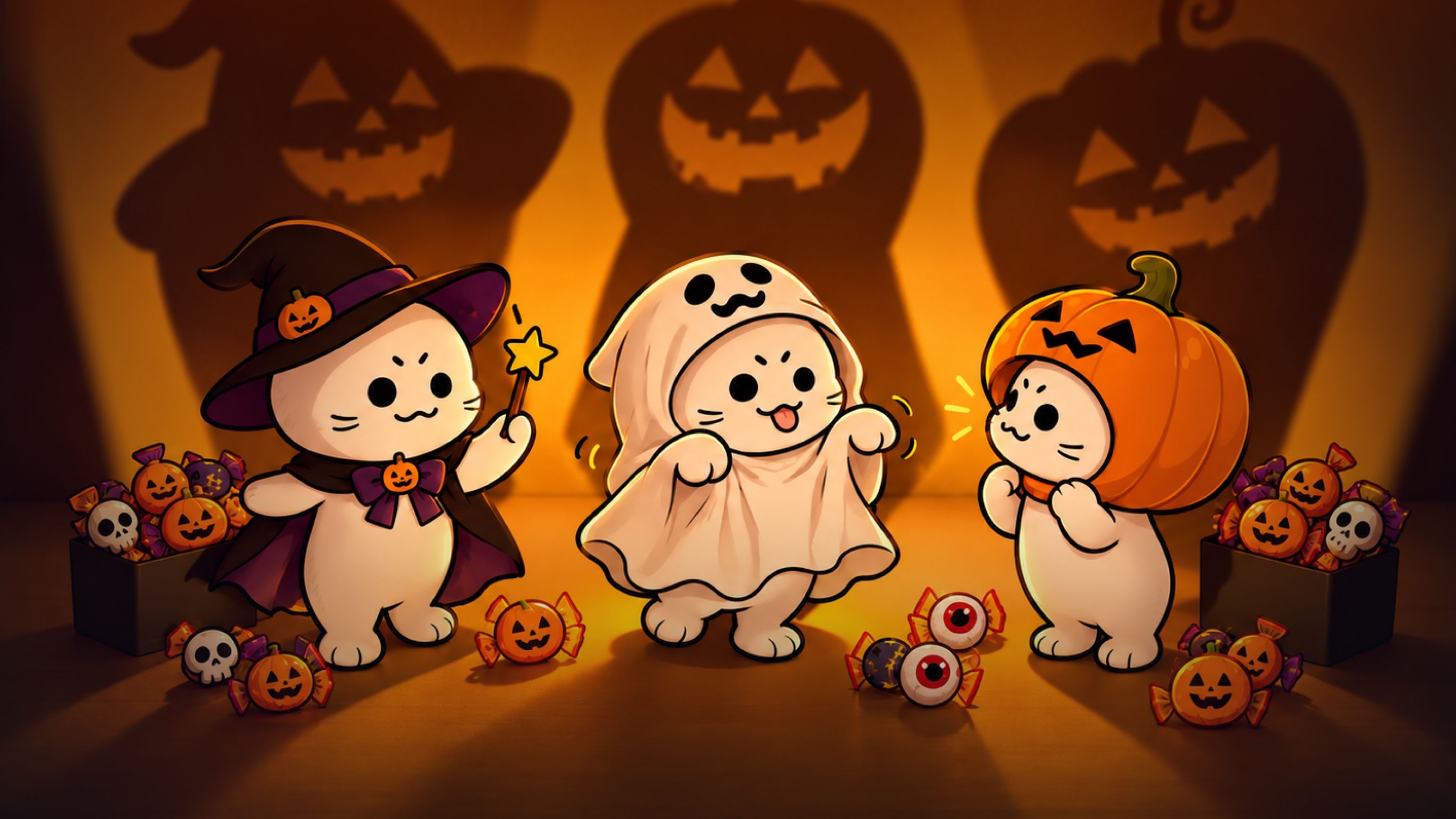
AIを使えば、ハロウィンの仮装を試したり、ペットのポスターや短いホラー動画を作ったりできます。お店のイベントポスター作りや、装飾のシミュレーションにも役立ちます。この記事では、作例とプロンプトを交えながら、ハロウィンに使える10のAIアイデアをご紹介します。
多くのアイデアは、手元にある写真から始められます。服装を変えたり、飾りを加えたり、被写体を別の場所に置いたりしてみましょう。以下の作例はアレンジの一例です。衣装やキャラクター、場所は自由に選べます。
写真と動画、どちらを作る?
見た目やデザインを伝えたいときは、写真が向いています。ハロウィンのプロフィール画像、ペットのポスター、パーティーの招待状、お店の装飾案などに使ってみましょう。
何かが起こる様子を見せたいときは、動画が向いています。衣装を着替えたり、キャラクターを踊らせたり、誰かの背後におばけを出現させたりできます。
まず写真を作り、後から動きをつける方法もあります。たとえば、愛犬のハロウィンポートレートを作ってから、その画像で短い動画を作ってみましょう。
始める前に、元の写真のどこを残したいか決めておきましょう。自分の顔、ペットの毛柄、お店のレイアウトなどです。変更内容を説明するときに、その特徴も指定してください。
試してみたいハロウィンのアイデア8選
1. ハロウィンの仮装チェンジ動画を作る
自分の写真でいろいろなハロウィン衣装を試し、着替える様子を短い動画にしてみましょう。仮装の候補を比べたり、「どれを着よう?」という投稿を友達と共有したりできます。
はっきり写った写真を用意し、試したい衣装を選びます。たとえば魔女、吸血鬼、骸骨などです。フォーマルな服装、ゲームをイメージした衣装、自分でデザインした服でも構いません。
こちらの仮装チェンジの作例では、マントや帽子で画面を覆ってから別の衣装に切り替えています。画面が隠れるタイミングを使うと、動画のどこで衣装を変えるかが明確になります。
Showcaseのプロンプト(英語版):
プロンプトをすべて表示
9:16 portrait format, 12 seconds, ultra-clear 4K. Use only the boyfriend's first-person viewpoint throughout, with no cuts. The boyfriend is also sitting on the tatami, and the camera is at his eye level, equivalent to a 35mm lens with a wide aperture. Keep the focus locked on his girlfriend's face, with round, warm bokeh in the background. Give the camera a subtle breathing quality: it dips slightly when she tugs his sleeve, gently rises when she stands, and smoothly moves backward when she approaches. Do not switch to a third-person view or show the boyfriend's face, including in the mirror. His hands appear only briefly along the bottom edge of the frame.

The girlfriend is an adult woman around twenty-two years old, with shoulder-length dark brown hair, wispy bangs, a soft round face, light, fresh makeup, and a natural lip color. Keep the same face throughout; only her clothes change. She is worrying about Halloween and complains in a sweet, affectionate tone: she gently tugs his sleeve and looks up into the camera, speaking in a soft, sweet voice. Her manner should be cute, natural, and fresh, appealing to a Japanese audience without making her look childlike or exaggerated.

Limit the setting to a small Japanese-style room in a quiet residential neighborhood in Tokyo, about six tatami mats in size, with light-colored tatami flooring. It is not a hotel or an empty studio set. On one side is a warm-white shoji window; beyond its fine wooden lattice are blurred blue-hour twilight and distant streetlights. A low wooden cabinet holds only neatly arranged orange ribbon, a small pumpkin bag, and spare hair clips. An off-white paper-shade floor lamp stands in the corner, and a narrow wardrobe has light wooden sliding doors. A full-length mirror with a thin black frame leans beside the wardrobe. The wall has only one string of small pumpkin lights, glowing steadily without flickering. The main light is warm-white side lighting from the floor lamp. Cool blue twilight from the window gives the hair a soft rim, while the pumpkin lights create tiny orange highlights in her eyes. Use an overall low-saturation palette of persimmon orange, ink black, milky white, and twilight blue. Keep skin tones clean, with a slight soft bloom around highlights and fine film grain.

All three outfits are complete and appropriate. For the first costume change, use a cape to cover the camera. For the second, use the witch hat she has removed to cover the camera before revealing the new outfit.

Seconds 0–3: She is already sitting sideways on the tatami, both knees bent and her lower legs together, with both legs extending diagonally toward the side and front of the camera and her toes resting on the tatami. One hand supports her at her side, and her upper body turns toward her boyfriend. Her legs occupy the lower half of the frame and her face the upper half, both fully visible. She wears the first outfit: a loose orange cardigan, a white shirt, a short black skirt, white ankle socks, and a small pumpkin brooch on her chest. She lightly holds her skirt hem, puffs her cheeks slightly, looks up into the camera with a complaining expression, and softly says, 「ねえ、普通すぎない?」

Seconds 3–6: She first draws her legs back, then stands as the camera rises with her. She lifts a wide black cape to cover the camera, filling the lens with fabric. When the fabric drops, she is wearing the second outfit, strictly following image1: a black, pointed, wide-brimmed witch hat with a slightly bent crown, a purple hatband, a purple bow on the side, and a small orange pumpkin ornament. Her black long-sleeved dress has a square neckline, purple lacing on the chest, and a purple ribbon at the waist. The cuffs have purple ruffles, and the two-layer skirt reveals a purple lining underneath. She wears white mid-calf socks and black platform Mary Jane shoes. With both hands, she holds a small orange pumpkin bag decorated with a black bow. Standing in the center of the tatami, she takes half a step closer and makes a half-turn, but the wide brim falls over her eyebrows and eyes. She lifts the brim slightly, frowns with a disappointed expression, tilts her head toward the camera, and says even more softly, 「これも、なんか違うの」. The camera moves gently backward as she stands and approaches.

Seconds 7–12: She removes the black witch hat and brings its wide brim toward the lens. The black hat completely covers the frame, leaving only a ring of warm light around the brim. When the hat moves away, she is wearing the third outfit from image2: a short persimmon-orange capelet over a black dress, a thin black belt, and white mid-calf socks. A small paper-lantern hair clip sits at the side of her hair, and she holds a round pumpkin bag. She is no longer wearing the witch hat. She takes small steps toward the camera, looks down to straighten the capelet, then raises her eyes.

She slowly turns all the way around in front of the camera, with the capelet and skirt settling half a beat after her body. After the turn, she sits sideways on the tatami again, drawing her still-bent legs slightly back toward the side and front, bringing her face closer to the camera. With both hands, she gently holds the boyfriend's fingers as they appear along the bottom edge of the frame, gives them one small shake, leans her upper body slightly forward, and says with a sweet smile, 「これにしよ?ね」. Keep the focus on her eyes as the camera comes to a smooth stop, retaining both the blue twilight outside and the warm indoor light in the frame.

Use a live-action cinematic look, ultra-clear detail, and shallow depth of field. Skin texture, the weave of the tatami, and woven fabric must look realistic, without skin smoothing or a plastic appearance. Include only these three short spoken lines, with synchronized lip movements. No subtitles, no logos, and no horror sound effects.
Showcaseのプロンプトを自分の衣装で使うには、2つの衣装リファレンスを差し替え、対応する服装の説明も修正します。このプロンプトのImage 1とImage 2は衣装を指しています。服を変える場合は、紫の帽子リボンやオレンジのマントなど、不要になった説明を削除してください。
部屋の説明も、寝室、パーティー会場の入口、飾りつけた通りなどに変更できます。同じ切り替え演出にしたい場合は、マントと帽子の動きを残しましょう。帽子のない衣装なら、2回目に画面を覆う動作も変更します。3種類の衣装は一例です。1回のビフォーアフターにするなら、最後の衣装の場面とセリフを削除してください。
2. ペットのハロウィンポスターを作る
猫や犬の写真をハロウィンポスターにしてみましょう。衣装を加え、背景を選び、短いタイトルをつけます。共有や印刷のほか、ハロウィンのプロフィール画像にも使えます。
こちらのペットのハロウィンポスターの作例には猫が登場します。犬やほかのペットでも、その動物に合う服装やポーズに変えて楽しめます。
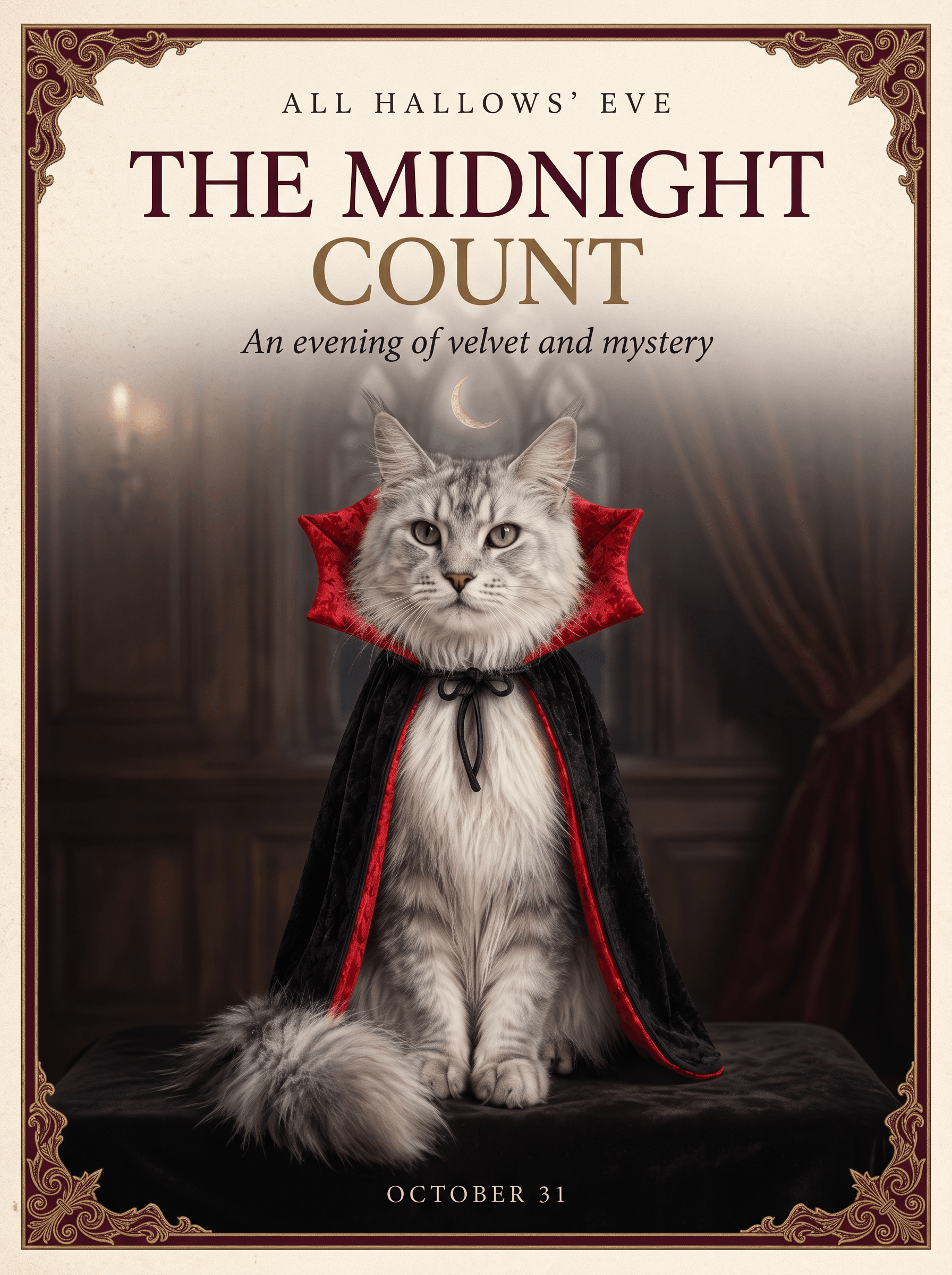
吸血鬼のマントのほか、かぼちゃの衣装、魔女の帽子、シンプルなオレンジのバンダナも試せます。顔と毛柄がはっきり見える写真を使いましょう。
このShowcaseでは、Nano Banana 2.1と、猫と衣装をまとめたリファレンスシートを使っています。同じリファレンスと以下のプロンプトから始められます。自分のペットの写真をアップロードする場合は、ペットやリファレンスの説明を写真に合わせて変更してください。
Showcaseで使われているプロンプト:
プロンプトをすべて表示
Create an elegant luxury Halloween editorial poster in a 3:4 portrait aspect ratio. Use the supplied reference sheet to preserve the exact silver Maine Coon's facial features, green eyes, tufted ears, long fur, and black brocade vampire cape with its dramatic crimson collar. Feature only one cat, seated regally in a frontal three-quarter portrait. Do not reproduce the reference sheet layout or its labels.
Art direction: restrained Gothic elegance, warm ivory paper, deep burgundy accents, subtle antique-gold detailing, soft cinematic lighting, exquisite fur and fabric texture. Use generous negative space, precise alignment, refined high-contrast serif typography, and a clear editorial hierarchy. Add a delicate ornamental border and a discreet crescent moon. Keep the composition sophisticated and uncluttered.
Render only these exact English words: a small top line, “ALL HALLOWS’ EVE”; a prominent headline, “THE MIDNIGHT COUNT”; a delicate subtitle, “An evening of velvet and mystery”; and a small footer, “OCTOBER 31”. All visible text must be English, beautifully typeset and clearly legible. No additional text, logos, or watermarks.
自分のペットに合わせるには、次の部分を編集します。
| プロンプト内の箇所 | 変更する内容 |
|---|---|
| 「supplied reference sheet」 | ペットの写真を1枚使う場合は、「uploaded pet photo」に置き換えます。 |
| 「silver Maine Coon」と、その特徴の説明 | ペットの品種や見た目、毛色、目、耳を説明します。犬なら、たとえば「golden retriever with brown eyes, floppy ears, and golden fur」と書けます。 |
| 「black brocade vampire cape with its dramatic crimson collar」 | 希望する衣装を説明します。元の写真にない衣装なら、維持するのではなく追加するよう指示してください。 |
| 「warm ivory paper, deep burgundy accents」 | 別の雰囲気にしたい場合は、オレンジと黒など、好きな色に置き換えます。 |
| 引用符で囲まれた4行のテキスト | 自分のタイトル、メッセージ、日付に置き換えます。指定した文字だけを描画する指示は残してください。 |
たとえば、衣装を着ていない犬の写真なら、2文目を次のように置き換えます。「Use the uploaded pet photo to preserve the dog’s face, brown eyes, floppy ears, and golden fur. Add a black vampire cape with a red collar.」
似たポスターにしたい場合は、ペット1匹の構図と読みやすい文字レイアウトを残しましょう。生成後は顔とつづりを確認します。後でポートレートを動画に使いたい場合は、文字なしの画像も保存しておきましょう。
3. ハロウィンのダンス動画を作る
骸骨、魔女、おばけ、自分のキャラクターなどでダンス動画を作ってみましょう。ソロダンスにしても、少人数のグループにおそろいのハロウィン衣装を着せても楽しめます。
こちらのハロウィンの骸骨ダンスでは、照明が切り替わるとダンサーの姿が変わります。このアイデアを使えば、ダンスの途中で衣装を変えられます。
Showcaseのプロンプトでは、通常の衣装のFigure 1と、骸骨の姿のFigure 2という2枚の集合画像を使っています。ダンス用のリファレンス動画も使います。登場人物を変える場合は、2枚とも差し替え、同じ人物がそれぞれの画像で同じ位置に並ぶようにしてください。
Showcaseで使われているプロンプト:
プロンプトをすべて表示
16:9 landscape format, continuous single-shot, 3D Halloween animation. The shot begins with full-body views of all five characters; there are no breaks, cuts, or split-screen effects throughout the sequence. All five characters remain in the frame at all times, with their hats and feet kept fully visible. The boy in the pumpkin cape at the center serves as the visual focal point, while the others are positioned to his sides and behind him without obscuring anyone's face. The focus tracks the active movements, allowing for slight background blurring.

Camera movement must synchronize with the dance choreography. When the action or formation shifts to the right, the camera pans right to follow—avoid remaining static; the same applies to movements to the left, forward, or backward. The tracking movement should be distinct but must not cause the characters to drift out of the frame. Rapid zooms-in are appropriate for sudden bursts of energy, close-ups, or pauses on heavy beats; rapid zooms-out suit moments where the group disperses, jumps apart, or concludes a sequence. All zooming occurs within the same continuous shot via speed changes, not through jump cuts. Do not cut to a different shot when toggling the lights.

When the lights are on, the characters' faces, costumes, hair, heights, and positions must strictly match Figure 1. When the lights are off, they must strictly transform into the appearance shown in Figure 2: the specific skeletons, hats, tattered clothing, and red hair must be retained as depicted, with skeletal structures visible through the gaps in the clothing. Do not simply darken the image or switch to a different skeleton design. There are no changes to the characters or their positions during the light transitions, and the dance does not restart.

All characters should display natural, lively expressions—avoiding both blank stares and puppet-like stiffness. When the lights are on, expressions should shift with the choreography; characters may smile, look at one another or the camera, blink, and relax their mouths. Even as skeletons in the dark, they should remain animated—heads and shoulders swaying to the rhythm, and jaws opening and closing slightly with the drumbeats—while strictly maintaining the appearance from Figure 2. Body weight should be grounded, with natural follow-through on arms, capes, hair, and skirt hems, ensuring smooth transitions between movements.

The setting remains the outdoor night scene depicted in Figures 1 and 2. When the lights are on, the pumpkin lanterns and handheld lanterns cast a warm orange glow; when the lights go out, they instantly dim in sync with the drumbeat, shifting the primary illumination to a cool blue moonlight. The background remains a night sky featuring the moon and lanterns throughout.

The five characters dance based on the reference video, adopting only its rhythm, intensity, and dynamic flow; they should not replicate the live-action movements, costumes, or settings frame-by-frame. Each character retains a touch of their own lively personality: the boy in the center is more light-footed; the red-haired witch incorporates slight turns and hair-tossing; the tall character takes longer strides with natural joint movement; the sheet ghost is more airy and weightless; and the remaining character uses a slightly smaller range of motion. Everyone stays perfectly in sync with the beat. The camera follows the direction of the characters' movements rather than the original setting from the reference video.

The music is strictly synchronized with the dance. Accents such as stomps, pauses, arm flicks, and turns align with the bass drum beats, while claps or subtle movements fall between the beats. There must be no misalignment between the music and the actions. Lighting changes occur only on the heavy bass drum beats, never between beats. Upon a lighting change, facial expressions, movements, and camera motion continue seamlessly from the previous state.

Begin dancing with the lights on, as shown in Figure 1. Upon the next distinct drumbeat, the lights go out, and the five characters instantly shift to the pose in Figure 2. At the following distinct drumbeat, the lights come back on, returning to the Figure 1 pose. Continue alternating in this pattern with the drumbeats until the dance concludes. The final switch lands on a drumbeat, leaving the five characters frozen in the skeletal pose from Figure 2, maintaining lively expressions.

4K resolution, detailed 3D animation with clear rendering of fabric, hair, and skeletal structures; not live-action. Warm orange lighting when on; low-saturation cool blue when off. No dialogue, lyrics, or subtitles.
次に、プロンプト内のキャラクターの説明を変更します。5人ではなく3人にする場合は、人数を変え、不要なキャラクターの説明を削除してください。同じ衣装切り替え効果にしたい場合は、照明のオン・オフの指示を残します。
明るい色と笑顔のキャラクターで親しみやすくしても、照明を暗くしてハロウィンパーティー向けにしてもよいでしょう。完成した動画を編集するときに、好きな音楽を追加してください。
4. 自撮り写真に不気味な要素を加える
手前に写った自分はそのままに、背後に奇妙なものを追加します。出入口に立つおばけ、窓の外にいる仮面の人物、鏡に映るはずのない人などが考えられます。
背景がある程度見えるポートレートを用意します。画像編集で顔とポーズを維持するよう指示し、何をどこに追加するかを説明しましょう。たとえば「Add a small ghost standing in the doorway behind me.」のように指定します。
直射フラッシュと少しの粒状感を加えて、古いカメラで撮ったようにしてもよいでしょう。元の照明を残せば、自宅で撮った写真らしい雰囲気を保てます。
怖さを抑えたいときは、おばけにお菓子のバケツを持たせたり、パーティーハットをかぶせたりしてみましょう。1枚で投稿するほか、元の写真と編集後の写真を並べた2枚のカルーセル投稿にも使えます。
5. 短いハロウィンのホラー動画を作る
短いホラー動画は、日常の場面に意外な変化を1つ加えるところから作れます。エレベーターで待つ人。ちらつく照明。その背後に現れる人影、といった流れです。
こちらの幽霊エレベーターの動画は、固定の防犯カメラの視点で撮られています。カットを切り替えずに、背景の変化を追いやすくなっています。
元の場面では、Image 1に乗客、Image 2にエレベーターのリファレンスを使っています。乗客は同じ場所に立ち続け、映像の乱れとともにゾンビが現れ、2回目の乱れの後で消えます。
Showcaseと同じ設定で始めるには、この2つのリファレンスをオムニリファレンスで使い、Seedance 2.5を選択します。元のプロンプトはこちらです。
プロンプトをすべて表示
9:16 vertical aspect ratio, continuous single-take shot, fixed-camera elevator surveillance perspective, with the aesthetic of a realistic Hollywood horror film. The camera is positioned in the top corner of the elevator car; the camera placement, angle, and spatial layout strictly adhere to Image 2, with no zooming, panning, or cutting from start to finish. The frame is bounded by the metal walls with no foreground obstructions; the young woman remains at the visual center throughout, with her full body and mobile phone clearly visible, and the character blends seamlessly with the environmental lighting/filter. Zombies appearing during the malfunction phase are positioned only beside, behind, or at her feet; they do not obscure her face or upper body, nor do they replace her.

The young woman’s facial features, skin tone, and face shape strictly replicate Image 1; her hairstyle and color match Image 1 exactly (long, slightly wavy, light golden-brown hair), as does her outfit (loose grey top, dark wide-leg jeans, light-colored shoes). Her expression remains relaxed as she looks down at her phone; there is no significant change in her mouth, and the cool light from the phone illuminates the lower half of her face. The zombies have a realistic, gruesome appearance and appear only during the surveillance malfunction; the woman herself does not transform into a zombie. There are multiple zombies, varying in gender, physique, and positioning, moving slowly.

The setting is the modern elevator car from Image 2: dark metal walls, dark flooring, and the button panel on the right with the red floor display remain unchanged. The woman enters from outside the elevator doors (at the far side of the frame) and eventually leans against the wall on the right side of the frame. Lighting is primarily cool-white diffuse light from the ceiling; the metal walls show only faint reflections, creating an overall cool, slightly dim atmosphere. The overhead light strobes briefly during the malfunction but immediately returns to the original steady cool light once the malfunction ends.

Seconds 0–2: The elevator doors open, and the woman walks in with a natural gait; her hair and the hem of her top sway slightly with her movement, and she presses a floor button with one hand. Seconds 2–3: She walks to the bottom-right corner of the frame, leans her back against the right-hand elevator wall, and looks down at her phone. One leg is slightly bent, and she shifts her weight against the corner wall. The elevator doors close, the car remains stationary, and the red floor indicator changes to "2"; she does not look at the camera.
Seconds 3–6: The shot remains the same, but the surveillance feed glitches; scan lines, static, and brightness fluctuations appear. Once the flickering stops, the camera angle remains unchanged, and the woman’s position, clothing, and posture (looking at her phone) remain consistent. Suddenly, multiple zombies appear surrounding her (they appear instantly, without a gradual fade-in); some are even touching her body. She remains unaware, continuing to use her phone as before. Seconds 6–7: The image glitches and flickers again; the zombies vanish during the flicker, leaving no afterimages. Seconds 7–8: The feed returns to normal. The woman is alone in the elevator, still leaning in the same spot and looking at her phone; the walls and floor are clean, and the overhead light is steady. The shot holds on this quiet surveillance view.
4K resolution; retains slight surveillance-style grain while keeping the subject and elevator details sharp. Textures of skin, fabric, metal, and bloodstains appear realistic. Low-saturation, cool gray color palette; fixed wide-angle shot covering the entire elevator car. Audio consists primarily of low-level ambient elevator noise; brief static/electrical interference occurs during the glitch, followed immediately by silence. No dialogue; the visual quality is completely realistic.
次の部分を編集すると、場面をアレンジできます。
- 乗客:Image 1を差し替え、女性の髪、服装、外見を説明する段落を修正します。たとえば「loose grey top, dark wide-leg jeans, light-colored shoes」を、写真に写っている服装に置き換えます。人物が変身しないようにする指示は残してください。
- 怖さを演出する要素:プロンプト全体の「zombies」を、「ghosts in Halloween costumes」など、登場させたいものに置き換えます。別の箇所にゾンビの説明が残らないよう、外見と動きも修正してください。
- 場所:Image 2を差し替え、場所、入ってくる位置、立ち位置を修正します。廊下にする場合は、階数ボタンやエレベーターのドアに関する動作を削除し、誰かが歩いてきて壁際で立ち止まる様子を説明してください。
- 結末:かぼちゃのランタンを残したい場合は、出現する場面にもランタンを追加し、結末を変更します。たとえば「The figure disappears during the second glitch, leaving its pumpkin lantern on the floor.」とします。床に何もないという指示は新しい結末と矛盾するため、削除してください。
元の防犯カメラ映像らしさを残したい場合は、固定カメラ、同じ乗客、2回の映像の乱れを維持します。時間ごとの区切りを選んだ動画の長さに合わせ、出力解像度はツールで設定してください。プロンプトに「4K」と書いても、解像度は設定されません。
背景の人物が乗客と入れ替わることなく、現れて消えるかを確認してください。調整する箇所がわかりやすいように、一度に1か所ずつ変更しましょう。
6. かぼちゃから登場する動画を作る
大きなかぼちゃの中から、キャラクターやペットを登場させてみましょう。ハロウィンのあいさつや、キャラクターの短い紹介動画に使えます。
こちらのかぼちゃから登場する作例は、森が舞台です。自分の動画では、玄関先、パーティー会場、ペットのベッドの横などに変えてみてもよいでしょう。
Showcaseのリファレンスとプロンプトから始めます。人物を変える場合は、キャラクターのリファレンスを差し替え、少女についての説明を修正してください。場所を変える場合は、森の説明と、冒頭で木々の間を進むカメラの動きを、新しい場所に合う内容に置き換えます。
Showcaseで使われているプロンプト:
プロンプトをすべて表示
A six-second, cinematic, first-person FPV tracking shot. Filmed with an 8mm ultra-wide-angle fisheye lens in a single, continuous take without cuts. The footage retains the authentic feel of FPV flight; rapid shaking, slight rolling, dynamic tilting, and high-speed weaving create a powerful sense of presence. Natural lens breathing, slight edge distortion, subtle vignetting, and realistic motion blur are preserved, lending the forest setting deep immersion and a fairytale-movie aesthetic.

The setting is a forest at night, with faint mist drifting in the air. Moonlight filters through the canopy, creating dappled light patterns, while warm orange jack-o'-lanterns illuminate the surrounding grass, mushrooms, vines, and wildflowers, crafting a dreamy Halloween atmosphere.

0–1 second

The video begins with an explosive burst of speed as the FPV camera surges forward. The camera shakes rapidly and rotates slightly while weaving at high speed through layers of trees. Thick trunks streak past on either side; a tangle of branches, vines, wildflowers, and tall grass repeatedly obscures the view before being swept aside by the camera's rapid movement. Leaves graze the edge of the frame, creating intense foreground occlusion, motion blur, and realistic parallax.

1–1.25 seconds

The flight begins to slow, and the camera stabilizes. The trees ahead part naturally, revealing the subject from Image 1 in the center of the frame. The camera drifts slowly forward; moonlight and warm orange light illuminate the subject, while the background forest remains softly out of focus, creating an atmosphere of quiet anticipation.

1.25–6 seconds

The shot transitions naturally to the girl shown in Image 2, maintaining the same continuous take.

The girl gives the lid of a giant jack-o'-lantern a firm push; the heavy lid merely wobbles slightly with a faint scraping sound but does not open. She pauses for a moment, stunned, before trying again.

This time, she uses both hands to grip the lid and heaves upward with all her might. Her brows furrow and her eyes squeeze shut, as if her entire face is straining with the effort. The pumpkin lid finally began to loosen, pushed open bit by bit by the girl; with one last burst of effort, she lifted it off completely.

As she struggled to open the lid, the camera smoothly rose about a meter, transitioning naturally from eye-level to a high-angle view. Warm orange light spilled out from inside the pumpkin, illuminating the girl's cheeks.

She tilted her head up and looked just off-camera; her eyes crinkled into crescents as she smiled—a sweet, relieved expression—and she gave her head a gentle tilt, exuding a charming, fairytale-like aura. The camera maintained a subtle, floating, "breathing" motion.

Sound Effects:

Uses only synchronous ambient sound. Sounds include the wind; the rustle of leaves brushing against the lens; the sound of grass; the chirping of night insects; the creak of wood as the lid first wobbled; the continuous friction and soft, muffled thud as she pushed it open; the sound of the lid finally coming free; and the girl's sweet vocalizations as she exerted effort.

No music. No narration. No subtitles. No text.
元の動作では、少女がかぼちゃのふたを苦労して持ち上げ、笑顔を見せます。この流れを残しても、もっと単純な動作に変えても構いません。ペット版にするなら、手の動きも変更します。たとえば、ペットが押し上げるとふたが持ち上がり、その後に周りを見回す動作にします。動物に両手でふたをつかむよう指示しないように、関連する動作の説明をすべて修正してください。
個人的なあいさつにする場合は、完成した動画に編集ソフトでメッセージを追加します。動画が終わる前に読める短さにしましょう。
7. ハロウィンの集合写真を作る
友達やオリジナルキャラクターのグループで、ハロウィンの画像を作ってみましょう。一人ずつ違う衣装にしても、魔女、吸血鬼、幽霊が出る学校など、共通のテーマを決めても楽しめます。
集合写真、使用許可を得た適切な個人写真、キャラクターのイラストなどを使います。画像を生成する前に、衣装と背景を決めておきましょう。飾りつけた出入口のようなシンプルな背景なら、人物を配置する余白を確保できます。
こちらのハロウィン衣装のアニメキャラクターは、グループの見た目を考える参考になります。Showcaseの動画では、3人のキャラクターを一人ずつ紹介しています。衣装のテーマを借りて、静止画の集合ポートレートを作ることもできます。
動画そのものをアレンジする場合は、キャラクターのリファレンスを差し替え、プロンプト内の各キャラクターの外見、衣装、小道具を修正します。順番はリファレンス画像とそろえましょう。かぼちゃのバケツをランタンに変えるなら、小道具の説明と、それを掲げる動作の両方を変更してください。
Showcaseのプロンプト(英語版):
プロンプトをすべて表示
16:9 landscape format, 12 seconds, a single continuous take showcasing cute Halloween characters. Each character stands in the center of the frame and rotates from side to side around a vertical axis. Normally, use a standard-lens full-body view with the entire head and feet visible. Only when the character turns to face the center should the lens become ultra-wide and the camera instantly push into an extreme close-up, almost touching the face, within the same continuous movement. The face fills much of the close-up, with the hat brim, veil, or hair slightly exaggerated around the frame edges, but do not distort the facial features beyond recognition. Immediately pull back to the full-body view after the action, then continue the rotation. No jump cuts or white flashes at any point. Keep the background softly blurred.

Strictly reuse the faces, hairstyles, outfits, and props of the three characters from the reference image, introducing them in order from left to right. The first is an elegant witch with long silver-white hair and purple eyes: an oversized purple-and-black witch hat, purple flowers, a black corset, white puff sleeves, and a long layered purple skirt. One hand may rest against her cheek while the other holds a pumpkin bucket. The second is a lively cat-girl with mint-green hair and cyan eyes: a cat-eared hood, an orange bow, a short black-and-orange cape and shorts, a crossbody pumpkin bag, and a dark cat tail. The third is a gentle ghost girl with long pale-blonde hair and purple eyes: a small witch hat, a white veil, a flowing white dress, a little ghost beside her shoulder, and a ghost lantern in her hand. Do not swap their outfits.

The setting is a clean, dark display platform with a ring of pale orange light at the character's feet and only blurred pumpkin lanterns in the background. Normally, use soft frontal lighting; during the extreme close-ups, the eyes and expressions must remain clearly visible.

The rotation speed should feel like a small ball swinging in the air, not a constant-speed turn. Accelerate from slow to fast after leaving the center, slow down and pause briefly near a side angle of about 60 degrees, then accelerate back toward the center. Clothing hems, hair, and the cat tail follow half a beat behind the body. Each character passes through the center twice, performing a different action in each ultra-wide close-up. Change characters as the camera pulls back at the end of the previous character's second close-up: the face, hair, and clothes naturally transition into the next character while continuing in the same direction. Do not stop in a static pose or dissolve into a different image.

Seconds 0–2: The witch turns to the center for the first time. The camera instantly pushes into an ultra-wide extreme close-up. She lowers the hand resting against her cheek and calmly looks into the lens, with the hat brim sweeping across the edges of the frame and a restrained smile.

Seconds 2–4: The camera pulls back. She swings quickly to one side, slows down, then accelerates through the center for the second time. In this close-up, she lifts the pumpkin bucket beside her face to display it, keeping a gentle gaze.

Seconds 4–6: As the camera pulls back, she naturally changes into the cat-girl, followed immediately by the cat-girl's first extreme close-up. She raises both hands beside her cheeks, curls her fingers into claws, opens her eyes wide, and forms a cute little circle with her mouth, pretending to be a tiger for the camera.

Seconds 6–8: After the pullback, she swings to the opposite side, then enters the second extreme close-up. This time, she extends one clawed hand toward the camera as if about to give it a gentle tap, draws the other hand back, and winks once.

Seconds 8–10: During the pullback, she lowers both hands and naturally changes into the ghost girl, followed by the ghost girl's first extreme close-up. She lowers her eyes, then gently raises them. Her veil drifts past the frame edges, the lantern lights her chin, and her expression remains quiet.

Seconds 10–12: After the pullback, she swings back to the center for the second extreme close-up. The little ghost beside her shoulder floats into a corner of the frame. She looks toward the lens and gives a very faint smile. End on this close-up.

4K, detailed and cute anime-style 3D animation. Use low-saturation purple, black, orange, and white, with shallow depth of field. The music is a light, playful Halloween piece, with accents only at each instant push-in. No dialogue, no lyrics, and no subtitles.
完成した画像は、パーティーの招待状やグループチャットの画像に使えます。一人ずつポートレートを作り、カルーセル投稿でまとめて共有する方法もあります。
8. ハロウィンの短い物語を作る
一人の人物を、ハロウィンらしいいくつかの場所に登場させてみましょう。家で準備をし、ストリートパーティーを訪れ、カフェで友達に会う流れなどが考えられます。
こちらのハロウィンの夜の散歩は、キッチン、お祭りの通り、カフェ、舞踏会場をひと続きの動画でつないでいます。プロンプトでは、それぞれの場所に衣装と動作を指定しています。
Showcaseで使われているプロンプト:
プロンプトをすべて表示
REFERENCE INPUT

@Image1 = the uploaded person. Preserve this person's identity, facial structure, skin tone, hair, apparent age, body proportions, and recognizable details throughout the entire video. The uploaded person replaces the original girl as the protagonist.

Do not de-age, gender-swap, beautify, clone, or morph the person. If the uploaded person is an adult, keep them visibly adult. Whenever the face is visible, it is unchanged. No masks over the eyes or mouth, no face paint that changes identity, no logos, and no readable text. Do not copy the background, pose, framing, or lighting from @Image1.

The protagonist must remain the same person in every moment. No duplicate versions of the protagonist. No workers, no uniforms, and no staff.

GLOBAL VISUAL RULES

Create a cinematic continuous walk through four connected Halloween places: a home kitchen, a festival street, a cafe, and a ballroom. The camera follows at a steady walking pace. No cuts, fades, dissolves, portals, teleportation, time jumps, or reset compositions.

Every scene has its own playful Halloween costume. A costume may change only while the body is hidden by something passing in the foreground, or at the top of a natural spin or jump the protagonist was already doing. The new clothes must finish that same motion: a cape completing the turn, a scarf settling from the jump, a hem landing with the step. No popping, flashing, morphing, or sudden wardrobe cuts.

NPCs are only two kinds. Cute little ghosts: small, round, soft white sheets with simple smiling faces, floating at knee height, playful and never scary. Human guests: every person in the background wears a different extravagant Halloween costume. No ordinary clothes, no workers, and no one operating machinery.

Festive Halloween at early dusk. Amber jack-o'-lantern light, violet sky, round string bulbs, candy colors, laughter, paper bats, pumpkins, and ribbons. Fun and lively, not horror: no gore, lunging monsters, jump scares, or dark abandoned places.

No readable text, subtitles, logos, watermarks, or generated writing.

15-SECOND TEMPLATE VIDEO — “ONE LANTERN NIGHT”

Use the shared template setup above.

[00:00–00:03] THE KITCHEN

START STATE — The protagonist, based on @Image1, stands in a small warm kitchen in the first costume: a playful black-cat look with a slim ear headband, a soft orange sweater, and a narrow tail belt. The face is completely clear. Pumpkin muffins cool beside a level glass of orange juice. One little ghost peeks from a teacup. Another hugs a muffin and drifts it toward the protagonist. The camera tracks backward at chest height.

ACTION — The protagonist gently boops the muffin ghost. The muffin settles back onto the plate, and the ghost tumbles in a happy loop. The protagonist picks up a trick-or-treat bucket and naturally turns toward the front door. A large pumpkin and the tumbling ghost cross the immediate foreground, covering the outfit for a moment.

CAMERA — Keep moving backward. The doorway and its pumpkin-lantern frame come into view without a cut.

END STATE — The body is still completing the same turn as the pumpkin leaves the lens.

[00:03–00:07] THE FESTIVAL STREET

START STATE — The turn finishes on a steep European street. The cat ears and tail are gone. The second costume is already in motion: a burgundy vampire cape with a high collar settles at the end of the same spin, over the orange sweater. The face is still bare and unchanged. The street is a lively Halloween parade.

ACTION — Every neighbor wears a different extravagant costume: a pumpkin knight, a candy-striped witch, a bat-wing coat, a mushroom hat, a starry jester. Little ghosts weave around their ankles. One ghost rides a balloon string and circles the protagonist. The protagonist gives the balloon a playful tap, then hops over a pumpkin painted on the pavement. At the top of the hop, the balloon ghost sweeps across the foreground and covers the outfit.

CAMERA — Stay centered on the protagonist. The hop carries them toward a glowing cafe door. No cut.

END STATE — They are landing as the ghost leaves the lens.

[00:07–00:11] THE CAFE

START STATE — The landing finishes inside the cafe doorway. The vampire cape is gone. The third costume completes the same hop: a soft pumpkin beret, a short black capelet, and a loose orange scarf settle from the downward motion. The face remains clear. The cafe is packed and cheerful.

ACTION — Guests in extravagant Halloween costumes laugh over pumpkin drinks. Little ghosts float between the tables. One balances a tiny cup. Another peeks from a table lantern and spins a cinnamon roll like a wheel. The protagonist twirls aside to let the cup ghost pass. At the height of the twirl, a pumpkin-bead garland swings through the foreground and covers the outfit.

CAMERA — Track beside the protagonist as the twirl carries them through the garland toward a heavy curtain at the back of the cafe. No cut.

END STATE — The spin is still turning as the garland clears.

[00:11–00:15] THE HALLOWEEN BALL

START STATE — The same twirl ends in a crowded Halloween ballroom. The cafe costume is gone. The fourth costume finishes the circle the body was already making: a short midnight-blue cape embroidered with gold stars flares out and settles, with a slim gold sash. The face stays uncovered and recognizable. No mask.

ACTION — Dancers in elaborate, mismatched Halloween costumes fill the floor. Little ghosts form a slow ring overhead and dip down around the protagonist. One small ghost catches the edge of the star cape and floats one dance step beside them. The protagonist completes that step, then looks up as the ghosts rise toward the lanterns.

CAMERA — Move with the last step and rise slightly, without cutting. Hold on the protagonist and the ring of ghosts.

END STATE — The star cape rests, the face is unchanged, and the ball continues around them for the final second.

AUDIO — Footsteps, a soft boop, muffin plate, balloon string, cafe cups, garland beads, shoes on a dance floor, distant laughter, and tiny bell-like ghost hums. A faint diegetic waltz is heard only inside the ballroom, with no lyrics. No dialogue and no generated text.
Showcaseのプロンプトから始め、人物のリファレンスを差し替えます。顔と外見を維持する指示は残してください。そのうえで、変えたい部分を選びましょう。
- 場所:各場面の設定を編集します。カフェをお菓子屋に変える場合は、テーブル、飲み物、カップ、関連する動作も合わせて変更します。
- 衣装:各衣装の説明を置き換えます。元のプロンプトで指定されているように、体が一瞬隠れる場面や、すでに振り向いているタイミングで切り替える指示を残してください。
- 動作:バケツを持ち上げる、風船を軽くたたくといった小さな動作を差し替えます。動きがつながるように、その場面の終わりと次の場面の始まりも修正します。
最初は4つの場面を巡る流れを残し、人物と衣装1つだけを変えてみましょう。その後で、別の場所や動作を試せます。写真で物語を作りたい場合は、同じ場面のアイデアを使って個別の画像を作ることもできます。
お店で使えるハロウィンのアイデア2選
お店で活用するなら、お客様に伝えたいことや、スタッフと決めたいことから考えてみましょう。イベントポスターで催しの内容を伝えたり、装飾の完成イメージで店内のアイデアを比較したりできます。
画像の作成や手持ちの写真の編集には、複数モデル対応のAI画像生成・編集ツールでNano Banana 2.1を使えます。お店のものをデザインに取り入れたい場合は、店舗や商品の写真をアップロードしてください。
クレジットを使って生成する場合、Nano Banana 2.1はリファレンス画像が1〜3枚なら、出力画像1枚につき2Kで7クレジット、4Kで16クレジットかかります。リファレンス画像が1枚増えるごとに、1クレジット追加されます。Relaxモードが含まれるプランなら、どちらの解像度でもクレジットを消費せずに生成でき、リファレンス画像を増やしても追加料金はかかりません。
9. ハロウィンのイベントポスターを作る
仮装コンテスト、ハロウィンメニュー、夜のイベント、季節限定キャンペーンなどのポスターを作ってみましょう。お店や紹介したい商品の写真から始めます。
カフェのイベントなら、カウンターの周りにかぼちゃや紙のコウモリを加え、写真の上にイベント名、下に日時を配置します。作例では、装飾に合わせてクリーム色の背景、濃い茶色の文字、オレンジのアクセントを使っています。
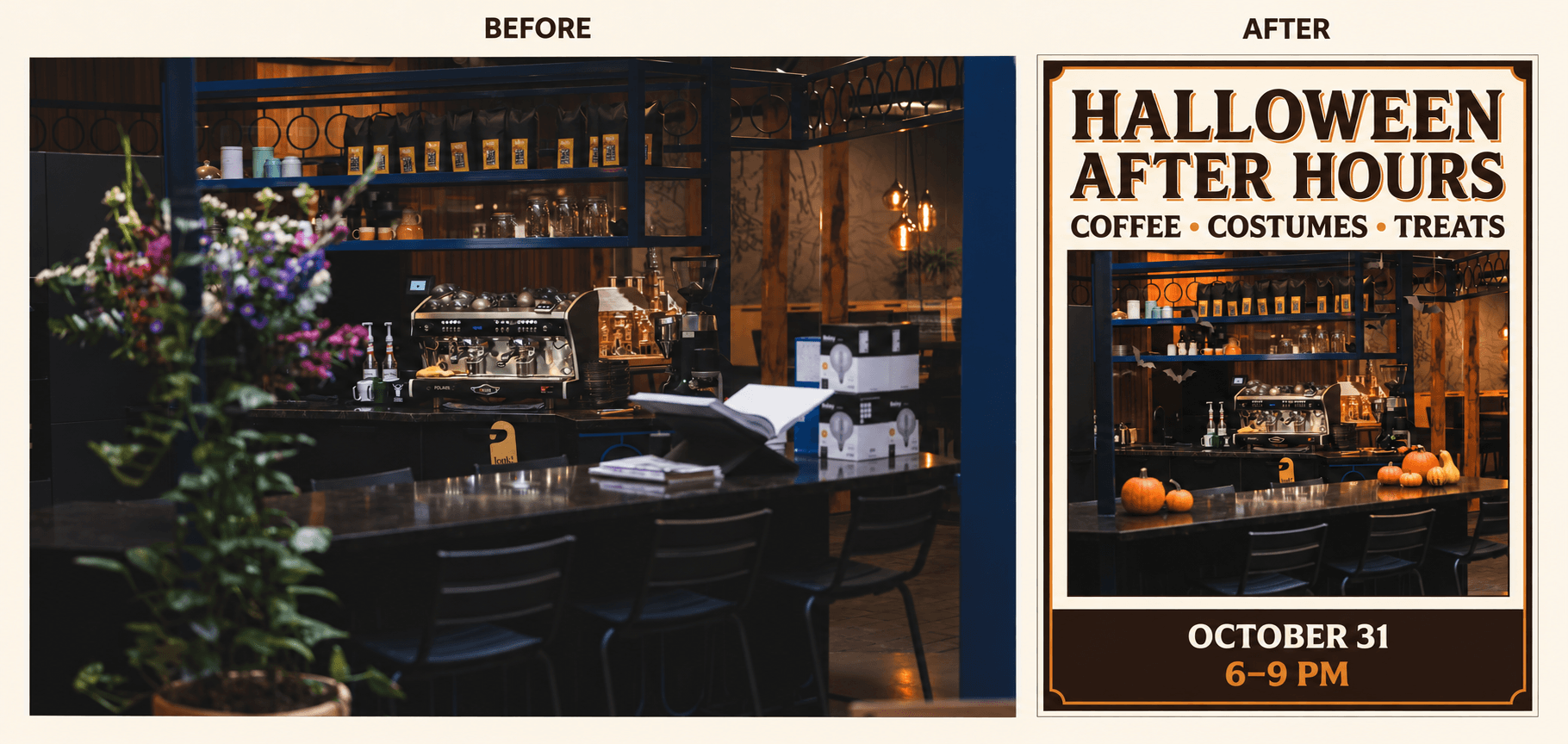
カフェの写真とハロウィンポスターの比較。イベント名、日付、時間は説明用の例です。
カフェの写真をアップロードし、Nano Banana 2.1を選んで、次のプロンプトを試してみましょう。
プロンプトをすべて表示
Create a vertical Halloween event poster using the uploaded café photo.

Keep the café recognizable. Preserve the black espresso machine, metal shelves, and counter. Remove the blurred flowers in the foreground and the cardboard boxes. Add a few small orange pumpkins on the counter, black paper bats near the shelves, and warm amber lighting. Keep the decorations realistic and leave the coffee equipment visible.

Use a simple cream-and-dark-brown layout with orange accents. Place a large headline above the café photo. Let the photo fill the middle of the poster. Put the date and time in a clear footer.

Include only this exact text:

HALLOWEEN AFTER HOURS
COFFEE • COSTUMES • TREATS
OCTOBER 31
6–9 PM

Make the headline the largest text. Keep all text sharp, readable, and away from the edges. Do not add other words, logos, addresses, prices, or watermarks.
ポスターをアレンジするには、「Include only this exact text」の後にある4行を、自分のイベント情報に置き換えます。必要に応じて、その部分に店名、場所、予約情報を追加してください。レイアウトに収まるように、テキストは短くまとめましょう。
「cream-and-dark-brown」と「orange accents」をブランドカラーに変更します。ベーカリーなら、コーヒー器具をケーキのショーケースに置き換えましょう。ペットショップなら、ペットの写真を使い、ペットの仮装イベントに変更します。残すものと取り除くものの説明も、アップロードした写真に合わせて修正してください。
共有する前に、特に日付、価格、連絡先などの文字を確認しましょう。正確な表記が必要な箇所は、レイアウト編集ツールで修正します。Instagramストーリーズや印刷用の告知には、文字が読みやすいように専用のレイアウトを作ってください。
詳しい手順は、Nano Banana 2.1の使い方で紹介しています。商品画像を新しい場所に配置し、広告に使う方法がわかります。
10. お店のハロウィン装飾をシミュレーションする
お店の写真を使えば、飾りを購入する前に、さまざまなハロウィン装飾を置いた様子を確認できます。
同じ写真でいくつかの案を試してみましょう。カフェなら、かぼちゃのディスプレイと魔女をテーマにしたコーナーを比較できます。洋服店なら黒とオレンジのウィンドウ装飾、書店なら展示台の周りに紙のおばけ、キャンドル、紅葉を配置する案などが考えられます。
入口のディスプレイなら、店構えがはっきり写った写真をアップロードし、Nano Banana 2.1を選択します。プロンプトの例はこちらです。
プロンプトをすべて表示
Add Halloween decorations to the shop in my photo. Keep the building, windows, door, shop sign, and camera angle the same. Place pumpkins beside the entrance, add warm string lights around the window, and put small paper bats inside the display. Keep the door and walkway clear. Use orange, cream, and black decorations. Do not change the shop name or add people.生成結果を元の写真と比べましょう。ドア、窓、看板が変わっていないか確認します。画像を使ってデザインを相談し、装飾品を注文する前に実際の寸法を確認してください。
始める前にモデルを比較したい場合は、Nano Banana 2.1とNano Banana 2の比較で、ポスターの文字や商品画像の編集などの作例を確認できます。自分の画像で何を試すかを決める参考にしてください。
ハロウィンのShowcaseから始めよう
アイデアを1つ選び、使いたい写真やイラストを用意しましょう。ハロウィンのAI写真・動画アイデアから、イメージに近い作例や、制作の出発点にできるShowcaseを探せます。
作例を開いて「Remix」を選ぶと、そのリファレンスとプロンプトから始められます。必要な画像を差し替え、衣装、場所、動作を自分のアイデアに合わせて変更しましょう。
Showcaseには、制作の参考にできるリファレンスとプロンプトが用意されています。元の設定から始め、変えたい部分を置き換えてください。人物、衣装、小道具、場所がプロンプト内に複数回出てくる場合は、すべての記述を修正して指示を統一しましょう。
最初の生成結果を、元の写真やアイデアと比べて確認します。そのうえで、衣装、背景、動画の動作など、修正が必要な部分を調整しましょう。