
AI Halloween Poster Ideas for Pets and People

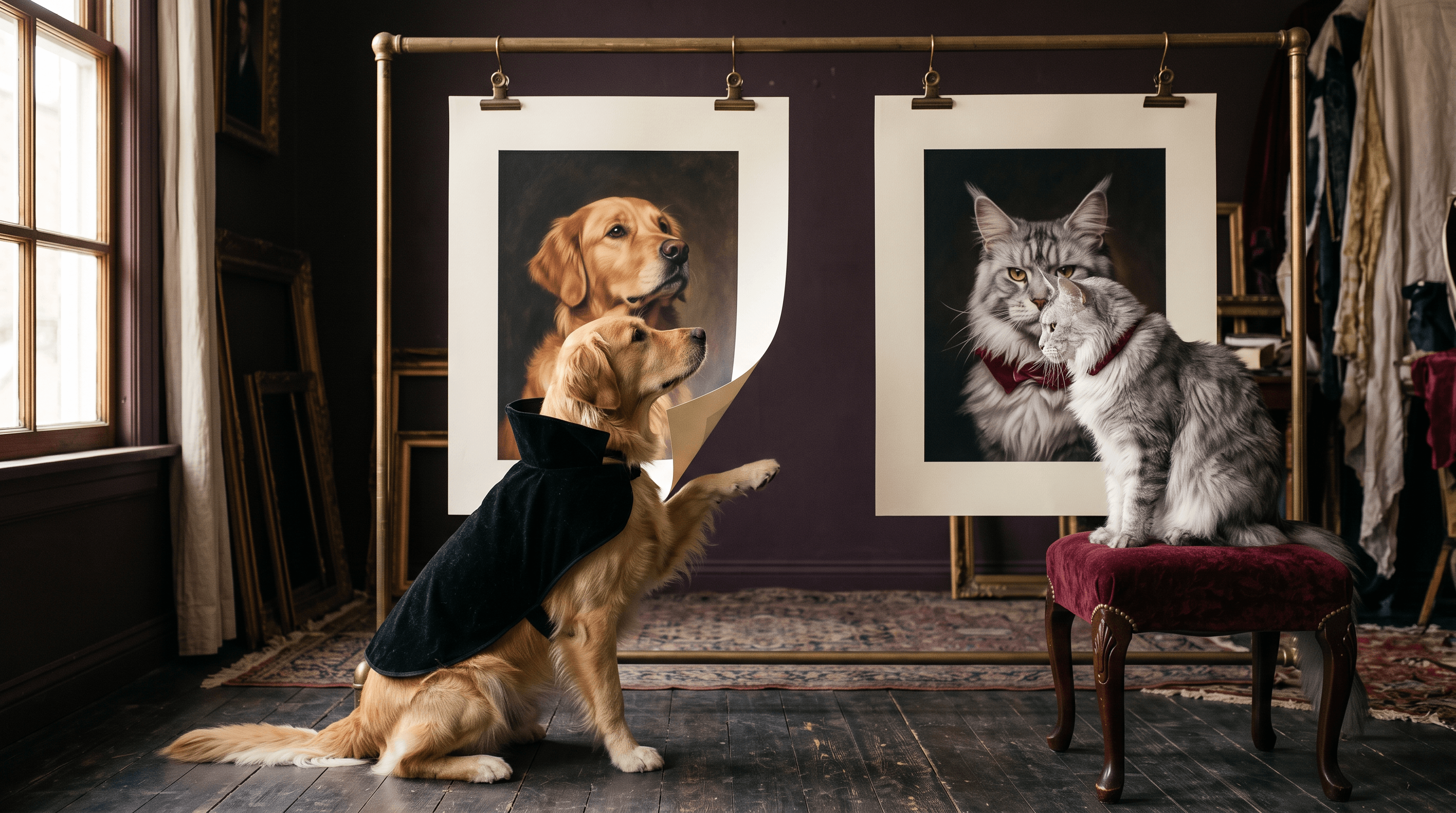
Create AI Halloween posters for pets and people with DomoAI’s Multi-Model Image Generator & Editor. Use the cat portrait below as a costume reference, then adapt the dog or masquerade prompt for a pet post or party invitation.
Use the pet version for a Halloween account post or greeting card. Use the human version for a costume reveal or masquerade invitation, with event details added after generation.
Prepare Your Subject and Costume References
- Subject photo: choose one cat, dog, or person with a clearly visible face. For a pet, include the ears and any distinctive patches. For a standing portrait, use a photo that shows the body area you want in the poster.
- Costume reference: use an image where the cape, collar, or outfit is easy to see. Tell the prompt to borrow those clothes. Keep another animal’s face or a reference-sheet layout out of the requested result.
- Poster text: write the headline and one short supporting line before generating. Put them in quotation marks in the prompt. Reserve addresses, ticket links, and detailed schedules for the final layout.
The examples below use a cat costume reference. The dog and woman are generated characters; use your own subject photo and replace those character descriptions when likeness matters.
Vampire Cat: A Halloween Pet Portrait
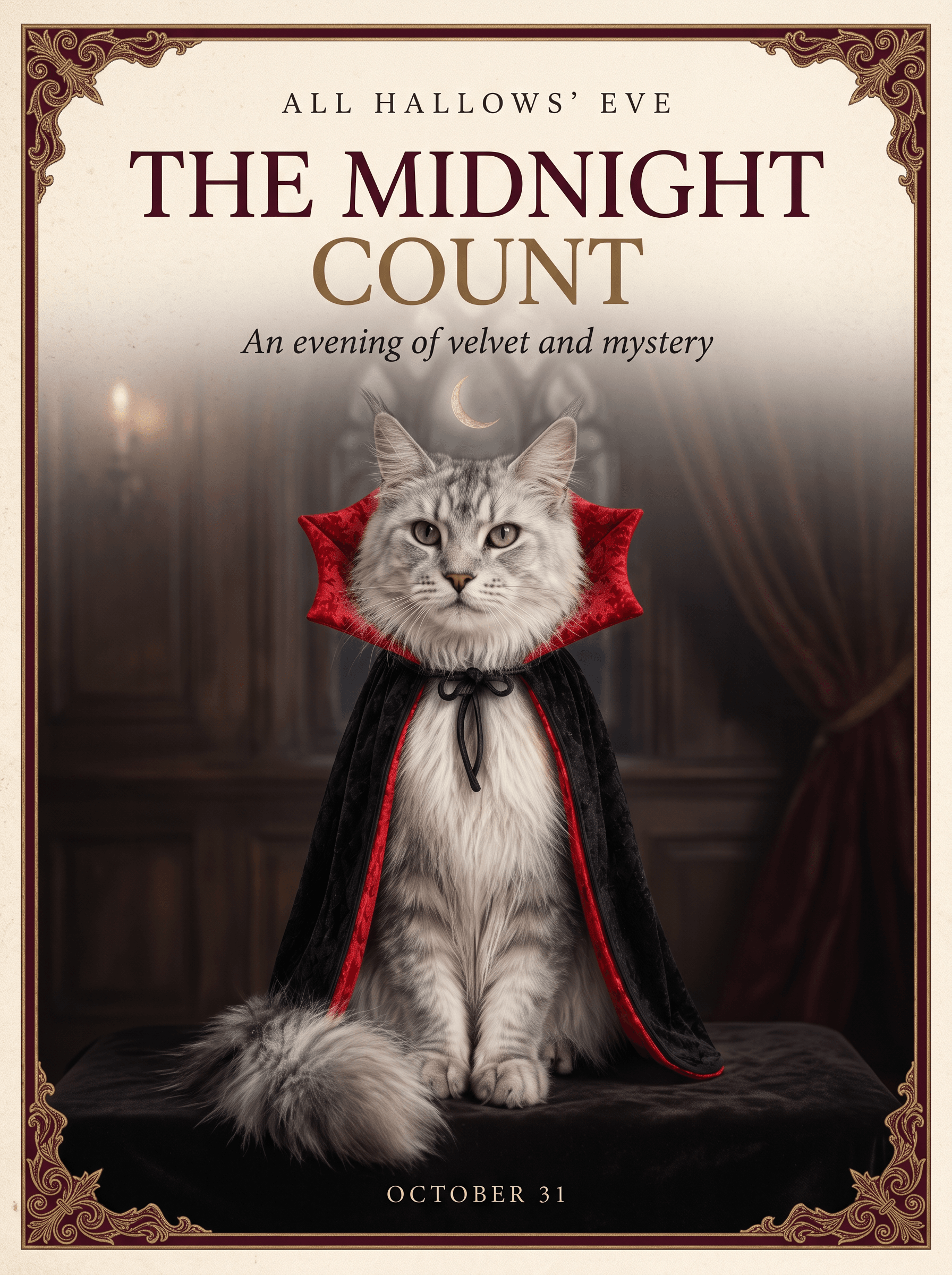
The Halloween cat poster Showcase pairs a black vampire cape and crimson collar with an ivory background. Keep the ears and face visible when adapting the costume to your own cat.
The Golden Count: A Gothic Dog Poster
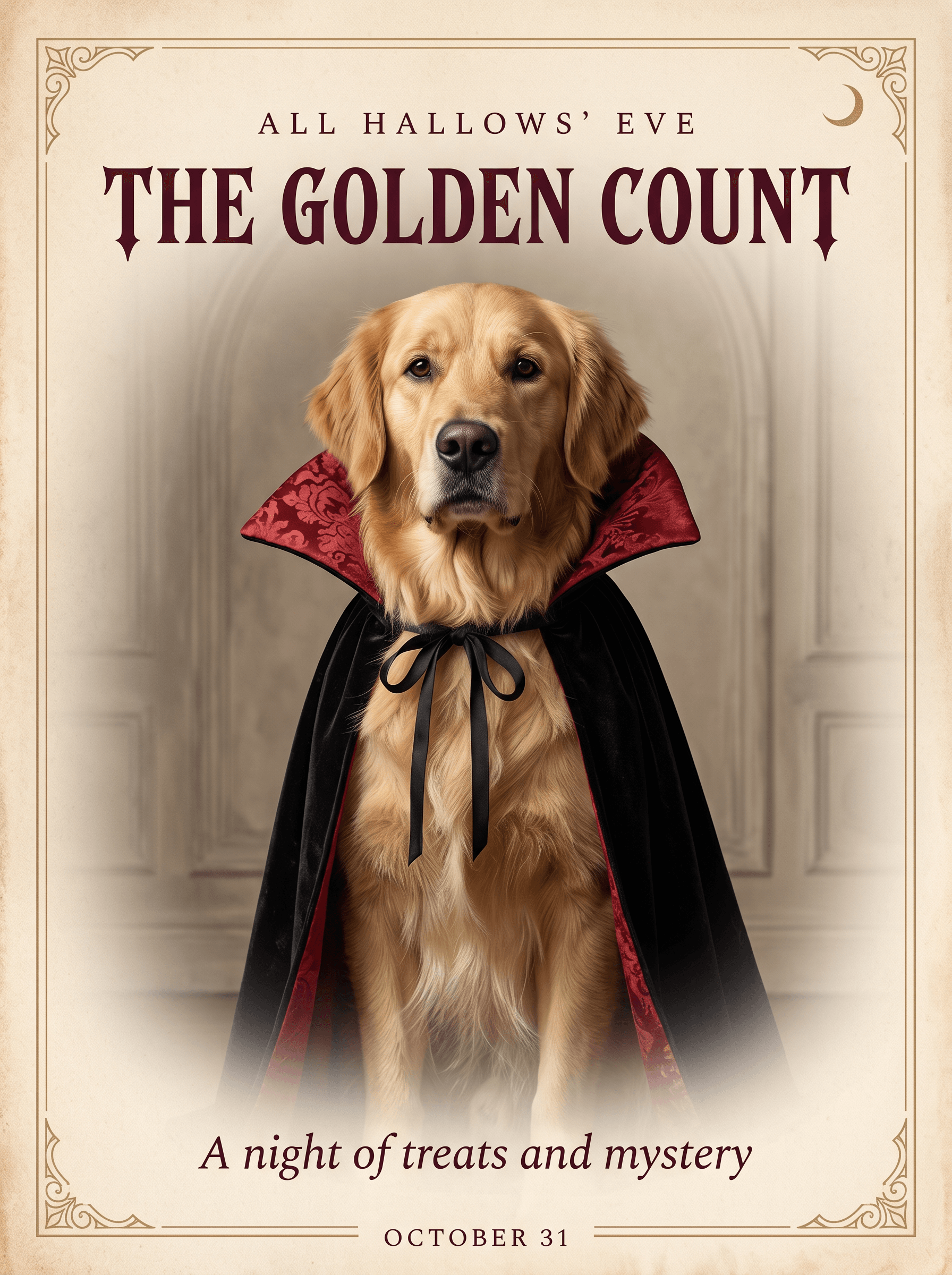
This example uses the cat reference for the cape and collar, then replaces the subject with a golden retriever. The prompt creates a new dog character; for your own pet, use the photo instructions below.
Example settings: Nano Banana 2.1 · Image Editing · 3:4 · 2K.
Create an elegant luxury Halloween editorial poster in a 3:4 portrait aspect ratio. Use the supplied cat reference sheet only for the black brocade vampire cape and crimson collar styling. Replace the cat completely with one adult golden retriever with natural golden fur, floppy ears, dark brown eyes, a black nose and realistic canine anatomy, seated regally in a frontal three-quarter portrait. This is a new dog character, not an identity-preservation edit. No cats, no feline features, no reference-sheet layout or labels.
Art direction: restrained Gothic elegance, warm ivory paper, deep burgundy accents, subtle antique-gold detailing, soft cinematic lighting, exquisite fur and fabric texture. Use generous negative space, precise alignment, refined high-contrast serif typography, and a clear editorial hierarchy. Add a delicate ornamental border and a discreet crescent moon. Keep the composition sophisticated and uncluttered.
Render only these exact English words: a small top line, “ALL HALLOWS’ EVE”; a prominent headline, “THE GOLDEN COUNT”; a delicate subtitle, “A night of treats and mystery”; and a small footer, “OCTOBER 31”. All visible text must be English, beautifully typeset and clearly legible. No additional text, logos, or watermarks.
To change the breed, replace “golden retriever,” “golden fur,” and “floppy ears” together. Edit the quoted headline and subtitle to name your character.
The Midnight Masquerade: A Costume Portrait
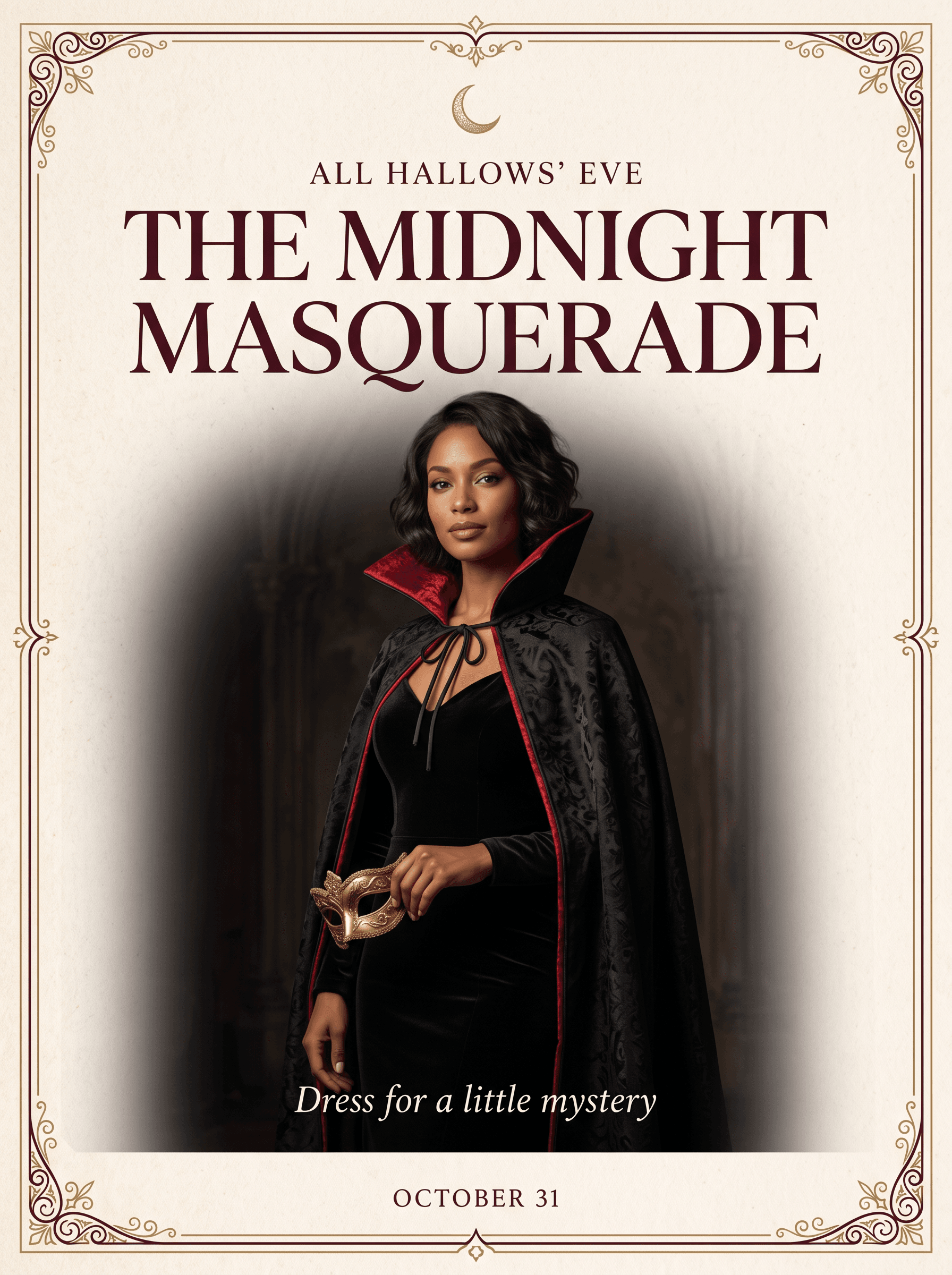
A fictional woman, crimson-lined cape, and gold mask turn the same costume reference into masquerade artwork. Add your venue and event time in a layout editor after generation.
Example settings: Nano Banana 2.1 · Image Editing · 3:4 · 2K.
Create an elegant luxury Halloween masquerade invitation poster in a 3:4 portrait aspect ratio. Use the supplied cat reference sheet only for the black brocade cape and crimson collar costume styling. Replace the cat with one fictional adult woman aged 30 with short wavy dark hair, warm brown skin and a calm confident expression, wearing a tailored black velvet gown and the dramatic crimson-lined cape. She holds a small antique-gold masquerade mask beside her waist. Three-quarter standing portrait. Natural human anatomy, realistic hands. Do not reproduce any cat, animal ears, fur, reference-sheet layout or labels.
Art direction: restrained Gothic elegance, warm ivory paper, deep burgundy accents, delicate antique-gold ornament, soft directional cinematic lighting, tactile velvet and paper. Generous negative space, refined high-contrast serif typography and a clear editorial hierarchy. Add a delicate ornamental border and a small crescent moon. Sophisticated and uncluttered.
Render only these exact English words: a small top line, “ALL HALLOWS’ EVE”; a prominent headline, “THE MIDNIGHT MASQUERADE”; a delicate subtitle, “Dress for a little mystery”; and a small footer, “OCTOBER 31”. All lettering must be clearly legible and correctly spelled. No other text, logos or watermarks.
Make Your Halloween Poster in DomoAI
1. Select the model and frame
Open the Multi-Model Image Generator & Editor and select Nano Banana 2.1. In Ratio and resolution, choose 3:4 and 2K to follow these examples. Set the ratio in the interface as well as describing it in the prompt.
2. Upload the references
Use Add Images to upload the costume reference. Add your own pet or portrait photo if you want that subject in the result. State which image supplies the subject and which supplies the outfit. A single costume reference is enough when you want a new fictional character.
3. Adapt the subject and lettering
Copy the dog or masquerade prompt. Replace the breed, fur color, hairstyle, outfit, and quoted words that do not fit your idea. When using your own photo, remove “new dog character” or “fictional adult woman” and describe the visible features to preserve.
For a black-and-white dog, name the white muzzle and chest patch instead of retaining the golden-fur description. If you change the cape to a wizard robe, also remove the vampire-collar wording. Keep one coherent costume request.
4. Generate and check the result
Review the displayed credit quote, then generate. Compare the face, ears, markings, and body proportions with your subject photo. Read the headline, subtitle, and small footer individually. Check that the cape does not cover the face and that hands or paws remain recognizable.
5. Finish the layout and save
Add event details in a layout editor, where you can correct names and times without regenerating the portrait. Check the poster at its intended display size, then save the original-resolution file. Keep the source photo and prompt together if you plan a matching follow-up post.
For more on the editor controls, see the Nano Banana 2.1 guide.
Fix the Poster Before Sharing
| Problem | What to change |
|---|---|
| The dog inherits cat features | Specify the breed, muzzle, and ear shape. Restrict the cat reference to the cape and collar, and remove feline features from the subject description. |
| The face or markings change | Return to the original subject photo. Name the specific marking or facial feature you need preserved, then compare the next result against that photo. |
| The cape hides the face | Request a collar below the jaw and exposed ears. Use a simpler seated pose if fabric obscures the paws or shoulders. |
| The mask or hands look awkward | Reduce the pose to one visible hand holding one prop. Remove overlapping accessories before adjusting decorative details. |
| The text is wrong or too small | Correct the lettering in a layout editor. Shorten the headline and remove nearby ornaments; check the small subtitle separately. |
Halloween Poster Questions
Can I use the prompt without a reference image?
For a text-only variation, remove the sentences referring to the supplied cat reference and describe the outfit directly. The displayed examples use a reference; a text-only version will produce a different interpretation.
Will it keep my pet’s exact appearance?
Do not assume an exact match. Upload your own pet photo, specify its identifying features, and compare the result with the original. The Golden Count example demonstrates a new generated dog, not a likeness test.
Can I change the poster’s language?
You can request different lettering by replacing every quoted line and removing the English-only instruction. Treat the result as a draft: check spelling, accents, and letter shapes, or typeset the final wording yourself.
How should I resize the poster for a story or square post?
Choose the intended frame before generating and leave space around the headline and face. When adapting an existing poster, recompose those elements for the new shape rather than stretching the image or cropping through the title.
Is the 2K image ready for printing?
Check the exported pixel dimensions against your print size and the printer’s resolution requirement. The 2K setting alone does not establish suitability for a large poster. Ask the printer to confirm the file before ordering.
Choose a costume direction from the AI Halloween Generator, then build your poster with the matching prompt and subject reference.