

Remarkable advances in generative AI have brought video production much closer to everyday life. We have entered an era when anyone can easily create animated videos.
Hello, I’m Ny@Tech, pronounced NyaTech.
I originally worked in web marketing, but around 2024 I became interested in generative AI’s possibilities. I now also enjoy making animation with tools such as DomoAI.
Major companies such as Meta, Google, and Adobe have recently entered image- and video-generation AI in earnest, turning this field into an intense battleground.
Amid this competition, Niji Journey is a service I have increasingly seen in YouTube advertisements and elsewhere.
Niji Journey originated as a collaboration with the AI image-generation service Midjourney and has specialized in generating Japanese anime-style character images.
It has now added Niji Video, a feature that also generates video, so I tried it in several ways.
In this article, I compare Niji Journey with DomoAI, which I use regularly, and summarize their prices, appeal, and characteristics based on my experience.
An Overview of Niji Journey
Niji Journey is a generative AI service built on the image-generation AI Midjourney and specialized in Japanese anime styles.
Developed as a joint project with Spellbrush Japan LLC, it accurately reproduces the visual styles of Japanese anime and manga and is particularly good at generating cute character illustrations.
The Web, App, and Discord Versions
It is provided as a web service that runs in a browser, so there is no need to install software on your computer.
This means it can be accessed from computers, smartphones, and tablets.
Mobile apps are also available for iOS and Android, but this article uses the web version, which is easy for beginners to handle.
Niji Video Adds Video Generation
The service initially focused on still-image illustration generation. In June 2025, it added a video-generation feature called Niji Video.
Niji Video makes it possible to generate anime videos around five seconds long.
The addition transformed the service into an integrated creative AI tool for both still images and animation.
The Characteristics of Different Video-Generation Services
AI services that generate video from text and images have been appearing one after another in recent years.
The matrix below briefly compares and categorizes the main services related to or competing with Niji Journey by their features and uses, showing where each one fits.
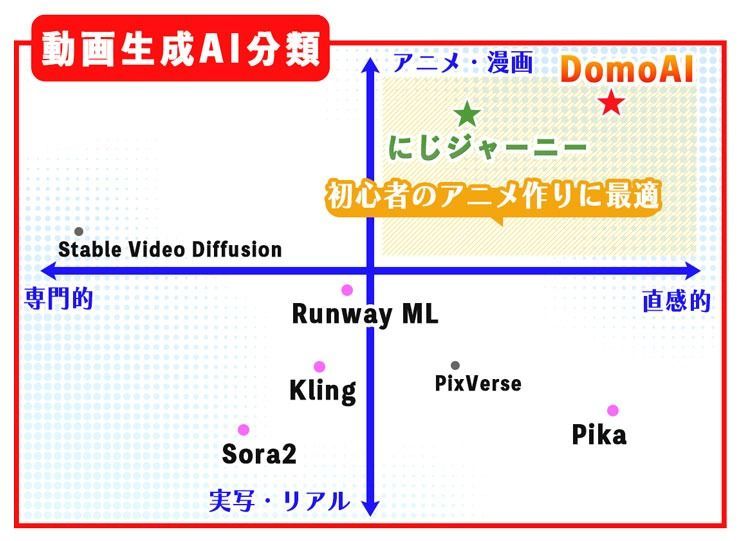
Here is a brief explanation of each AI video-generation service.
Sora 2
Sora 2 is an AI model from OpenAI, the developer of ChatGPT, that generates highly accurate video from text prompts.
It improves on the original Sora model announced in 2024. General users can now try video generation through its dedicated website and other access points.
Sora supports a wide range of styles. Its strengths are said to include relatively natural physical behavior, such as moving smoke and water or people’s gestures.
However, its convincing reproduction has also raised concerns that footage of events that never happened could be mistaken for real video.
Runway ML
Runway ML is a generative AI service from the American company Runway that creates short video clips from text and image inputs.
It appears to be used mainly by video creators and designers for advertisements and artistic visual work.
It is suitable for clips blending realism and fantasy and for abstract visuals. Uses include film concept videos, music-video prototypes, and short social media clips.
Kling AI
Kling AI is a video-generation AI developed by Kuaishou, which operates a major Chinese video platform.
Initially, users needed a Chinese mobile number, but around July 2024 it became possible to register with just an email address, making the service widely known outside China.
It is valued for producing fewer breakdowns in scenes involving human movement and camera work, with strengths in realistic footage and complex compositions. It is now often mentioned alongside Sora.
DomoAI
DomoAI is an AI service whose strengths include transforming existing images and videos into animation-style footage.
Uploading your own live-action video lets you convert its overall visual style into anime while retaining the original movement and composition.
It also works well with Japanese anime aesthetics. Available styles include looks reminiscent of Japanese animation, Western styles, 3D animation, and many other forms of expression.
Niji Journey
Niji Journey is a generative AI service specialized in Japanese anime-like visuals.
While Sora, Runway, and Kling excel at realistic or fantastical video, Niji Journey’s strengths are manga and anime-style expression.
For example, it shows its strengths in short animations featuring lively cute characters or videos that look like a scene from a manga.
With this in mind, I think both DomoAI and Niji Journey are strong options for making Japanese-style animation.
Comparing Niji Journey and DomoAI
At first glance, both appear to be tools for making anime-style videos with AI, but their features and uses differ clearly.
Here, I compare their main points and explain which users and purposes each one suits.
Comparing Niji Journey and DomoAI: Pricing and Characteristics
The following table compares their pricing, main features, and characteristics as of December 2025.
| Comparison Item | Niji Journey | DomoAI |
|---|---|---|
| Monthly price | - Basic 10$ - Standard 30$ - Pro 60$ - Mega 120$ | - Basic 9.99$ - Standard 27.99$ - Pro 69.99$ |
| Basic unit of video generation | Managed by generation time: GPU usage time. | Managed using allocated credits. |
| Main characteristics | Strong at Japanese anime-style and watercolor-like illustrations. | Converts live-action video to anime and supports lip sync matched to audio. |
| Special notes | Effectively unlimited generation with Relax Mode on Standard and higher plans. | Free credits available; effectively unlimited generation with Relax Mode on Standard and higher plans. |
| Commercial use | Available with a paid plan. | Available with a paid plan. |
One distinction is that many image-generation AIs consume units called credits, while Niji Journey uses a different system.
This system measures generation capacity in GPU Time. The Basic plan includes 200 minutes of GPU Time.
Each time you generate an image or video, the processing time is deducted from your GPU Time.
To check usage details, open the three-dot menu on the account icon at the bottom of the left-hand menu and select “Manage Subscription.”
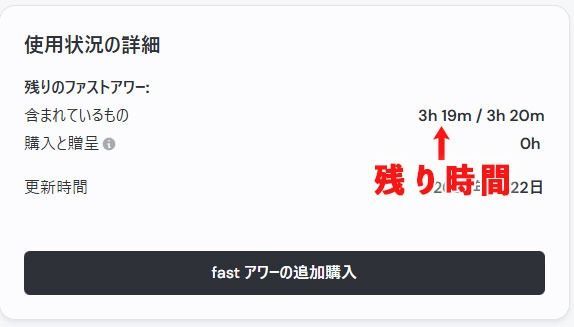
The example image shows three hours and 19 minutes of GPU Time remaining, which can be used to generate images and videos.
Comparing the Main Features of Niji Journey and DomoAI
This table compares their main features by input type, including text, images, and video or frames, as of December 2025.
| Feature | Niji Journey | DomoAI |
|---|---|---|
| Text to image | ○ Available | ○ Available |
| Text to video | × Generally unavailable | ○ Available |
| Image to image | ○ Available | ○ Available |
| Image to video | ○ Available | ○ Available |
| Video to video | × Generally unavailable | ○ Available |
| Frames to video | △ Limited Specified through start and end frames. | ○ Available Multiple frames supported. |
| Live action to anime | △ Limited Images only. | ○ Available Both images and videos. |
| Lip sync | × Generally unavailable | ○ Available |
| Transparent backgrounds | ○ Available | ○ Available |
With Niji Journey, you can generate an image from text and then add motion to that still image.
DomoAI, by contrast, supports a broad range of inputs, including text, still images, and live-action video. Its versatility lets you handle both generation and processing, such as converting live-action footage into anime and transforming video styles.
Comparing Images Generated with Niji Journey and DomoAI
Let’s compare images generated with Niji Journey and DomoAI.
For this comparison, I generated images in both AIs using the same scene: a young girl standing beneath a cherry blossom tree. Both used their default settings.
The prompt was as follows:
A young girl standing under a cherry blossom tree in full bloom.
She is wearing a light spring dress, with gentle sunlight filtering through the petals.
Anime-style illustration, soft colors, detailed background, calm and emotional atmosphere.
The girl is facing slightly sideways, cherry blossom petals falling around her.
The models and styles used were:
- Niji Journey: Niji 6
- DomoAI: Enhanced Anime, XL Model
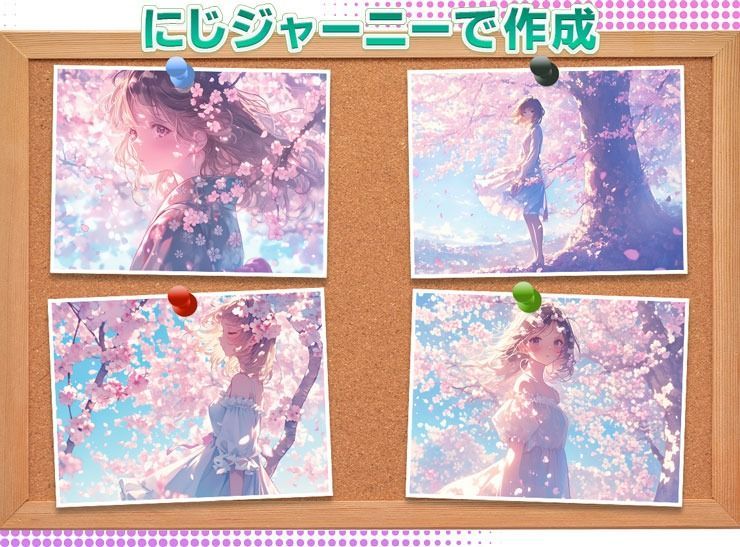
In the Niji Journey results, the girl and background are drawn in a vivid anime style, with varied compositions and angles that show a broad expressive range.
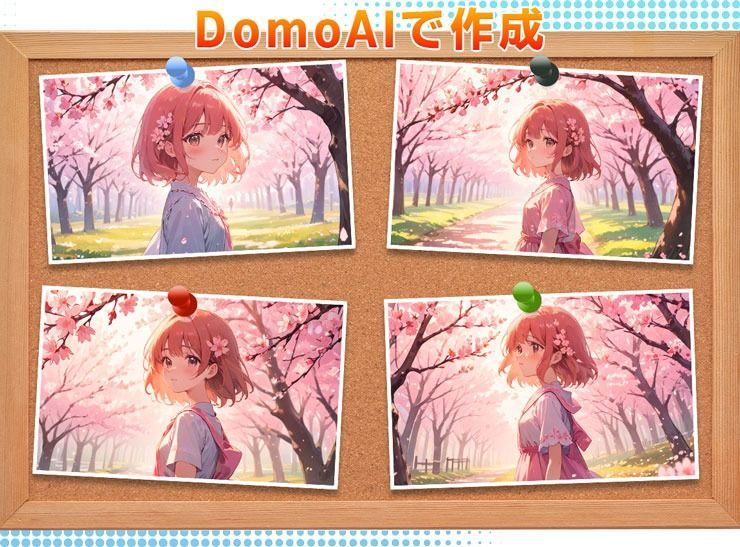
DomoAI’s results tended toward relatively similar compositions, characterized by a stable arrangement of the scene.
Niji Journey’s Basic Features
Here are the workflow and key points for creating animation with Niji Journey.
The Basics of Using Niji Journey
The workflow is very simple and can be completed entirely on the Create page.
Enter a prompt, then use the settings icon to adjust image size, model, aesthetics, and other options as needed.
Prompts can be entered in Japanese, but English is recommended when you want to control subtle nuances or composition.
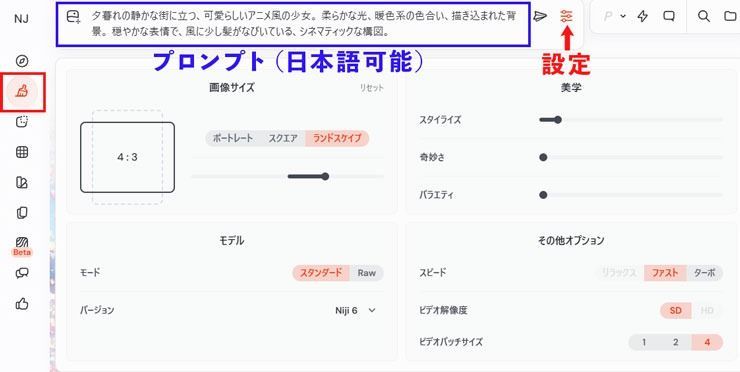
Here are additional explanations of settings that may be difficult to understand from their Japanese labels.
Stylize (-- stylize) affects the artistry and composition of generated images. Low values follow the prompt closely but produce less artistic results. High values create very artistic images that are less closely related to the prompt.
Weird (-- weird) generates more unusual and unexpected images.
Variety (-- chaos) affects image diversity. Higher values produce more distinctive and unexpected results or compositions. Lower values give more reliable and reproducible results.
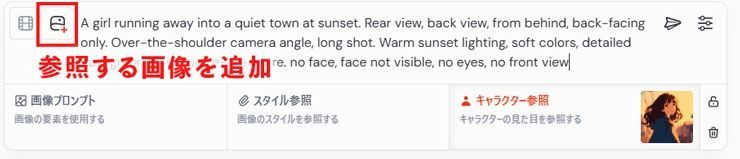
Adding a reference image also makes it possible to generate consistent characters.
The New Niji Video Feature
Niji Video is a video-generation feature released in June 2025.
It is simple to use: specify an image for the start frame and another for the end frame, and it generates a short animation connecting the two.
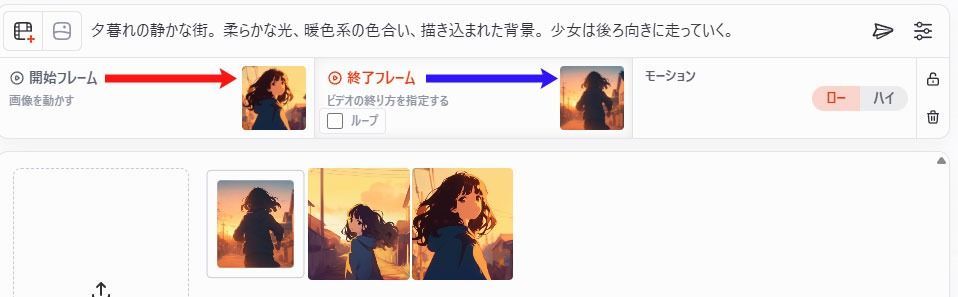
For example, specifying a smiling character at the start and a surprised character at the end generates an animation in which the expression changes from a smile to surprise.
Enabling the “Loop” checkbox for the end frame makes the video finish on the same image as the start frame.
Because the beginning and ending images match, the result can be played repeatedly as a seamless loop.
One point to note is that, as of December 2025, Niji Video fixes the duration between the start and end frames at approximately five seconds.
If there is little movement between the images or the prompt is unsuitable, the result may feel drawn out because the action does not fill those five seconds.
The example below shows a failed video that ended up feeling too slow.
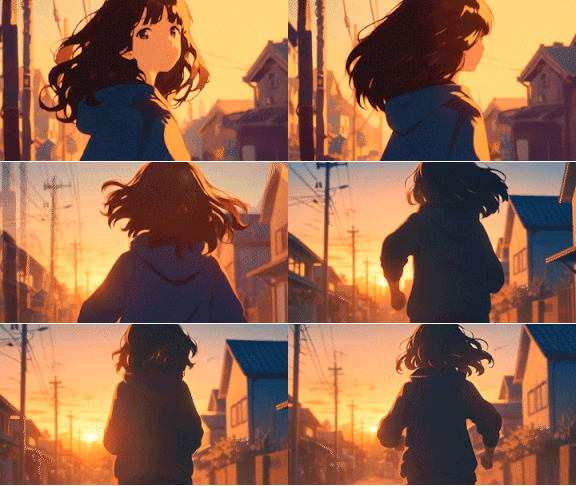
To create well-paced footage, it seems important to use suitable images and prompts that clearly suggest changes in movement.
Place the Same Character in Different Locations
The end-frame feature lets the same character appear in a variety of scenes.
For example, to bring the female character who was running earlier into a room, set the end frame to an image of an empty room.
Then enter an instruction in the prompt such as:
“The girl enters the room, smiles, and waves.”
This is the kind of direction to provide.

The result was a video of the woman entering the room.
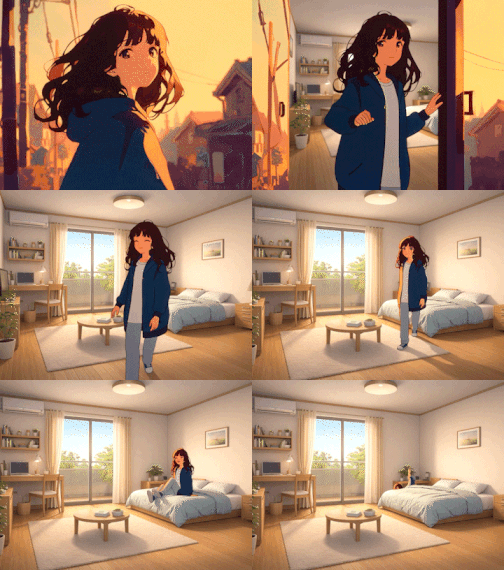
Because the end frame shows an empty room, there is some awkwardness in the movement and compositing. Even so, this feature allows you to move a favorite character to different locations.
Reference: How to specify an end frame on niji・journey!
That covers the basic workflow and the new Niji Video feature.
I think its appeal is an intuitive, clear interface that makes it easy for beginners to create images and Japanese-style animation.
DomoAI’s Basic Features and Characteristics
Next, I’ll explain how to use DomoAI and its main features.
DomoAI can generate videos in the following ways:
- Text to Video: Enter a text prompt to generate a video based on its contents.
- Image to Video: Give movement instructions in a prompt for a single still image to generate a video.
- Video to Video: Apply a style and prompt to an existing video to transform it into another look, such as anime.
- Frames to Video: Specify several images as frames and use prompts to describe the movement between them.
- Character to Video: Combine a character image with a movement video to animate the character.
- AI Talking Avatar: Use a character image and audio to make the character speak or sing.
Among these features, we will focus on two distinctive DomoAI functions: Frames to Video and Draw Only the Subject.
Frames to Video
This feature takes multiple still images, or frames, and automatically generates animation connecting them.
For example, prepare illustrations of key story scenes, and DomoAI joins them in order into smooth animation with movement.
There are two main differences from Niji Video. One is that the video length can be set between one and five seconds.
For a scene such as a girl turning her back and running away, which tended to feel drawn out in Niji Video, DomoAI produced a natural, well-paced result using the same prompt with the generation duration set to three seconds.
The other difference is that it can generate animation using up to eight images.
In this mode, you can arrange up to eight images in sequence and set a separate prompt for each interval between frames, such as A to B and B to C.
You can also adjust the duration of each interval from one to eight seconds, giving precise control over the speed of movement in each scene.
Click the “T” icon shown between frames to set that interval’s prompt and duration in seconds.
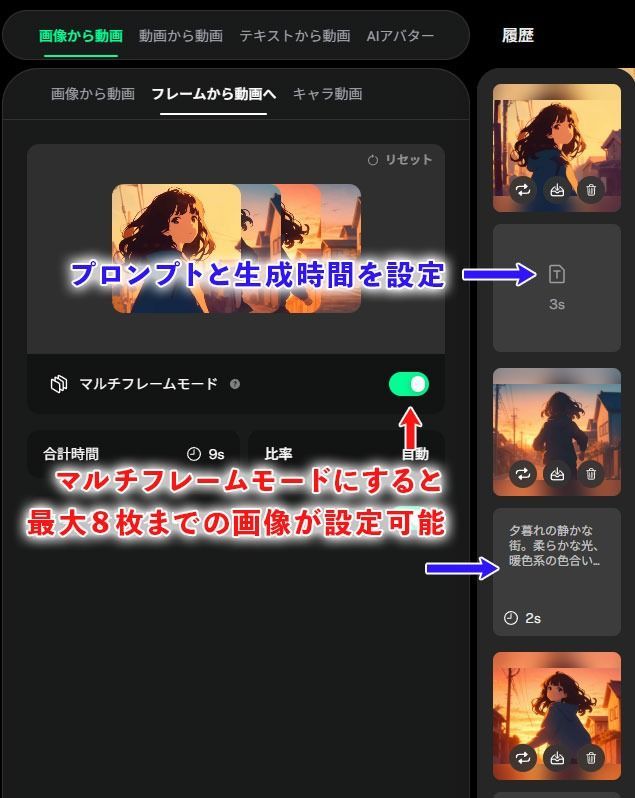
Once the prompts and durations are set for every interval, click “Generate,” and the video is created in a few minutes.
For this example, I created footage of a girl starting to run, stopping and looking back, then running again.

When generating a video from multiple images, the following points make it easier to get a result close to what you envision:
- Keep the same character looking consistent, including hairstyle, clothes, and colors.
- Limit each interval to one change; avoid changing location, clothing, and expression all at once.
- Use the same dimensions for every image.
Image size is particularly important: I observed cases where even small differences made the footage more likely to break down.
Draw Only the Subject
One of DomoAI’s options is Draw Only the Subject.
Enabling it keeps the background of the original video while transforming only the main subject, such as a person, into the selected style.
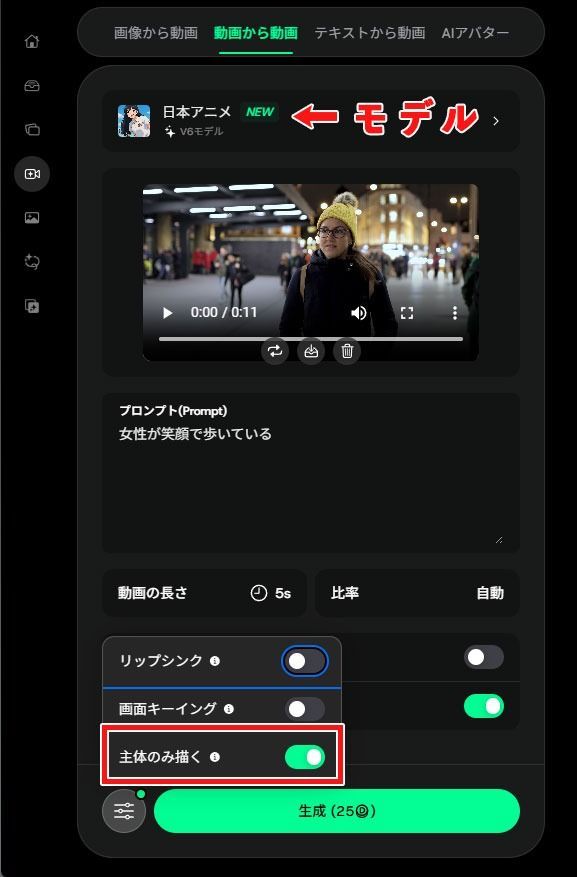
For example, applying it to live-action footage of a woman walking can turn only the woman into an anime character while leaving the background live action.
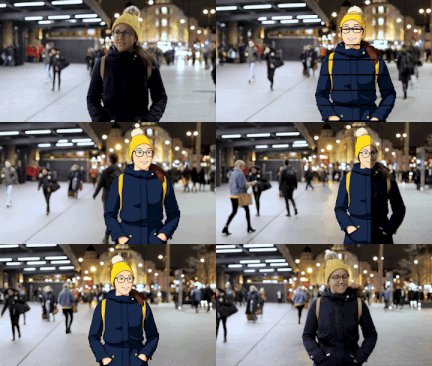
In the footage above, I added effects in Adobe Premiere Pro when switching between live action and animation.
I think one of DomoAI’s distinctive features is its ability to turn only the person into a two-dimensional character while retaining the live-action background, camera movement, and lighting.
Copyright and Ethical Precautions for AI Video Production
When creating video with AI, remember legal and ethical considerations, including copyright and portrait rights.
I believe the following points deserve particular attention.
Do Not Use Other People’s Images or Videos Without Permission
Niji Journey and DomoAI let you upload your own images and footage for AI processing.
Be careful not to use works, photographs, or footage in which a third party holds rights without permission.
For example, importing images of commercial anime characters or photos of celebrities without permission for training or video generation could infringe copyright or portrait rights.
It is important to use original material you created yourself or rights-cleared material whose terms of use you have checked.
Do Not Misuse Fake Videos
More advanced AI has made it easy to create fake videos that deceive viewers.
However, using this footage to deceive people is widely regarded as a serious social problem.
Impersonating another person or spreading footage that presents invented events as real can cause social disruption.
In Japan, for example, fake bear videos have circulated and even misled public authorities, becoming a social issue.
I believe creators have an ethical responsibility not to make or publish AI videos intended to deceive people.
Summary and Frequently Asked Questions
Finally, here are answers to questions readers may have.
Frequently Asked Questions
Q1. Can complete beginners use these tools?
A1. Yes. Both services are designed with beginners in mind and can be operated intuitively. More Japanese-language guides are becoming available, so feel free to give them a try.
Q2. Can I use the videos and images commercially?
A2. In general, commercial use is available with a paid plan. However, if you use other people’s copyrighted images or videos as training material, those rights must be cleared separately. All services also prohibit uses contrary to public order and morality, so use them responsibly.
Q3. Which should I use, Niji Journey or DomoAI?
A3. Ideally, choose according to your purpose. Niji Journey suits creating original characters and scenes from scratch and turning them into anime footage. DomoAI is suitable when you already have source footage or character designs and want to animate them or convert them into an anime style. It is especially suited to converting live-action video into anime, such as giving your company’s advertisement an anime look.
Q4. Do video length and processing time differ?
A4. Each Niji Video clip is fixed at around five seconds, so longer videos require generating and joining multiple clips. DomoAI can generate around 20 seconds, depending on the source footage and feature used. Processing time depends on demand, but both services generally generate results in a few minutes.
That concludes the frequently asked questions.
Mastering the two powerful services Niji Journey and DomoAI can put Japanese-style animation that rivals professional work within reach.
Both are easy for beginners to use, so try them for yourself.


